
March 2026
New features
Model Import & Export (with dbt support)
You can now import and export SQL models as zip files through the UI or API. Weld automatically detects and converts dbt projects (dbt_project.yml) into Weld-native dependencies.
Model Import & Export documentation →
Usage Dashboard & Forecasting
A new Usage Dashboard for tracking Monthly Active Rows (MAR) and synced rows, with historical usage trends and AI-driven consumption forecasting.
Retired Stream Tags
Data streams deprecated by their platform are now visually tagged as "Retired" in the Weld UI.
CDC for Free Trials
Change Data Capture (CDC) replication is now enabled for free trial accounts, with engine improvements to prevent timestamp collisions and improve data ordering.
New connectors
Klarna
Full sync support for transaction, payout, and payout_summary streams.
Klarna connector documentation →
3 total changes
| Table/column | Change type | Notes |
|---|---|---|
transaction | New table | |
payout | New table | |
payout_summary | New table |
PayPal
Sync balances, invoices, transactions, billing_plans, subscriptions, and disputes from PayPal.
PayPal connector documentation →
6 total changes
| Table/column | Change type | Notes |
|---|---|---|
balances | New table | |
invoices | New table | |
transactions | New table | |
billing_plans | New table | |
subscriptions | New table | |
disputes | New table |
Connector updates
Shopify: History tables for 19 streams
We've added history table support across 19 Shopify and Shopify Plus streams. History tables use an SCD Type 4 (Slowly Changing Dimensions) approach — your main table always reflects the latest state, while a separate append-only history table records every change over time.
Each history table is protected and runs in append mode, so existing rows are never overwritten or deleted. Every sync captures a snapshot of changed records, letting you reconstruct the state of any entity at any point in time.
This is useful for:
- Tracking price changes on products and variants
- Auditing customer profile updates
- Monitoring inventory level movements across locations
- Analyzing order lifecycle changes
To learn more about history tables and slowly changing dimensions, see our blog post on Slowly Changing Dimensions.
Changelog
19 total changes
| Table/column | Change type | Notes |
|---|---|---|
abandoned_checkout_history | New table | Abandoned checkout changes over time |
collection_history | New table | Product collection updates |
company_history | New table | B2B company profile changes |
customer_history | New table | Customer profile updates |
customer_metafield_history | New table | Customer metafield changes |
discount_code_history | New table | Discount code modifications |
draft_order_history | New table | Draft order changes |
fulfillment_order_history | New table | Fulfillment status transitions |
inventory_item_history | New table | Inventory item attribute changes |
inventory_level_history | New table | Stock level changes across locations |
line_item_group_history | New table | Line item group modifications |
order_history | New table | Order lifecycle changes |
order_metafield_history | New table | Order metafield changes |
order_return_history | New table | Return status and detail changes |
price_rule_history | New table | Pricing rule updates |
product_history | New table | Product detail changes |
product_image_history | New table | Product image updates |
product_metafield_history | New table | Product metafield changes |
product_variant_history | New table | Variant-level changes (price, SKU, etc.) |
How to enable
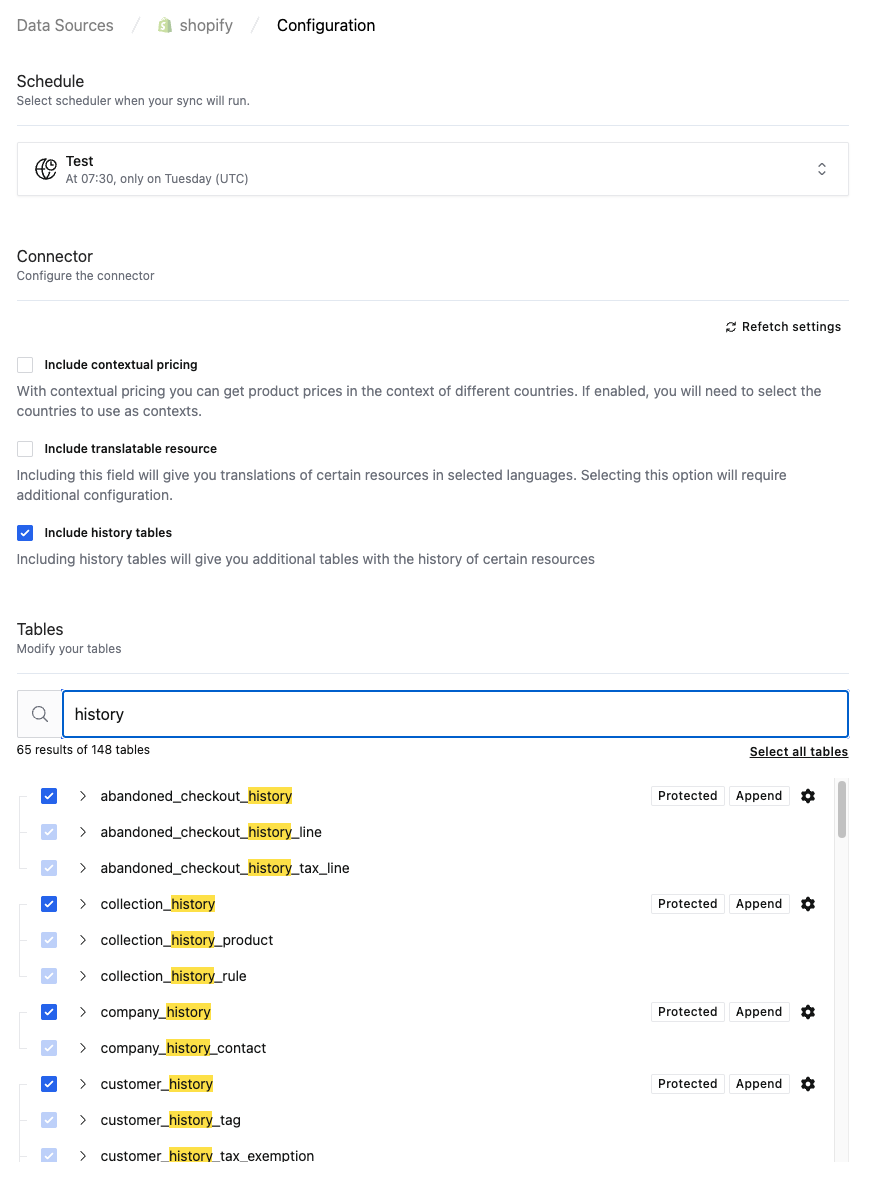
- Go to Settings → Connectors and select your Shopify connection.
- In the table selection panel, search for
history. - Select the history tables you need and save.
Weld will begin appending historical snapshots on the next sync.
Shopify
- Optimized incremental syncs for faster product updates.
- Added
lineItemdetails to order agreements andfeatured_media_idto products.
2 total changes
| Table/column | Change type | New name | Notes |
|---|---|---|---|
order_agreement | |||
column | New Column | lineItem | Line item details on order agreements |
product | |||
column | New Column | featured_media_id | |
Google Ads
- API Upgrade: Upgraded to the v23 API.
- New Stream: Added
SEARCH_TERM_STATS. - Quality Scores: Added
quality_info(including Quality Scores) to ad group criteria.
2 total changes
| Table/column | Change type | New name | Notes |
|---|---|---|---|
SEARCH_TERM_STATS | New table | ||
ad_group_criteria | |||
column | New Column | quality_info | Includes Quality Scores |
Update (3 April 2026): We published a follow-up clarification for Google Ads data consistency and soft-delete reconciliation in the February 2026 release notes. See February 2026 Release Notes for full details.
Google Search Console & Reddit Ads
Custom reporting capabilities for both platforms — configure your own dimensions, aggregations, and breakdowns in integration settings.
Amazon Selling Partner & Amazon Ads
- Upgraded to the
searchOrdersAPI for more reliable order syncing. - Added unified hourly campaign reports, associated orders, and new buyer details (email, name, PO number).
4 total changes
| Table/column | Change type | New name | Notes |
|---|---|---|---|
order | |||
column | New Column | buyer_email | |
column | New Column | buyer_name | |
column | New Column | purchase_order_number | |
hourly_campaign_report | New table | Unified hourly campaign reports | |
HubSpot
- New Stream:
account_details. - Expanded Marketing Email content.
- Support for generic v4 Custom Objects association tables.
1 total change
| Table/column | Change type | Notes |
|---|---|---|
account_details | New table |
Facebook Ads & Microsoft Ads
- Added multi-account backfill support.
- Improved API resilience to prevent transient errors from failing syncs.
- Fixed Microsoft Ads report parsing to natively exclude headers and footers.
TikTok Shop
- New Stream:
STATEMENT_TRANSACTION_REPORT— fixes empty legacy finance tables.
1 total change
| Table/column | Change type | Notes |
|---|---|---|
STATEMENT_TRANSACTION_REPORT | New table | Replaces legacy finance tables |
Zendesk
- Added
ticket_side_conversationandticket_side_conversation_eventstreams.
2 total changes
| Table/column | Change type | Notes |
|---|---|---|
ticket_side_conversation | New table | |
ticket_side_conversation_event | New table |
GoHighLevel
- Added
conversationandmessagestreams.
2 total changes
| Table/column | Change type | Notes |
|---|---|---|
conversation | New table | |
message | New table |
AppLovin
- Added daily and hourly
advertiser_campaign_reportstreams.
2 total changes
| Table/column | Change type | Notes |
|---|---|---|
advertiser_campaign_report_daily | New table | |
advertiser_campaign_report_hourly | New table |
Xero
- Added toggle for advanced plan features and more granular permission scopes.
Platform improvements
Smarter Reverse ETL
Row-level destination errors are now tolerated and logged rather than triggering a complete sync failure. Excel table replacements are dramatically faster.
BigQuery zero-downtime updates
Atomic swap mechanism for BigQuery when table partitioning changes — tables are created and swapped seamlessly with no downtime. Includes automatic cleanup for temporary tables.
Snowflake reliability
Fixed a timeout issue causing a dead loop when syncing large files, and added intelligent upload retries.
Postgres optimization
Prevented timeouts during massive MERGE operations and optimized full syncs to skip temporary primary key overhead.
Bug fixes
- Fixed pagination limits and API timeouts across GoHighLevel, Netvisor, Mixpanel, and the Facebook Graph API.
- Fixed timestamp parsing bug where trailing spaces or newlines (e.g. from HubSpot) broke column formatting.
- Fixed Amazon Vendor Central connection form incorrectly blocking standard Seller authentication.
- Resolved Snapchat Ads start/end time conflicts in reports.
- System notifications for sync errors now re-alert after 24 hours if left undismissed.