
Plans & billing
Weld plans are priced by monthly active rows: the rows inserted or updated in your warehouse in a month. Each plan includes a number of active rows, connectors and members. See Monitor and optimize usage for exactly what counts.
Plans
| Plan | From | Included active rows | Included connectors |
|---|---|---|---|
| Basic | €99 / month | 5M | 2 |
| Premium | €399 / month | 10M | 6 |
| Business | €999 / month | 50M | 10 |
| Enterprise | Custom | Custom | Custom |
- Every plan can be extended with more active rows, connectors and members. The pricing page has the current prices.
- Paying yearly instead of monthly gives a 20% discount.
- New workspaces start with a 14-day free trial.
- For Enterprise, book a call.
Where to find your plan
Open Settings → Plan Details & Billing. Members without billing rights see it as Plan Details, without the Billing tab.
The Plan tab shows:
- your plan and its state, such as Free Trial,
- what it includes: monthly active rows, connectors and members, each with how many are in use, and the sync frequency,
- Current Usage Period, with how many active rows you've used so far and the Projected Usage for the whole period,
- Subscription Status: when your plan renews and the estimated amount, with View Invoice Preview and View past invoices.
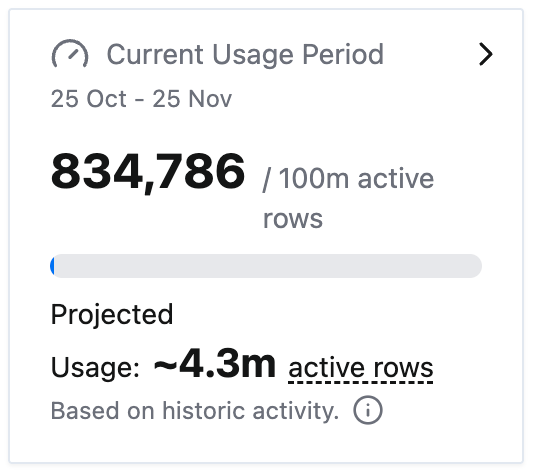
Click Current Usage Period to open the Usage page. Projected usage is an estimate based on your activity so far in the period.
Change your plan
- On the Plan tab, click Modify Plan.
- Choose a plan: Basic, Premium or Business. Choosing Enterprise puts you in touch with us instead.
- Set Rows usage (your monthly active rows limit), Connectors and Members (the total number of seats).
- Choose Annually or Monthly billing and confirm.
Upgrades are self-serve. To lower your plan, rows, connectors or members, or to move from yearly to monthly billing, contact support and we'll schedule it for your next renewal.
Modify Plan isn't shown on Enterprise and manually provisioned plans, or while a cancellation is scheduled.
On a monthly plan, Switch to yearly billing on the Plan tab moves you to yearly billing with the discount.
Billing details, payment method and invoices
The Billing tab has:
- Billing Details: your company and invoice details. Click Add Billing Details or Update Billing Details.
- Payment Method: click Update Payment Method to change the card.
- Billing History: every invoice by month, with its amount, status and a link to the invoice.
The Billing tab is shown to members with billing rights on self-serve paid plans. It's hidden during the free trial and on manually provisioned plans.
If you go over your active rows
Weld shows a banner in the app as you get close to your limit. If you go over, the extra rows are billed at your plan's rates. To avoid that, raise Rows usage under Modify Plan or move to a larger plan.
Renewal and cancellation
- Your subscription renews automatically at the end of each monthly or yearly period.
- To cancel, open the Plan tab and click Cancel Subscription. On Basic and Premium, tell us why and confirm. On Business and Enterprise, the button opens a chat with us.
- Some subscriptions have a notice period. A cancellation takes effect at the end of the notice period, and never before the current billing period ends. See the Terms of Service.
- After you cancel, the plan shows Cancels with the date. You can undo it until then with Don't cancel subscription.
- Keep your payment method up to date. If a renewal payment fails, access to your workspace may be suspended until it's paid.
Troubleshooting
I can't see the Billing tab. Ask an admin for billing rights. The tab also stays hidden during the free trial.
Modify Plan is missing. Your plan is Enterprise or was set up manually, or a cancellation is scheduled. Contact support to change it.
I want to downgrade. Contact support before your renewal date and we'll schedule it.