
Monitor and Optimize Usage
Overview
Be up to date and become proactive by monitoring your active row usage. Active row is any row that is either inserted or updated during a given month, and is typically represent 10-20% of the total rows synced. Rows that don't change are not counted again in the following months, so you only pay for the data that is actually new or updated.
Note: To figure out how many rows do you need you can set up a free trial or connect to a new source then let it run for the first 14 days. During this trial period, Weld tracks your Monthly Active Rows (MAR) automatically without charging for usage.
How Usage is Measured
A monthly active row is any row of data that is inserted or updated during a given month across your connected sources. Rows that do not change are not counted again, which means that recurring data doesn't drive additional costs. Inside the app, you can monitor your exact usage and growth trends, and use the Usage Forecast Estimator in the billing section to predict future MAR needs as your data volume grows.
Counting usage:
- New and updated rows count toward your MAR total.
- Bill is based on usage within your current plan's included MAR allowance.
- If your volume grows, you can add more MAR units or upgrade plans directly in the Weld app.
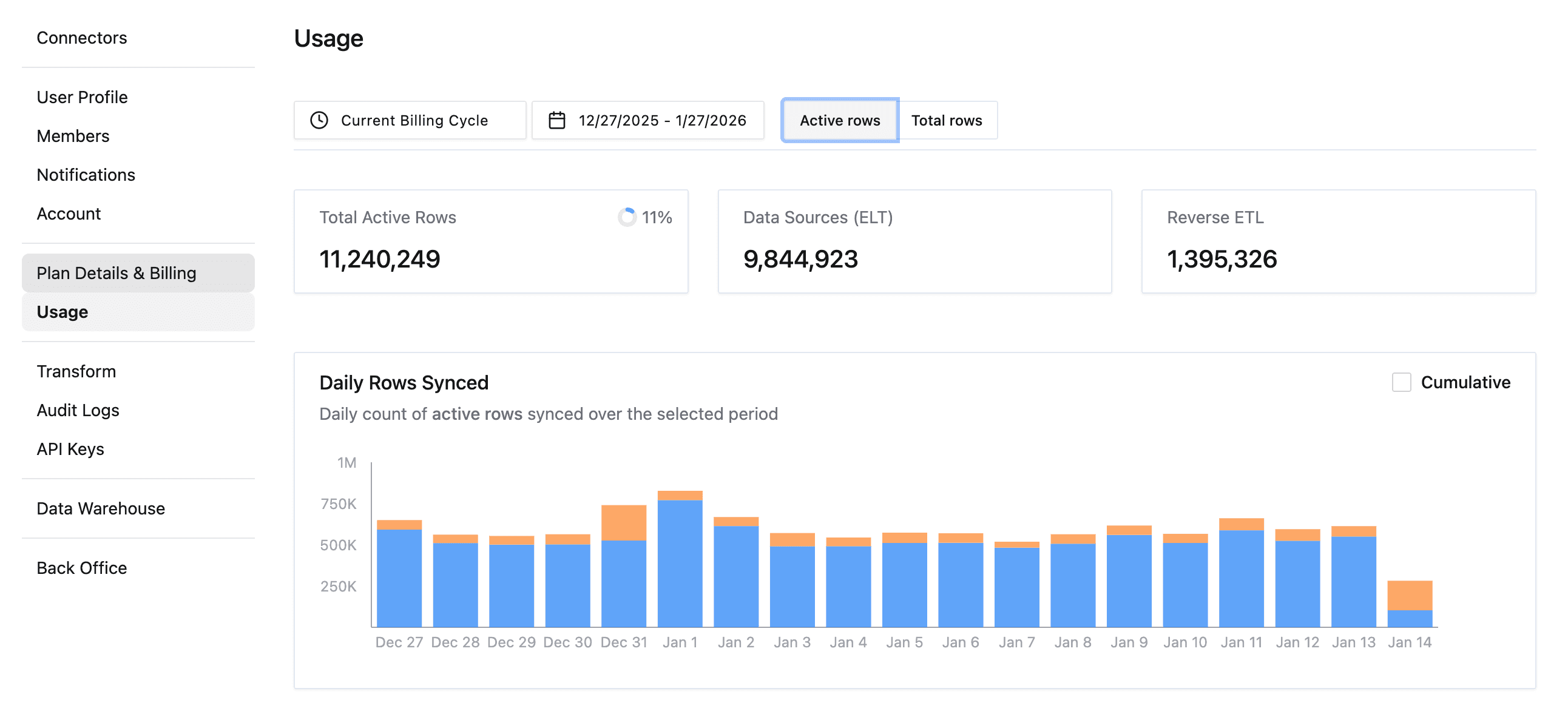
ELT and Reverse ETL Usage
Weld tracks usage separately for:
- ELT: Rows synced from source systems into your data warehouse (e.g. databases and SaaS tools).
- Reverse ETL: Rows synced from your data warehouse back into downstream tools (e.g. CRMs, marketing tools).
Both contribute to your total Monthly Active Rows and are visible in the Usage dashboard.
Usage feature
The Usage page in Account Settings provides a detailed breakdown of how your account is consuming rows during the selected billing period. This view helps you monitor consumption, identify high-volume sources, and forecast usage against plan limits.
At the top of the page, you can control how usage data is displayed:
Billing cycle selector: View usage for the current billing cycle or a custom date range.
Row type toggle:
- Active rows: Data rows inserted or updated during a Data Source (ETL) or Reverse ETL sync.
- Total rows: All rows inserted or updated during a sync, regardless of when they were last updated.
See the daily count of all rows synced over a selected period. Optionally enable Cumulative to represent the growth over time.
Rows synced by connector
This section breaks down usage by connector, helping you and your team to identify which data sources are contributing most to overall usage.
- Shows the total number of rows synced per connector during the selected period.
- Cnonnectors are sorted by highest usage.
Rows synced by table
This section provides a more granular understanding of your usage when it comes to sources tables (or streams). This level of detail is especially helpful when optimizing filters or sync frequencies.
- Displays row counts grouped by individual tables.
- Useful for identifying high-volume tables that may drive usage.
Sync Options & How They Impact Usage
Weld supports two primary sync modes: incremental syncs and full syncs. It is important to note that your choice of sync method directly impacts how many Monthly Active Rows (MAR) are generated and therefore how much usage you consume.
Incremental Syncs
By default, Weld uses incremental updates whenever possible. This means we only sync rows that are new, updated, or deleted since the last successful sync.
As a result:
-
You only pay for rows that actually change.
-
Stable data that remains unchanged and is not counted again.
-
This keeps usage predictable and cost-efficient.
Example scenarios:
-
If your system mainly receives new records (for example, new customers or transactions), only those new rows count toward MAR.
-
If you occasionally update existing records, only those modified rows are counted for that month.
-
This approach ensures you’re only billed for active data movement, not your entire dataset.
Full syncs
In some cases, you may choose (or be required) to run a full sync, which re-imports the entire dataset from the source system. This can significantly increase MAR usage.
Example scenarios:
-
If you modify historical records frequently, Weld may need to re-sync large portions of your tables.
-
If your connector or configuration requires full refreshes, a much higher percentage of rows may be counted as active.
-
Re-syncing large tables can cause a spike in MAR for that billing period.
Best Practices to Control Usage
- Use incremental syncs whenever possible
- Avoid unnecessary updates to historical data
- Schedule full syncs only when required
- Monitor MAR usage in you dashboard on the Weld app
What Happens if you Reach your Limit
If your usage exceeds your plan's included MAR, we warn you in the app or by email first, and the extra usage is billed at your plan's rates. To stay within your plan, or if you approach your limit:
- You can purchase additional MAR add-ons at any time.
- You can upgrade your plan to a higher tier directly from Plan Details & Billing
If you're unsure of your data syncing needs, getting close to the limits, or need to increase your limit, you can always reach out to our support team for assistance and guidance here, or you can book a call with us here.