
Load Into Several Destinations
Beta. A data source sync can load its tables into extra ELT destinations next to your data warehouse. For example, the same Shopify tables can land in your BigQuery warehouse and in a Snowflake database, or in an S3 bucket for a data lake.
You add a destination once, under Settings → ELT Destinations, and then pick it on each sync that should load into it. The sync extracts the data once and loads it into the data warehouse and every extra destination.
ELT destinations are available on the Business and Enterprise plans, and during a free trial. On other plans the ELT Destinations page shows what the feature does and how to upgrade.
Add an ELT destination
-
Open Settings → ELT Destinations and click Add ELT destination.
-
Under Connection, pick the connection to load into. Any connection Weld can load into as an ELT destination works, except your data warehouse, which every sync already loads into.
-
Give the destination a label. The label is how the destination appears everywhere in Weld, so it must be unique in the workspace.
-
Fill in the connection's settings, if it has any. They decide where the data lands:
Destination Settings Snowflake The database, and whether syncs added to it use uppercase identifiers PostgreSQL, Redshift, Microsoft SQL Server The database MotherDuck The database BigQuery, ClickHouse, Databricks, Iceberg, Amazon S3 None: data lands under the sync's schema name -
Decide on Use for new syncs by default. When it's ticked, new syncs load into this destination unless it's deselected when the sync is created. Existing syncs are not changed. It starts ticked, unless another destination on the same connection is already the default.
-
Click Add.
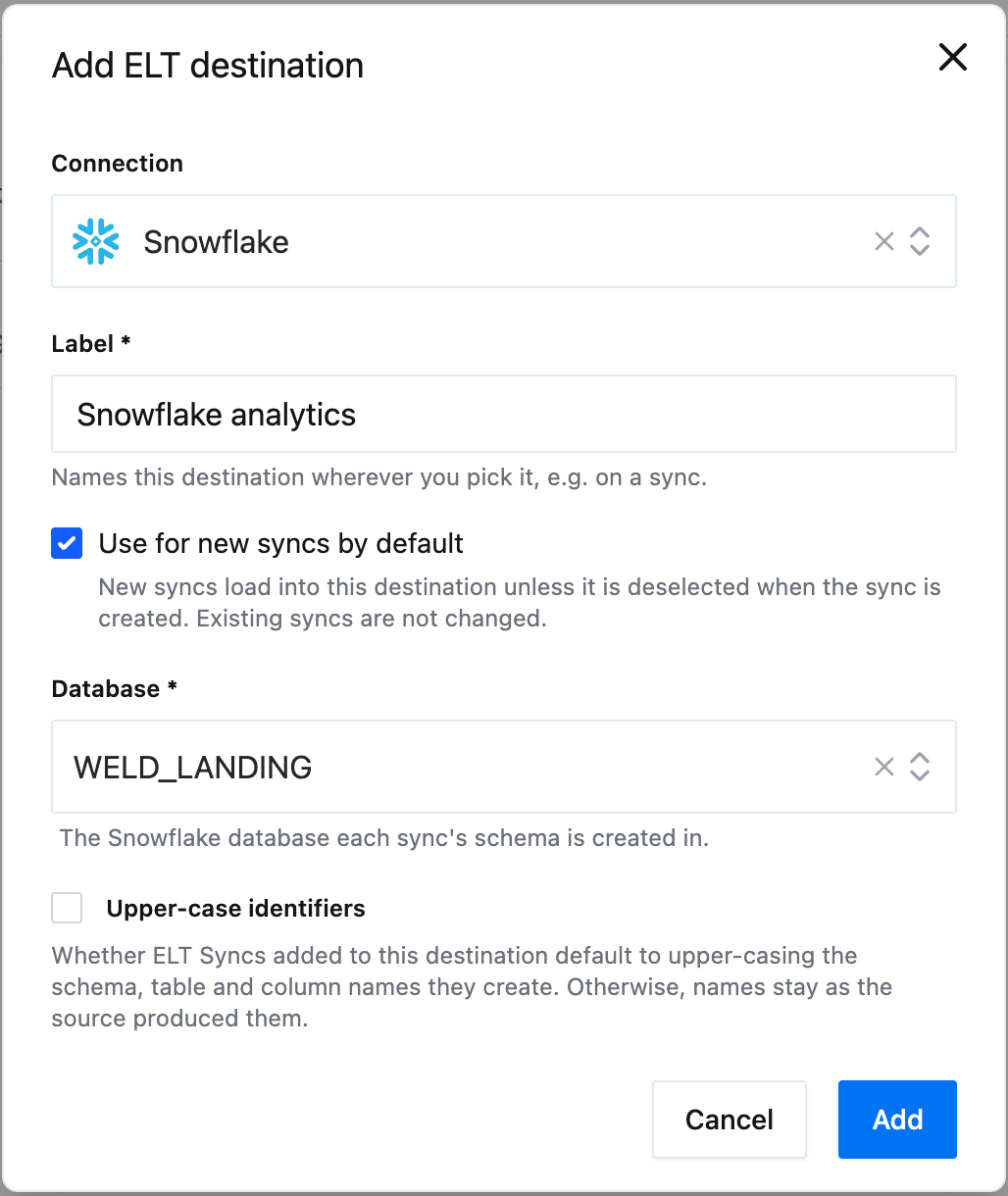
One connection can back several destinations, for example one per Snowflake database. Only one of them can be the default for new syncs.
Edit or remove a destination
The ELT Destinations page lists each destination by its label, with its connection and settings.

- Edit can always change the label and the default for new syncs. The settings can only change while no sync loads into the destination.
- Remove asks for confirmation first. If syncs still load into the destination, you also confirm removing it from those syncs. They stop loading into it, and tables already created there are not deleted.
Load a sync into a destination
When you create a sync
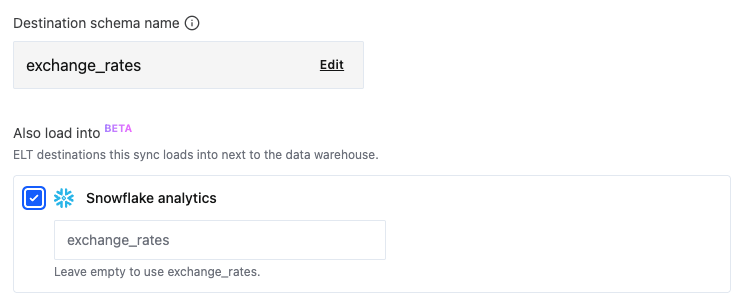
The sync settings step has an Also load into list with your ELT destinations. Tick the ones the sync should load into. For each one you can set the schema name the sync uses there, or leave it empty to use the suggested name. Destinations marked Use for new syncs by default start ticked.
On an existing sync
Open the sync and find the ELT destinations section on its Overview tab. It lists the destinations the sync loads into, with the schema name in each.
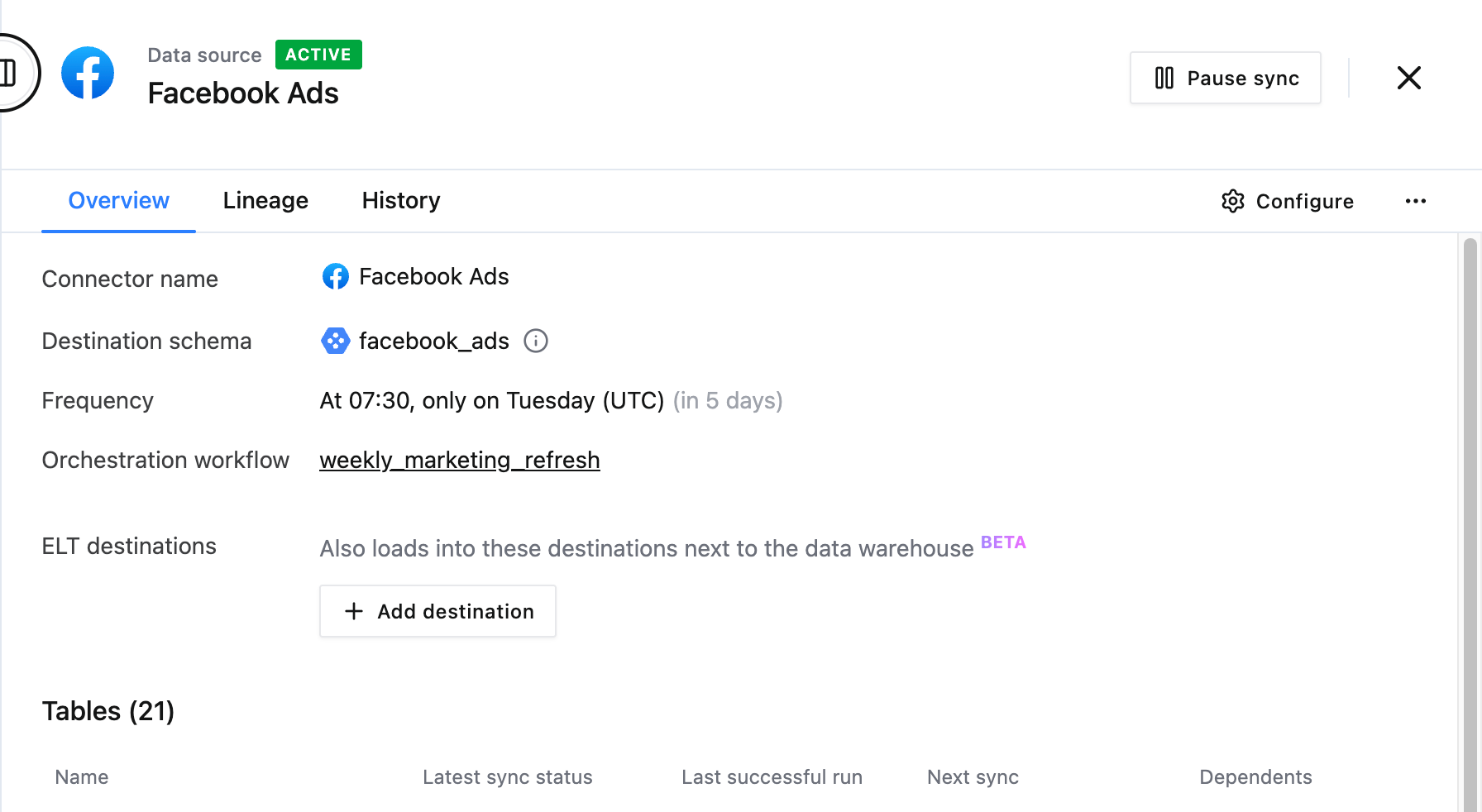
- Click Add destination.
- Pick the Destination.
- Optionally set the Destination schema, using letters, numbers and underscores. Leave it empty to use the name shown as the placeholder, which is the sync's own schema name. The schema can't be changed once the destination is added.
- Choose what happens to the data the sync already holds:
- Continue from the next sync loads only what the next syncs pick up. Rows synced before stay out of this destination.
- Full sync every table reloads every table into every destination of this sync, the data warehouse included. It isn't available for syncs with change data capture tables, which can only continue.
- Click Add.
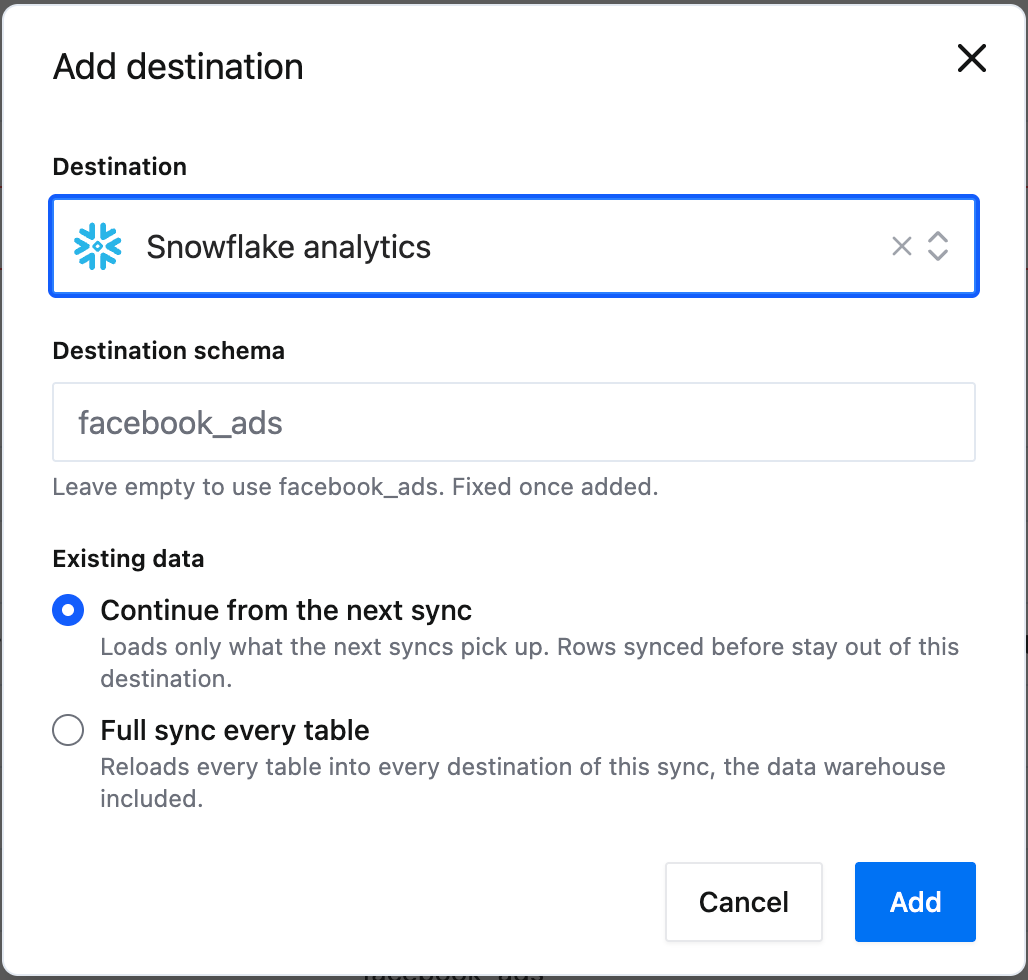
To stop loading into a destination, remove it from the section. The sync stops loading into it from the next sync on. Tables it already created there are not deleted.
Options that stay in the data warehouse
These table options run in the data warehouse:
- Capture deletes
- History tables
- Deletes from change data capture, for PostgreSQL sources
The tables themselves load into every destination as usual. When you add a destination, Weld shows which tables use one of these options, for example "29 tables with a history table won't get one here", so you know what to expect before you add it.
Destinations stay in step
A sync run completes when every destination of the sync has loaded, so the data warehouse and your extra destinations always hold the same data. A run that doesn't complete isn't counted toward your active rows.
How extra destinations count toward your usage
From December 1, 2026, each extra destination a sync loads into adds 50% of the active rows that sync counts. A table with 1,000 active rows that also loads into one extra destination counts as 1,500. With two extra destinations it counts as 2,000.
When you add a destination with Full sync every table, that one reload is free, in the data warehouse as well as the new destination. Full syncs after that count as usual: each row once a month. See Monitor and optimize usage for how active rows are counted.
Weld Connect API and MCP server
Everything above can also be done through the Weld Connect API and the MCP server.
ELT destinations
| Weld Connect API | MCP tool | What it does |
|---|---|---|
GET /elt_destinations, GET /elt_destinations/{id} | list_elt_destinations | List the account's ELT destinations, or fetch one |
GET /elt_destinations/settings_schema | The settings a connection takes as an ELT destination | |
POST /elt_destinations | add_elt_destination | Add a destination, with its label, settings and new-sync default |
POST /elt_destinations/{id} | update_elt_destination | Change the label, the new-sync default, or the settings while no sync uses it |
DELETE /elt_destinations/{id} | remove_elt_destination | Remove a destination. While syncs load into it, set force_remove to also remove it from those syncs |
Destinations on a sync
| Weld Connect API | MCP tool | What it does |
|---|---|---|
GET /elt_sync_destinations, GET /elt_sync_destinations/{id} | list_elt_sync_destinations | List the destinations syncs load into, or fetch one |
POST /elt_sync_destinations | add_elt_sync_destination | Load a sync into a destination, with its schema name and whether to continue or full sync |
DELETE /elt_sync_destinations/{id} | remove_elt_sync_destination | Stop loading a sync into a destination |
When you create a sync through the API or MCP server without listing extra destinations, it also loads into the destinations marked as the default for new syncs. An explicit list replaces the defaults, and an empty list means the data warehouse only.