Slowly Changing Dimensions (SCD): A Complete Guide to Tracking Historical Data
What Are Slowly Changing Dimensions?
Here's a scenario most data teams have run into: a customer updates their billing address, a product gets repriced, or an account gets reassigned to a new sales rep. The change happens, the database updates, and the old value just... disappears.
Now imagine someone asks, "What was this customer's address when we shipped that order last quarter?" If you overwrote it, you can't answer that question. The data is gone.
This is exactly the problem that slowly changing dimensions (SCD) solve. SCD is a set of data warehousing techniques for handling attributes that change over time -- but not frequently. Think customer addresses, product prices, employee titles, or account ownership. These values do change, but slowly compared to transactional data like orders or clicks.
The core question SCD answers is straightforward: when a dimension value changes, what should happen to the old value? The answer depends on your use case, and that's where the different SCD types come in.
Why This Matters for Your Analytics
Without an SCD strategy, your analytics can only describe the present. You can see what is, but never what was. That's a significant limitation when you need to answer questions like:
- Revenue attribution: Which sales region owned this account when the deal actually closed?
- Price analysis: How has this SKU's price changed over the past 12 months -- and did revenue follow?
- Customer journey: When did this customer move from "prospect" to "active," and what triggered it?
- Compliance & audit: What was the exact state of this record on a specific date?
- Trend detection: Are inventory levels at this location trending down over time?
These aren't edge cases. They come up constantly in finance, operations, and any team running reports that compare time periods. SCD is a foundational concept in dimensional modeling (the Kimball methodology) and applies to every major data warehouse -- BigQuery, Snowflake, Redshift, and Databricks included.
SCD Types Explained
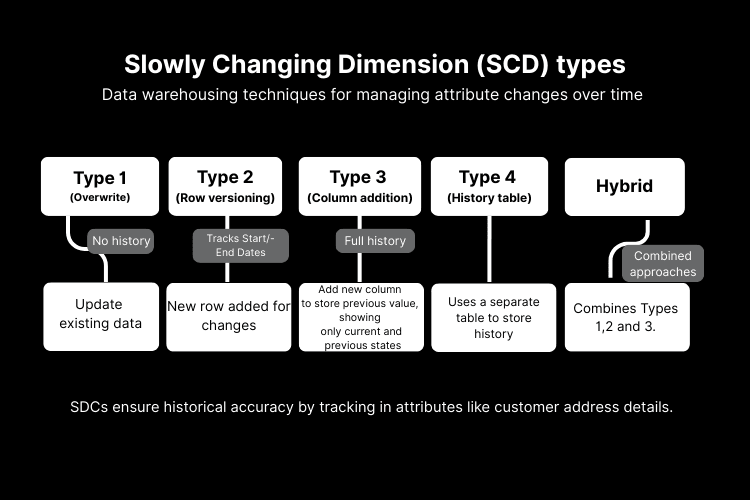
There are several SCD types, each making a different trade-off between simplicity, storage cost, and how much history you actually keep. Let's walk through them.
SCD Type 1 -- Overwrite (No History)
This is the default behavior in most databases: when a value changes, you overwrite it in place. Simple. Fast. And the old value is permanently gone.
Before the change:
| customer_id | name | city |
|---|---|---|
| 101 | Alice | NY |
After Alice moves to SF:
| customer_id | name | city |
|---|---|---|
| 101 | Alice | SF |
NY is gone forever. There's no record that Alice ever lived there.
This is fine for correcting typos or updating non-critical fields. But if the attribute matters for reporting -- say, you're segmenting revenue by customer location -- overwriting it will silently distort your historical numbers.
Use SCD Type 1 when:
- You're fixing data-entry errors
- The attribute genuinely doesn't matter historically
- Storage and simplicity are top priorities
SCD Type 2 -- Row Versioning (Full History)
This is the most widely used SCD approach, and for good reason. Each time a value changes, a new row is added with timestamps marking when that version was valid. The old row stays untouched.
| customer_id | city | valid_from | valid_to | is_current |
|---|---|---|---|---|
| 101 | NY | 2022-01-01 | 2024-03-15 | false |
| 101 | SF | 2024-03-15 | 9999-12-31 | true |
Now you can answer both questions:
- "Where did customer 101 live on 2023-06-01?" -- NY (the row where
valid_from <= 2023-06-01 < valid_to) - "Where do they live now?" -- SF (where
is_current = true)
The trade-off is that your table grows over time. For dimensions with millions of rows and frequent changes, this row bloat can start to impact query performance. But for most use cases, it's the gold standard.
Use SCD Type 2 when:
- You need full audit trails or compliance reporting
- You're doing time-series analysis on dimension attributes
- Anyone on your team might need to "go back in time"
SCD Type 3 -- Previous Value Column (Limited History)
Instead of adding rows, SCD Type 3 adds columns. You keep the current value and the previous value side by side.
| customer_id | current_city | previous_city | city_changed_at |
|---|---|---|---|
| 101 | SF | NY | 2024-03-15 |
It's quick to query and keeps the schema simple. But there's an obvious limit: you can only see one level back. If Alice moves from NY to SF to LA, the NY record is lost completely.
Use SCD Type 3 when:
- You only care about the most recent change ("before and after")
- Schema simplicity matters more than deep history
- You need fast "did this value change?" comparisons
SCD Type 4 -- History Table (Separate Tracking)
SCD Type 4 takes a different approach entirely. Instead of modifying the main table, you keep it clean with only current values and maintain a separate history table that logs every change as an append-only record.
Main table (always shows the current state):
| customer_id | name | city |
|---|---|---|
| 101 | Alice | SF |
History table (append-only -- every change is recorded):
| customer_id | name | city | synced_at |
|---|---|---|---|
| 101 | Alice | NY | 2022-01-01 |
| 101 | Alice | SF | 2024-03-15 |
This gives you the best of both worlds: your main table stays fast and compact for day-to-day queries, while the history table holds the full timeline for audit, analysis, or debugging.
This is the approach Weld uses for history tables -- we'll cover the details below.
Use SCD Type 4 when:
- You need fast queries on current data and full historical access
- Main table performance is important (no row bloat)
- Audit and compliance requirements exist
- You want "current state" analytics separated from "historical state" analysis
SCD Types Compared
Here's a quick reference for choosing the right type:
| SCD Type | Keeps History? | Method | Best For | Drawback |
|---|---|---|---|---|
| Type 1 | No | Overwrite in place | Error corrections, non-critical fields | History is permanently lost |
| Type 2 | Full | New row per change | Audit trails, time-travel queries | Table grows over time |
| Type 3 | Last change only | Extra column(s) | Before/after comparisons | Only one level of history |
| Type 4 | Full (separate table) | Append-only history table | Performance + auditability | Two tables to manage |
In practice, most teams end up using a mix. Type 1 for non-critical fields, Type 2 or Type 4 for the dimensions that actually matter. The key is being intentional about it rather than letting every change silently overwrite history.
What Are History Tables?
A history table is the practical implementation of SCD Type 4. It's a separate, append-only table in your data warehouse that captures every version of a record over time.
The key properties:
- Same schema as the main table, plus a timestamp column (
synced_at,updated_at, etc.) - Append-only -- rows are never updated or deleted, only added
- Protected -- the table is managed automatically; you can't accidentally modify historical records
- Complete timeline -- every sync captures a snapshot of changed records
This means you can always answer: "What did this record look like on date X?" -- which is surprisingly hard to do without a deliberate strategy.
How History Tables Compare to Change Data Capture (CDC)
If you've worked with change data capture (CDC), history tables might sound familiar. They solve a similar problem -- tracking what changed -- but they work quite differently in practice:
| History Tables (SCD Type 4) | CDC | |
|---|---|---|
| Trigger | Periodic sync snapshots | Real-time event stream |
| Granularity | Full record snapshot per sync | Individual field-level changes |
| Latency | Minutes (sync interval) | Seconds (event-driven) |
| Complexity | Low -- just enable the table | High -- requires log parsing, schema registry |
| Best for | Analytics, reporting, audit | Real-time pipelines, event sourcing |
For most analytics and reporting use cases, history tables hit the sweet spot: they're dead simple to set up, give you full record-level snapshots, and don't require any infrastructure beyond your existing data warehouse.
Using History Tables in Weld
Weld makes setting up history tables straightforward across supported connectors. There's no code to write and no schema to configure -- you just select the tables you want.
Here's how to enable them:
-
Open your connector settings:
Go to Settings -> Connectors and select your data source. -
Search for history tables:
In the table selection panel, typehistory. All available history streams will appear. -
Select and save:
Check the history tables you want (e.g.,product_history,order_history,customer_history) and save.
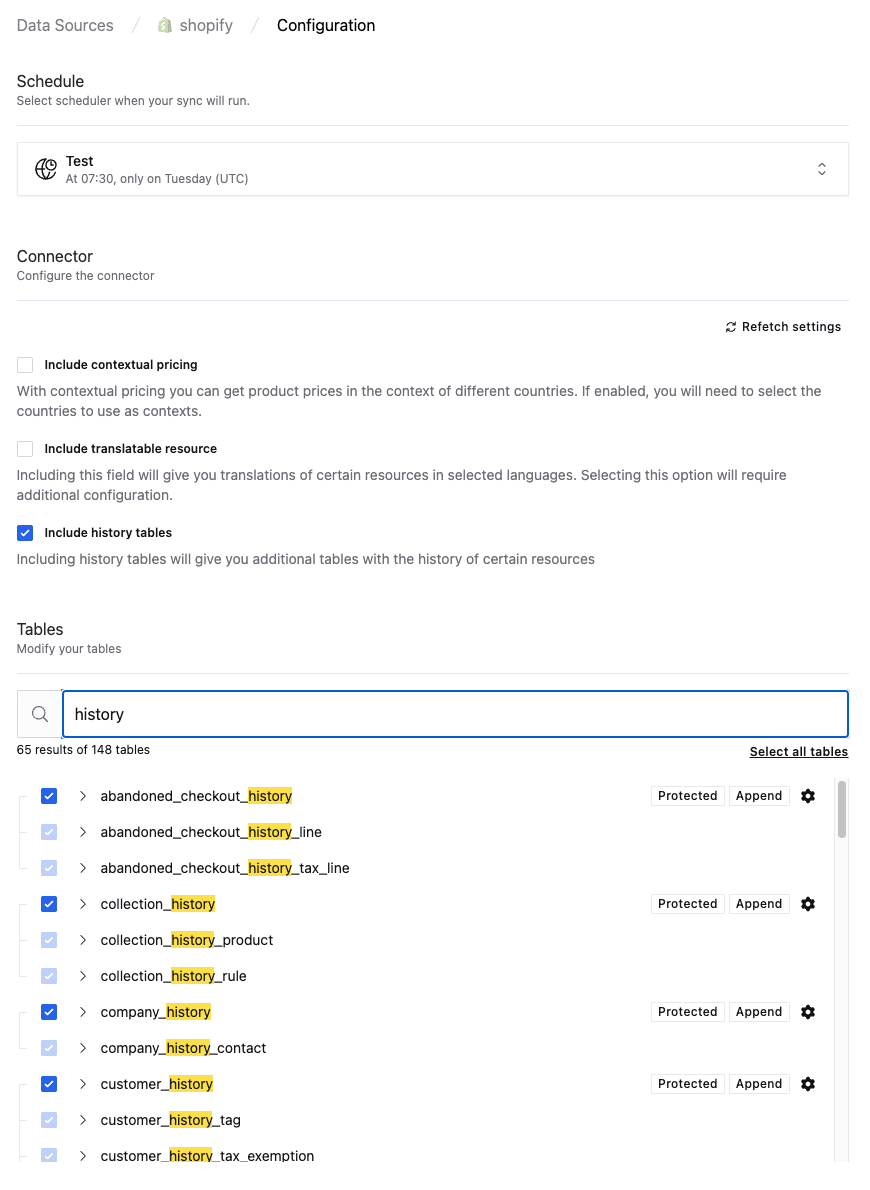
That's it. Weld will start appending historical snapshots on the next sync. Each history table runs in append mode and is marked as protected, so existing rows are never overwritten or deleted. Every sync captures the current state of changed records, building a complete timeline automatically.
Example: Shopify History Tables
As an example, Weld supports 19 history tables for Shopify across all major entities:
| Category | History Table | What It Tracks |
|---|---|---|
| Checkout | abandoned_checkout_history | Abandoned checkout changes over time |
| Collection | collection_history | Product collection updates |
| Company | company_history | B2B company profile changes |
| Customer | customer_history | Customer profile updates (address, email, tags) |
| Customer | customer_metafield_history | Custom customer metafield changes |
| Discount | discount_code_history | Discount code modifications |
| Draft Order | draft_order_history | Draft order changes before completion |
| Fulfillment | fulfillment_order_history | Fulfillment status transitions |
| Inventory | inventory_item_history | Inventory item attribute changes |
| Inventory | inventory_level_history | Stock level changes across locations |
| Line Item | line_item_group_history | Line item group modifications |
| Order | order_history | Order lifecycle changes (status, amounts, tags) |
| Order | order_metafield_history | Custom order metafield changes |
| Order | order_return_history | Return status and detail changes |
| Price Rule | price_rule_history | Pricing rule updates |
| Product | product_history | Product detail changes (title, description, status) |
| Product | product_image_history | Product image additions and updates |
| Product | product_metafield_history | Custom product metafield changes |
| Product | product_variant_history | Variant-level changes (price, SKU, weight, inventory) |
Tip: You can join any history table back to its main table to compare current vs. past values. For example: "Show me all products where the price changed in the last 30 days" -- a query that's trivial with history tables and impossible without them.
Practical Example: Tracking Product Price Changes
To make this concrete, here's how you'd use a Shopify product_variant_history table to find every product whose price has changed:
1with
2    price_changes as (
3        select
4            product_id
5          , title
6          , price
7          , synced_at
8          , lag(price) over (
9                partition by
10                    product_id
11                order by
12                    synced_at
13            ) as previous_price
14        from
15            shopify.product_variant_history
16    )
17select
18    *
19from
20    price_changes
21where
22    price != previous_price
23order by
24    synced_at desc
The LAG() window function grabs the previous price for the same product, so each row shows both the new price and what it was before. This kind of time-aware query is exactly what history tables unlock -- and it's something that's simply not possible when your data pipeline overwrites records in place.
You could extend this to calculate price change percentages, alert on drops above a threshold, or feed the output into a dashboard tracking pricing trends across your catalog.
Wrapping Up
Slowly changing dimensions aren't a new concept -- they've been a core part of data warehousing since Ralph Kimball formalized them in the 1990s. But they're more relevant than ever as companies rely on analytics for decisions that span time periods, not just snapshots.
The right SCD strategy depends on what you actually need:
- SCD Type 1 when history genuinely doesn't matter
- SCD Type 2 when you need full row-level versioning in a single table
- SCD Type 3 when you only care about the most recent change
- SCD Type 4 (history tables) when you want fast current-state queries and a complete audit trail, without compromising on either
Weld's history tables implement SCD Type 4 across supported connectors -- giving you append-only historical tracking with zero configuration beyond selecting the tables you want. No schema changes, no custom code, no maintenance.
If you've been overwriting your dimension data and hoping nobody asks about the past, now's a good time to stop doing that.
Sources & Further Reading
- Kimball Group: Slowly Changing Dimensions -- The original Kimball methodology for SCD types
- Snowflake: Slowly Changing Dimensions with Dynamic Tables -- Implementing SCD in Snowflake
- Dev.to: Slowly Changing Dimensions Types 1-3 with Examples -- Hands-on walkthrough of SCD types
- ThoughtSpot: What Are Slowly Changing Dimensions? -- Business-friendly overview
- Wikipedia: Slowly Changing Dimension -- Comprehensive reference for all SCD types
- Wikipedia: Change Data Capture -- How CDC compares to SCD approaches
- Weld: March 2026 Release Notes -- Shopify history tables and more