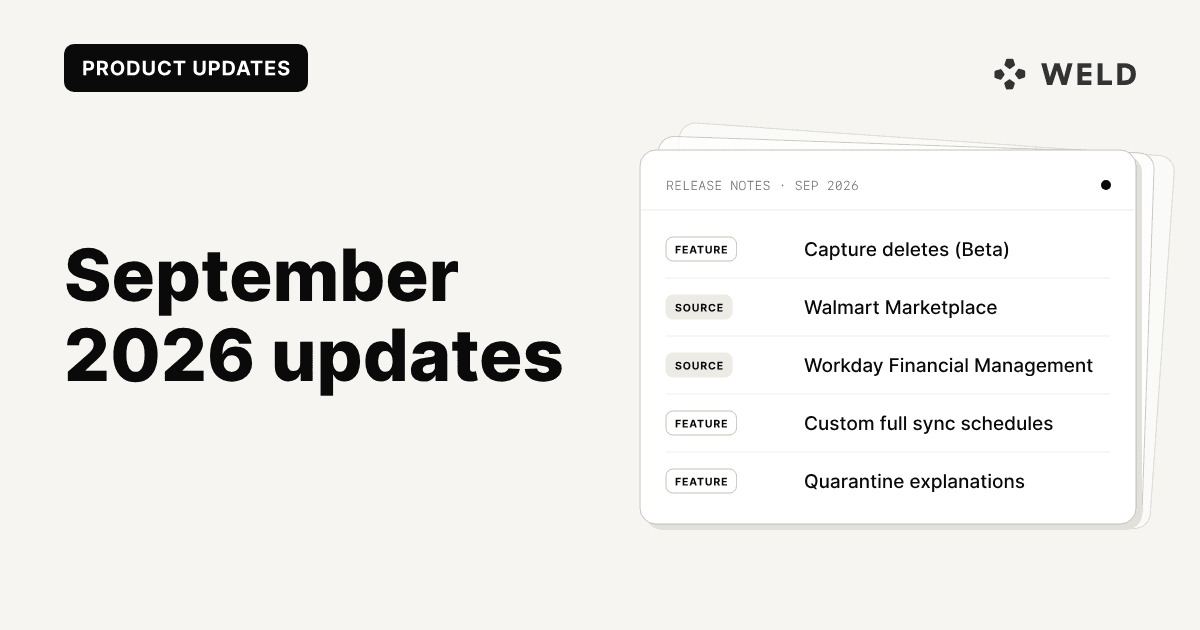
September was about keeping your warehouse faithful to the source. Capture deletes (Beta) keeps the rows a source stops returning instead of silently dropping them, and gets its own write-up today. Incremental tables can also run their full sync on any schedule you like, and Snowflake users can now have Weld create upper-case names, so tables can be queried without double quotes. When a sync does go wrong, Weld now explains why in plain language instead of showing a raw error.
We also added five new sources: Walmart Marketplace, Workday Financial Management, Claimlane, Storepoint, and QRFY. NetSuite picked up the general ledger tables you need for a trial balance, and Recurly and QuickBooks both got substantially deeper.
Since the month closed, we've also shipped a new ERD viewer for exploring any connector's schema, made Apache Iceberg a Weld destination, and published how OMHU is building an AI-ready data platform with Weld. There's more on all three under On the Blog.
Here's everything new and improved in Weld this month.
New Features
Capture Deletes (Beta)
When a record disappears from a source, a full sync used to remove it from your destination table too. That keeps the table in step with the source, but it also means the row is gone: you can't see that a campaign existed last month, or audit what was removed and when.
Capture deletes changes that. Turn it on from a table's settings menu, just above History tables, and rows the source stops returning are marked with a _weld_deleted_at timestamp instead of being deleted. They stay queryable for auditing and point-in-time analysis, and a row that comes back is unmarked again.
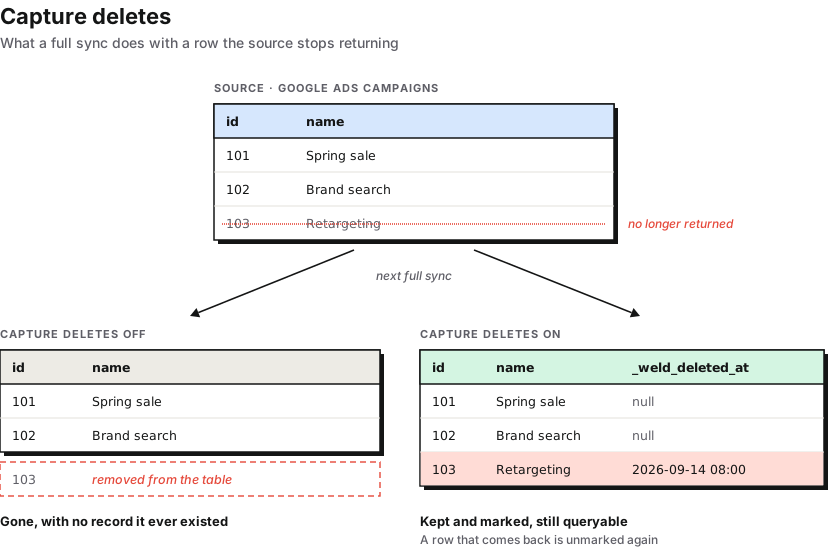
Capture deletes needs a full sync that reads a complete snapshot of the source, so we are adding it table by table. It launched on the Google Ads dimension reports, and during September it reached Microsoft Ads and the NetSuite SuiteQL tables, including transaction and transactionaccountingline. Since then, Microsoft SQL Server tables with primary keys and the main Traede tables have joined them.
It works on BigQuery, Snowflake, Redshift, Postgres, Microsoft SQL Server, MotherDuck, and, since October, Apache Iceberg, and is available on the Premium and Business plans.
We wrote up how it works, how to query the deleted rows, and how it compares to history tables and CDC: Capture deletes: keep the rows your source deletes.
Custom Full Sync Schedules
Incremental tables can run a periodic full sync to pick up anything an incremental run can miss, but until now only at midnight. You can now give it any cron schedule, for example every Sunday or on the first of each month, and the next run at or after that time runs as a full sync.
The schedule doesn't add runs of its own, so it never makes a table sync more often than its sync interval. In the app, turning on Scheduled full sync in a table's options menu opens the schedule picker below, replacing the old Full sync at midnight checkbox, and over the API the setting is full_sync_schedule. The previous full_sync_at_midnight flag keeps working and is stored as the equivalent daily schedule.
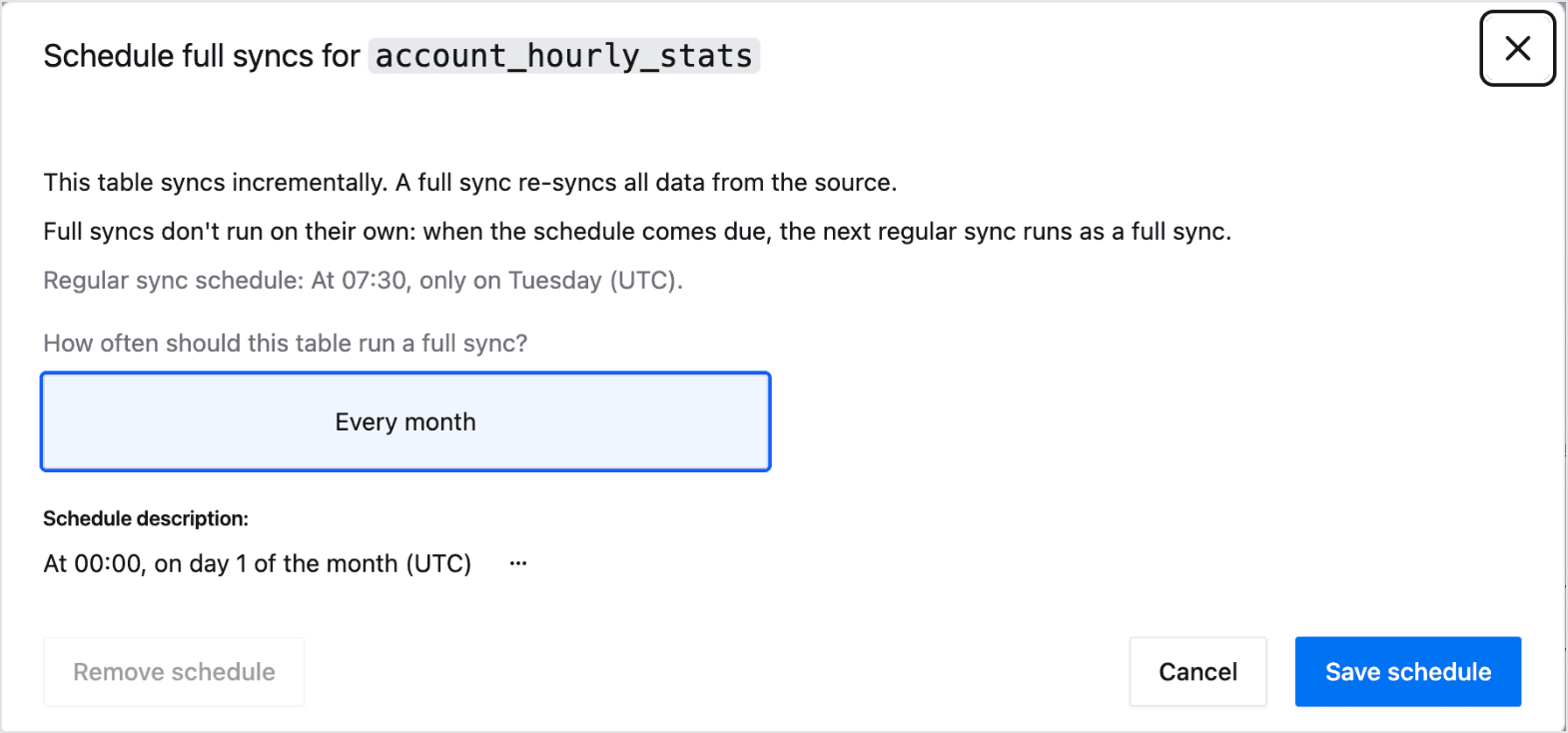
Turning on Capture deletes for an incremental table requires a full sync schedule, since deletes are only reconciled on a full sync.
Upper-Case Identifiers for Snowflake
Snowflake resolves an unquoted name to upper case, and Weld quotes every name it writes, so a table created as "orders" could only be queried with quotes. Snowflake destinations can now have Weld create schemas, tables, and columns in upper case instead:
1select
2    id
3from
4    hubspot.orders
Turn on Create tables and columns in upper case under Advanced when you connect Snowflake, or later on the Data Warehouse settings page, to set the default for new syncs. Each sync can override it when you create it. The casing is fixed once a sync is created, because "orders" and "ORDERS" are two different objects in Snowflake, so existing syncs keep the names they have.
Explanations for Quarantined Syncs
When a table is quarantined, Weld now explains what happened in plain language instead of showing the raw error from the source. The explanation comes with suggested next steps you can act on directly: re-authenticating a connection, adjusting a sync's incremental settings, reducing its frequency, or contacting support with the affected table already filled in.
When the cause is on Weld's side, the card says so and tells you no action is needed, rather than suggesting fixes that wouldn't help.
Error Markers and Live Validation in the SQL Editor
A failed preview now marks the line the warehouse blamed, right in the SQL editor, instead of only showing the message in the bottom pane. The marker follows your SQL as you edit: changing that line clears it, editing elsewhere moves it, and undoing back to the failing query brings it back.
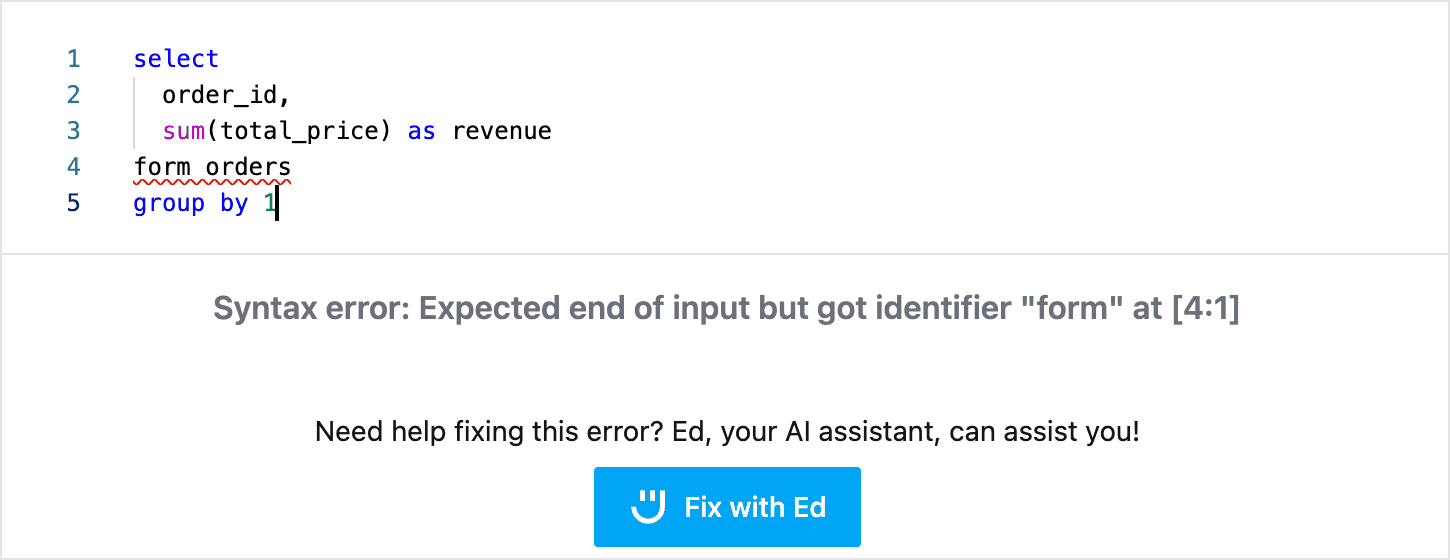
The editor can also validate your SQL against the warehouse while you type. Validation waits for a pause in typing and runs as a free dry run or EXPLAIN, so it never executes the query, and a valid query clears any leftover marker.
Usage by Source Table: Filter and Sub Tables
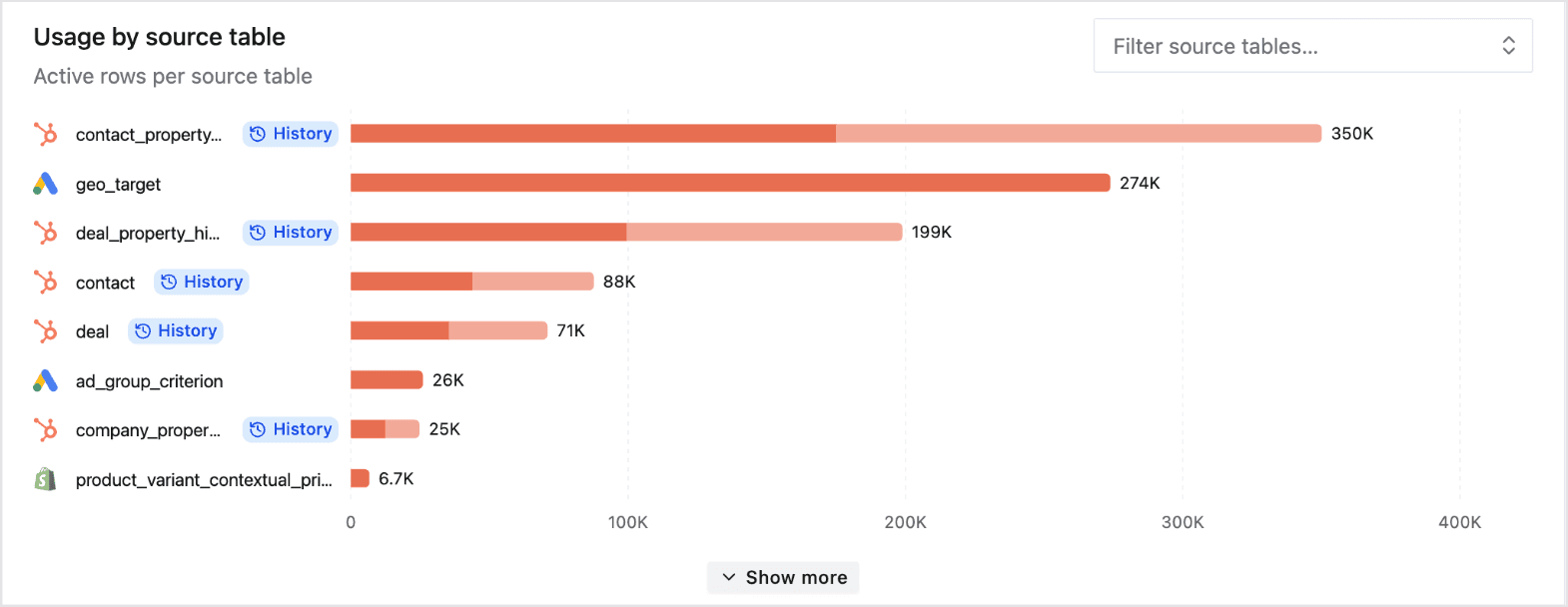
The Usage by source table chart on the Usage page has a search box, so you can narrow it to one integration or a single table. A new Include sub tables toggle adds a grey segment for subtable rows to each table's bar. Subtable rows aren't billed, and the tooltip labels them that way.
Orchestration Overview: Sorting, Contents, and a Disabled Filter
The orchestration overview now sorts workflows with leading numbers in numeric order, so "2. Klaviyo Sync" comes before "10. Shopify Sync". Each workflow card shows what it contains (models, source tables, Reverse ETL syncs, and webhooks), and a new toggle hides disabled workflows.
New Connectors
Walmart Marketplace
Walmart Marketplace is now available as a source, syncing 57 tables across the seller's catalogue, inventory, orders, returns, feed submissions, pricing, payments, shipping settings, WFS inbound shipments, and listing quality.
A few tables are worth calling out. pricing_insights carries Buy Box win rate and competitor prices per SKU. recon_report syncs settlement reconciliation files by settlement date, so files Walmart publishes days after the period they cover aren't skipped. listing_quality_score appends today's score on every sync, since Walmart only ever returns the current value, which turns it into a trend line you can chart.
Connections authenticate with the Client ID and Client Secret from Seller Center's API Key Management page. Walmart returns orders from the last 180 days, so order history starts there, while returns go back up to two years.
Explore Walmart documentation → · View Walmart data schema →
Workday Financial Management
Workday Financial Management is now available as a source, syncing purchase orders and receipts with 43 subtables between them. Both tables sync incrementally on their last updated date.
2 total changes
| Table/column | Change type | Notes |
|---|---|---|
purchase_order | New table | Incremental. Includes 29 subtables. |
receipt | New table | Incremental. Includes 14 subtables. |
Connections authenticate with OAuth through an API client for integrations, or with an integration system user and password.
Explore Workday Financial Management documentation → · View Workday Financial Management data schema →
Claimlane
Claimlane is now available as a source for warranty and returns data, syncing retailers, suppliers, B2B and B2C claim tickets, and Claimlane's raw data exports.
5 total changes
| Table/column | Change type | Notes |
|---|---|---|
retailer | New table | |
supplier | New table | Includes brand and product identification subtables. |
b2b_ticket | New table | Incremental. Eight subtables cover claim products, tags, and statuses. |
b2c_ticket | New table | Nine subtables cover products, refunds, parts, and shipping lines. |
raw_b2b_product_data, raw_b2c_product_data, and four more | New table | One table per Claimlane raw data export type. |
Connections authenticate with an API key, and an organization picker lets you limit the sync to specific retailers or suppliers.
Explore Claimlane documentation → · View Claimlane data schema →
Storepoint
Storepoint is now available as a source, syncing your store locator's locations along with their tags and custom field values.
4 total changes
| Table/column | Change type | Notes |
|---|---|---|
location | New table | |
custom_field | New table | |
location | ||
location_tag | New subtable | |
location_custom_field | New subtable | |
Explore Storepoint documentation → · View Storepoint data schema →
QRFY
QRFY is now available as a source, syncing QR codes, folders, and scan analytics from the QR code platform. Each code's type-specific data (one of 22 types, such as URL, vCard, or Wi-Fi) and design land in their own subtables, and scan analytics sync incrementally.
3 total changes
| Table/column | Change type | Notes |
|---|---|---|
qr | New table | Includes subtables for the per-type data and the design style. |
folder | New table | |
analytics | New table | Incremental scan report. |
Explore QRFY documentation → · View QRFY data schema →
Connector Updates
NetSuite: General Ledger Tables, Capture Deletes, and Safer Paging
NetSuite gained five tables from its SuiteAnalytics schema. The important one is transactionaccountingline, which carries the GL account and debit or credit for every transaction line: the table a trial balance, P&L, or balance sheet is built from. entity and item are the union tables behind NetSuite's per-type records, and accounttype and accountingperiodfiscalcalendars are small reference tables.
6 total changes
| Table/column | Change type | Notes |
|---|---|---|
transactionaccountingline | New table | GL account and debit/credit per transaction line. |
entity | New table | |
item | New table | |
accounttype | New table | |
accountingperiodfiscalcalendars | New table | |
deletedrecord | New table | NetSuite's deletion log, synced incrementally. |
The SuiteQL tables also support Capture deletes, and a new deletedrecord table syncs NetSuite's own deletion log. Separately, SuiteQL paging now resumes after the last row it read instead of paging by offset, so a row modified in the middle of a sync can no longer cause the next row to be skipped. That fix applies to every NetSuite sync.
Recurly: Transactions, Line Items, Credit Payments, and Coupons
Recurly transactions, invoice line items, and credit payments now sync as tables of their own, read directly from Recurly's site-level endpoints. Before, they were only reachable through the invoice they belonged to, which meant declined transactions and pending line items were missing, line items were capped at 200 per invoice, and a credit payment applied to another invoice could appear twice. All three of those are fixed.
Recurly also gained a coupon_redemption table covering account and subscription redemptions, an invoice_coupon_redemption subtable linking each redemption to the invoices it discounted, a per-line invoice_line_item_discount subtable, and a discount column on invoice.
The new
transaction,invoice_line_item, andcredit_paymenttables aren't added to existing Recurly syncs automatically. Contact Weld support to add them, and each one backfills the previously missing records on its first sync.
QuickBooks: Vendor Credits and Richer Bills
QuickBooks now has a vendor_credit table, with account-based and item-based expense lines in subtables, matching how other QuickBooks transaction tables are split. The bill table gained its document number, private note, home balance, exchange rate, vendor address, and sales term, and a new bill_linked_txn table links each bill to the transactions settling it, such as its payment.
4 total changes
| Table/column | Change type | Notes |
|---|---|---|
vendor_credit | New table | |
bill_linked_txn | New table | The transactions linked to a bill, such as its payment. |
vendor_credit | ||
vendor_credit_account_based_expense_line | New subtable | |
vendor_credit_item_based_expense_line | New subtable | |
Bill expense lines also gained a project_ref column, and bill_account_based_expense_line rows now include their amount.
HiBob: Employment History and Custom Fields
HiBob now syncs an employee_employment_history table with one row per employment change (contract, working pattern, salary type, and similar terms) and its effective date, so you can report on what someone's terms were at any point, not only today.
The employee table syncs many more fields, covering employment terms, lifecycle and termination details, work address, salary, and personal fields, each alongside HiBob's readable version where one exists. Custom fields, which have tenant-specific ids, now land in dedicated employee_custom_fields and employee_payroll_custom_column tables instead of being dropped. time_off now includes pending requests and looks up to two years ahead.
Unleashed: Product Attributes and Corrected Columns
Unleashed product attributes now sync to a product_attribute subtable, and two new tables, assembly_status and sales_order_status, round out the reference data. Several columns that always synced as null, including the sell price tiers, salesperson fields, and bill of materials costs, have correctly populated replacements, and a set of previously missing fields now sync on sales orders, invoices, credit notes, suppliers, and purchase orders.
Stripe: Usage for Billing Meters
Stripe has a new meter_event_summary table with daily usage for items billed through Billing Meters, which the existing usage_record table can't read. Each row pairs a meter with a customer, so usage stays available even after a metered item is removed from a subscription.
Criteo: Ad Sets
Criteo now has an adset table and an adset_statistics_daily_report, filling in the level between campaigns and ads. The ad statistics report now carries adset_id and campaign_id on every row, and all three statistics reports include readable campaign, ad set, and ad names alongside the ids.
Shopify: Market-Assigned Catalogs on Company Locations
Shopify B2B company locations now include catalogs assigned through a market, not only those assigned directly to the location, with a new catalog_type column telling the two apart. Re-authenticate your Shopify connection once to grant the read_markets scope this needs.
Additional Connector Updates
- TikTok Shop:
statement_transaction_reportnow syncs incrementally instead of re-reading every statement on every run. - Fortnox:
vouchersnow syncs incrementally on each voucher's last modified date, instead of re-reading every financial year. - Traede:
ordernow carries the delivery and invoice addresses, 12 fields each. - Cargoson: A new
bookingstable reads the booking references you already hold in a warehouse table or view and looks each one up in Cargoson, with packages, containers, package units, and dangerous goods rows in subtables. - Facebook Ads: Custom report rolling windows now label month-based windows correctly, such as "Last 12 months (one row per month)".
Platform Improvements
History Tables Seed From Existing Data
Turning on a history table for a table that was already syncing used to capture changes from that point on only, so rows that hadn't changed since were missing from __history until they next changed. __history is now seeded from the current table when it's first created, so the full dataset is captured straight away. This works on BigQuery, Snowflake, Postgres, Redshift, Microsoft SQL Server, ClickHouse, and MotherDuck.
Redshift Reliability
A round of fixes for Redshift destinations under real workloads: text columns are now varchar(max) so long values no longer fail to load, incremental syncs on tables without a unique primary key no longer fail on MERGE, reserved words like order are quoted correctly, long column names no longer load as NULL, mixed-case columns are no longer re-added on every sync, and models on late-binding views read their columns correctly. A shared fix also corrects PostgreSQL destinations reporting every column as non-nullable.
ClickHouse: Incremental Schema Changes
Schema changes on a ClickHouse destination no longer force a full resync. Adding or removing fields and changing their nullability are now applied in place, as on other destinations. Type changes still need a full resync, since ClickHouse rewrites the whole table to convert a column.
Weld Connect API and MCP Server
The Weld Connect API and MCP server now report when a table on a sync has been retired, with retired and retirement_details fields matching what the app shows. They also return each table's primary_keys and reject a request that excludes a primary key column, the same way the app does.
Bug Fixes
- Facebook Ads double counting: Custom reports with a weekly, bi-weekly, or monthly aggregation could write overlapping partial-period rows next to the full ones after a backfill, which double counted any
SUMacross the table. New syncs no longer produce them, and affected tables have been refreshed. - Facebook Pages access lost: When a page was unshared, deleted, or its admin lost access, syncs crashed with a generic error. They now pause with a plain-language message and a link to reconnect.
- Lookback syncs running every time: Klaviyo, Cargoson's
bookingstable, and TikTok Shop'sstatement_transaction_reportran a full lookback on every sync instead of alternating with lighter incremental runs, which cost extra rows and sync time. - Google Drive syncs created by API: Google Drive syncs set up through the API or MCP server couldn't resolve their folder, so listing or adding tables failed. The settings API now also offers a list of real folders to pick from.
- Query error panel freezing: Working out which raw views a failed query depended on could freeze the tab in workspaces with heavily shared model lineage.
On the Blog
Supermetrics Pricing Explained
Supermetrics is cheap to start and harder to predict as you grow: each plan is a fixed price, but destinations, data sources, users, and ad accounts are add-ons with ceilings, and the data warehouse, transformations, and API access sit on Enterprise alone. Supermetrics pricing explained walks through every plan and add-on, four worked cost examples, and how the numbers compare with Weld.
The Agent Context Stack
Ask two AI agents "what is our revenue?" and you will often get two different answers, and after that, nobody trusts either. The agent context stack walks through what an agent needs before it can answer that reliably: skills, MCP, a semantic layer, context, and permissions, layer by layer, with where Weld fits and where to start.
Weld Is an Official MotherDuck Technology Partner
Weld is now listed in MotherDuck's technology partner ecosystem for both ingestion and Reverse ETL. The announcement explains what MotherDuck adds to DuckDB and three ways teams are combining the two, from letting AI agents query data safely to feeding customer-facing analytics.
Since the Month Closed
Three more posts landed in the first week of October:
- The new ERD viewer puts the schema browser beside the diagram on every connector page, searches tables and columns at once, and traces how a table joins to the rest of the model, with a walkthrough on Shopify's schema.
- Apache Iceberg is now a Weld destination. Weld writes Iceberg tables through any Iceberg REST catalog, including Amazon S3 Tables and AWS Glue, so your data lives in a bucket you own and any engine can query the same copy.
- How OMHU is building an AI-ready data platform with Weld covers how the Danish design company is building one source of truth for reporting, finance, forecasting, and the AI agents its team uses in Slack.
That's a wrap for September! For the full technical details, check out the September 2026 release notes.
Questions or feedback? Reach out to us anytime.