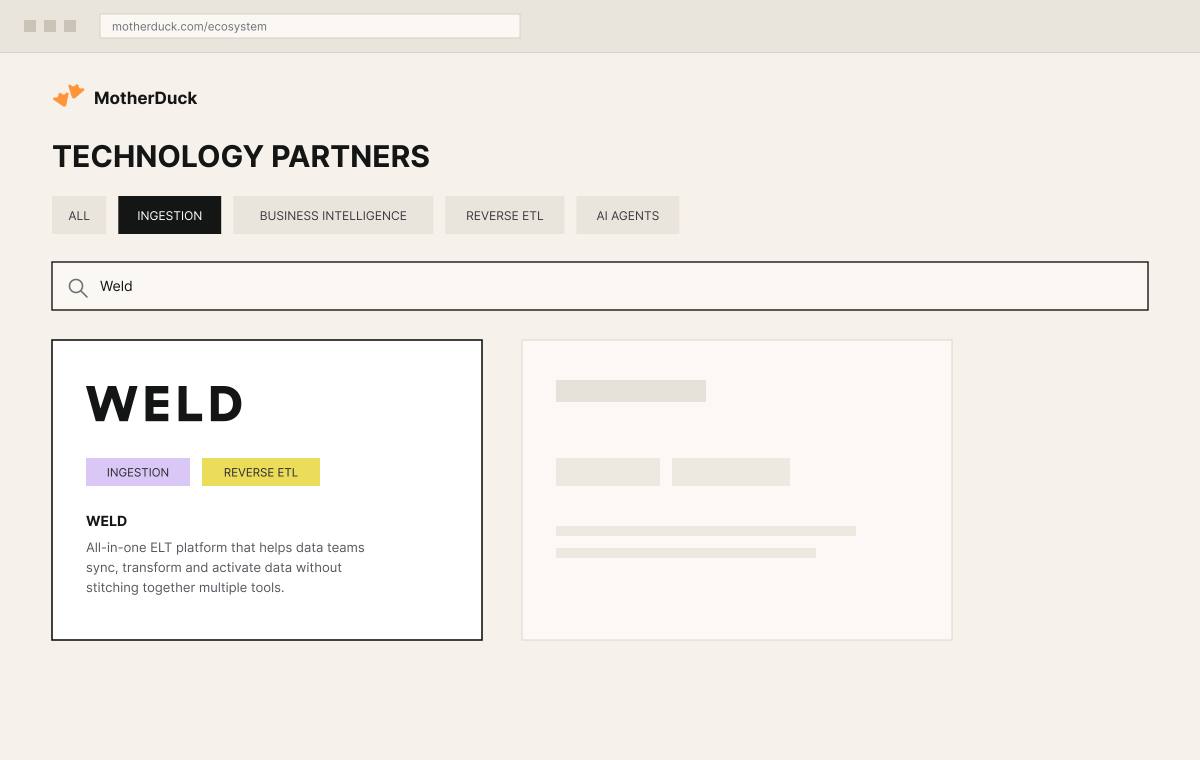
Weld is now an official MotherDuck technology partner, listed in their ecosystem for both ingestion and reverse ETL, and MotherDuck is live as a Weld destination. You can sync your sources straight in and start querying with DuckDB's speed in minutes.
Teams are increasingly choosing MotherDuck for analytics that do not need a warehouse running around the clock. Ducklings spin up on the first query and scale to zero when idle, and the Pulse size is metered per query, so intermittent workloads stop paying for a warehouse that is sitting there waiting.
What DuckDB is, and what MotherDuck adds to it
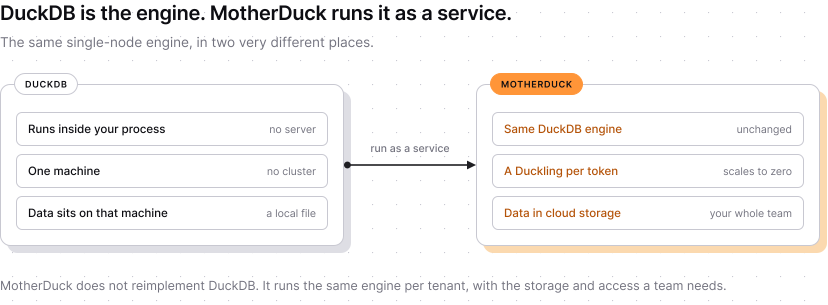
DuckDB is an analytical database that runs inside the process that queries it. There is no server to install, no cluster to size and nothing to keep running between queries. It speaks ordinary SQL, stores data column by column, and is built for the kind of work analytics actually involves: scanning large portions of a table, aggregating, and joining big tables together. People often describe it as SQLite for analytics, which is a fair shorthand for both the simplicity and the single machine it runs on.
That last part is the catch. DuckDB on its own is a library on someone's laptop or inside one application, so the data is wherever that machine is, and nobody else can query it. MotherDuck takes the same engine and runs it as a managed service: each instance is a Duckling, sized independently and scaled to zero when idle, with the data in the cloud rather than on a laptop. You get DuckDB's speed on a single node without operating anything, and a warehouse your whole team and your tools can reach.
What Weld brings to MotherDuck (and vice versa)
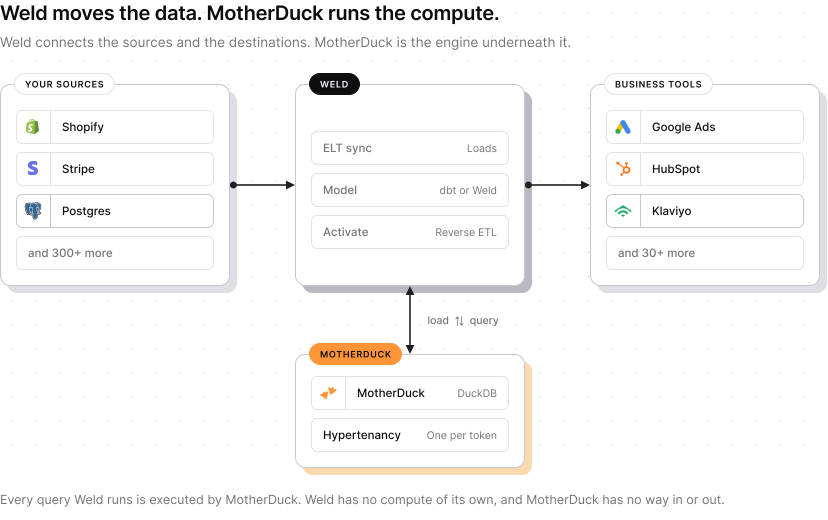
MotherDuck is a serverless, DuckDB-powered warehouse, but it has no built-in way to pull data out of your SaaS tools, ad platforms, or databases, and no way to push modeled data back out once it's there. Weld is the other half: it syncs from 300+ sources, models the data with SQL, and activates it back out to business tools. The modelling step is not tied to one tool either: you can build models in Weld, keep them in GitHub, or run dbt against the same warehouse, and MotherDuck executes the SQL in every case. But on its own, Weld has no compute engine to run that on. Together, Weld handles the ingestion and activation, MotherDuck handles the compute.
1. Let AI agents query your data safely
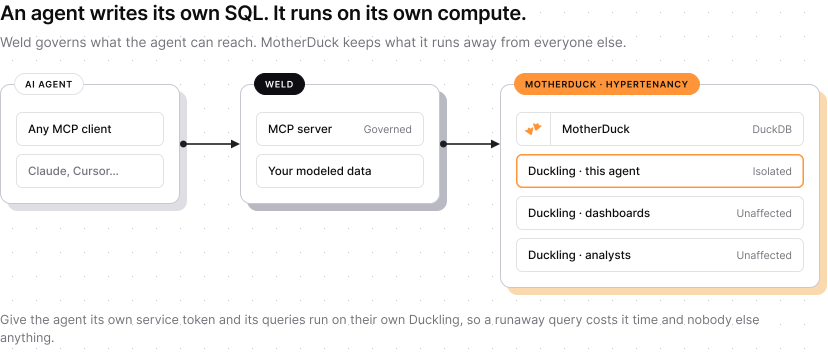
Why it matters: giving Claude, Cursor, or other AI assistants access to your data through Weld's MCP server means letting an agent write its own SQL, and exploratory or malformed queries can hit a shared warehouse hard.
How Weld and MotherDuck solve it: Weld's MCP server gives an agent a governed interface into your synced, modeled data; MotherDuck's Hypertenancy provisions a dedicated Duckling per service token, so giving the agent a connection with its own token keeps its queries on isolated compute. That ensures a runaway or expensive query does not affect other users or blow up cost. In addition to that, Ducklings scale to zero when not in use, so you only pay for the compute you actually use. Weld alone has no way to isolate queries from an agent, and MotherDuck alone has no way to get the data in or out. Together they provide a safe, cost-effective way to let AI agents query your data.
2. Feed customer-facing analytics with live, multi-source data
Best for: teams building analytics features or dashboards for their own customers, where blended data from multiple sources and low query latency matter more than raw compute isolation.
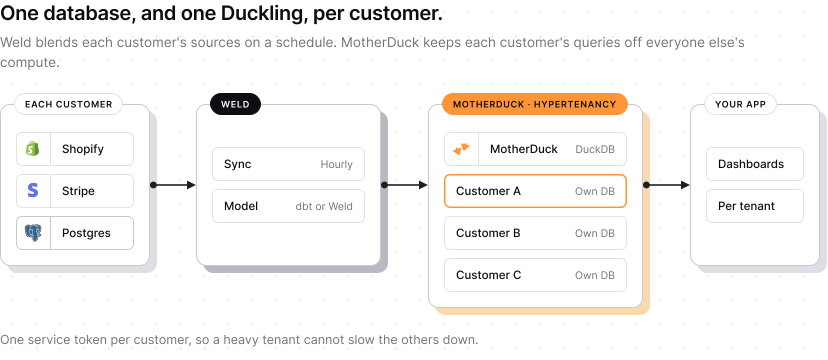
Weld syncs and models each customer's data, pulled from their CRM, billing, product usage, and other sources, on a recurring schedule, then lands it in that customer's own database behind its own service token, so each customer's dashboards run on their own Duckling and stay fast under concurrent load. MotherDuck alone has nothing to put in those per-customer databases, and Weld alone has no low-latency compute to serve queries back out to an app. Together they provide a way to feed live, multi-source data into customer-facing analytics features without building your own warehouse or query engine.
3. Close the loop: model in MotherDuck, activate with Weld
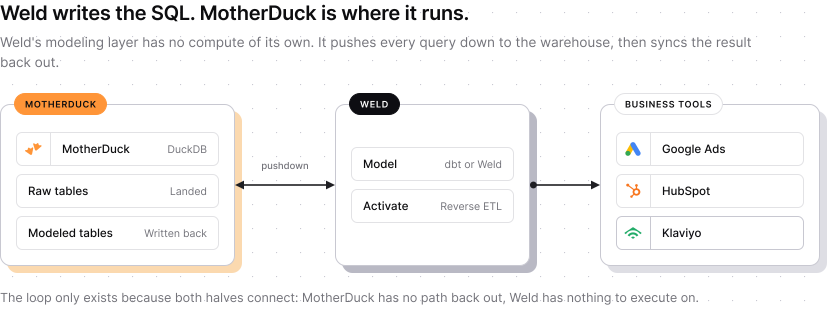
This one's for teams that want their MotherDuck models to actually change what happens in the business, not just sit in a dashboard. Data lands in MotherDuck through Weld, gets modeled with DuckDB-fast SQL in Weld's Model feature, in models version-controlled in GitHub, or in dbt if that is what your team already runs, and then Weld's Reverse-ETL feature, Activate, syncs that modeled data back out of MotherDuck and into CRM, ad platforms, or support tools. MotherDuck has no path back out to those tools by itself, and Weld's modeling layer has no compute of its own to execute that SQL on. It pushes every query down to the warehouse behind it, so the full loop only exists because both are connected.
How to set it up
Weld connects to MotherDuck using a Service Token, which you generate from the MotherDuck UI. A token is required since Weld runs headless in the background and can't complete an interactive browser or SSO login, so connections without a token can't be created.
1. Log in to your MotherDuck account.
2. Go to Settings → Tokens and create a new Service Token. A Service Token is recommended over a personal access token, since it isn't tied to a specific user and won't expire when a team member leaves.
3. Copy the generated token, you'll need it in the next step.
4. In Weld, when adding a new MotherDuck connection, provide:
- Service Token, the token generated in step 2. Required.
- Database, the name of the MotherDuck database (catalog) to connect to. Optional, if left empty, Weld connects to your default database.
5. Press Connect. Weld validates the token by running a test query against MotherDuck.
When used as an ELT destination, Weld creates a dedicated schema inside the chosen database for each source connection, so landing tables from different sources never collide.
For the per-agent or per-customer isolation described above, create one Service Token per tenant in MotherDuck and add a separate Weld connection for each. Hypertenancy provisions a Duckling per service account, so isolation follows the token rather than the database. Once connected, you can start syncing data into MotherDuck, use it as a source for Activate, or query it directly from Weld's query builder.