"I gave the agent the same prompt twice, and it came back with two different answers"
"The agent's numbers don't match my UI. I will keep using the UI for now, thank you"
"I don't trust the agent's answer"
These are the comments data teams hear again and again when they roll out AI agents to business users. The models have improved a lot, but adoption is still a struggle for many teams.
In most cases, the model isn't the problem. The problem is what the model has to work with: the agent context stack underneath it.
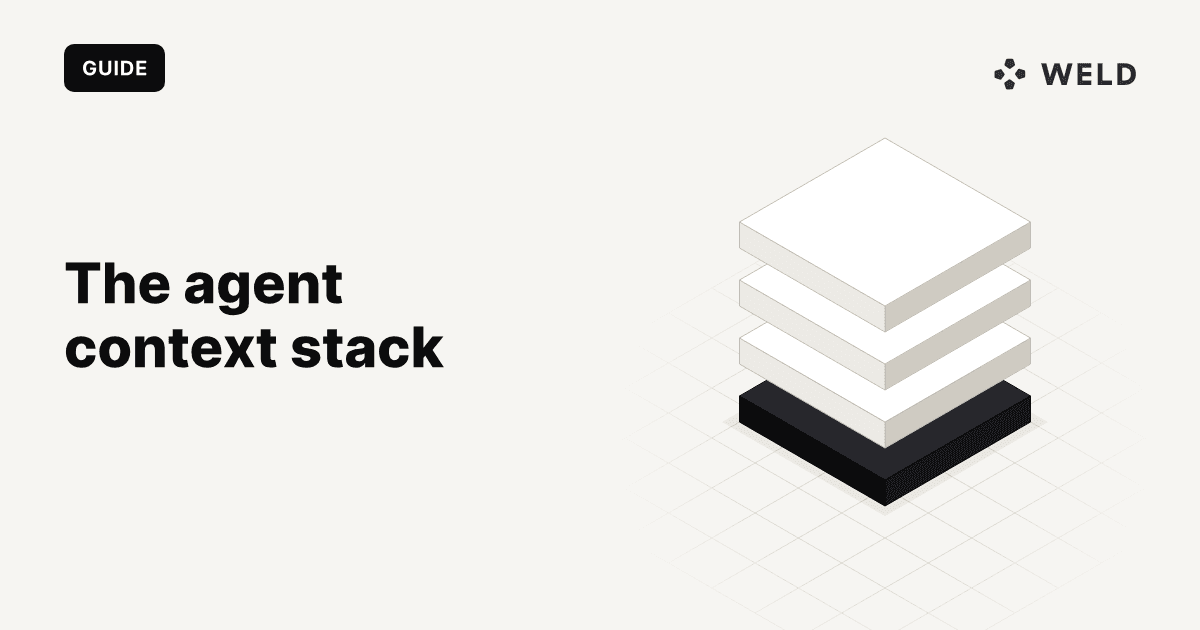
TL;DR: AI agents give inconsistent or untrusted answers when they lack the context an experienced analyst carries in their head. The fix is an agent context stack: skills that tell the agent how to work, an MCP interface, a semantic layer for metric definitions, a context layer for caveats and history, a solid data foundation, and permissions that follow the user.
The problem isn't new
Semantic layers, and now broader context layers, are getting a lot of attention for good reason. The problem isn't new. People needed the same context too. They just carried most of it in their heads.
An analyst who has been at a company for a year knows which tables to trust, which dashboard finance actually uses, and why March looks strange. Nobody wrote it down, because nobody needed to. Maintaining an extra layer of documentation rarely made the cut, so teams focused on the essentials.
This work has long been undervalued. Data teams have spent years buried in ad hoc requests, so it's understandable that it took a back seat.
Agents change that. An agent starts from zero every time, unless the context is written down somewhere it can reach.
What context actually means
AI agents need the same context people have: data relationships, business definitions, exceptions to the rules, which source to trust, and why the numbers are what they are.
In practice, that breaks down into five things:
| Context | Example | Where it usually lives today |
|---|---|---|
| Data relationships | Orders join to customers on customer_id, not email | In the analyst's head, or in a model nobody documented |
| Business definitions | Revenue = orders minus refunds, excluding test accounts | Scattered across dashboards, each slightly different |
| Exceptions to the rules | Enterprise deals are booked on signature, not invoice | Slack threads |
| Which source to trust | Billing wins over the CRM when they disagree | Tribal knowledge |
| Why the numbers are what they are | Revenue dropped in March because the definition changed | Someone's memory |
An analyst usually knows that "revenue" excludes refunds and test accounts. An agent doesn't know that unless you tell it.
You lose the backstop
There's a second difference that matters just as much. An analyst will usually catch a bad number before it reaches the CEO. They look at it, think "that seems high," and check before sending it.
With agents, you don't have that backstop anymore, so the data and definitions the agent works from have to be right.
This is also why the three complaints at the top are so common:
- Two different answers to the same prompt: the agent has no fixed definition, so it improvises the logic each time.
- Numbers that don't match the UI: the dashboard and the agent use different definitions, different sources, or different permissions.
- "I don't trust it": once a business user catches one wrong number, they stop using the agent. Trust is lost much faster than it's earned.
The agent context stack, layer by layer
So what does work? The setups that hold up best in practice share the same six layers. It's also where the major platforms are heading: dbt Labs laid out a similar stack at dbt Summit 2026, and Snowflake and Databricks are building governed MCP access of their own.
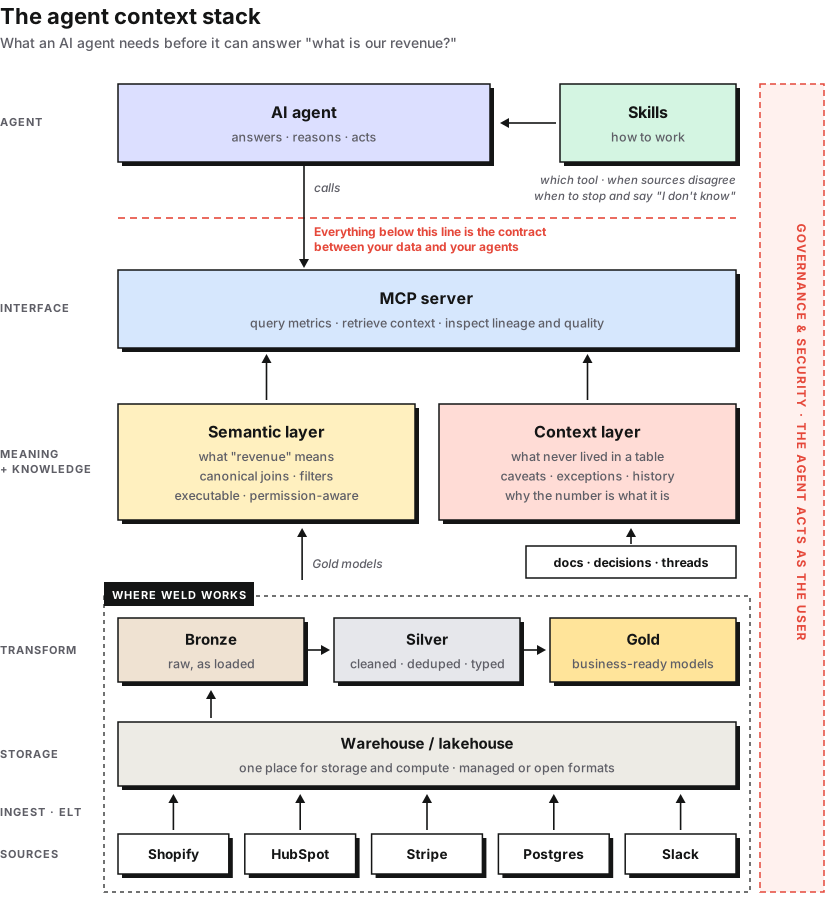
From the top:
1. Skills: how the agent should work
Skills tell the agent how to do the job: which tool to use, what to do when sources disagree, and when to stop and say "I don't know."
Skills work best when they're organized per domain, such as Finance, Customer Success and Sales, ideally with one top-level skill that routes to the domain-specific ones. Each skill should be focused and have a clear description, because that's what the agent uses to decide which one to load.
2. The interface: MCP
Below the agent sits the contract between your data and your agents. In most setups today that's one or more MCP servers, which let the agent query metrics, retrieve context, and inspect lineage and quality.
The point is that the agent never has to guess its way through raw tables. It asks through a defined interface, and gets governed answers back. The Weld MCP server is one example: an agent can query your modeled data in the warehouse, read how each model is defined, and check whether the syncs behind a number ran on time.
3. The semantic layer: what things mean
The semantic layer holds the metric definitions: what "revenue" means, the canonical joins, and the filters. It's executable, so every question about revenue gets calculated the same way, whether it comes from a dashboard, a spreadsheet, or an agent.
This is what fixes "two different answers." In dbt Labs' 2026 benchmark, the same model answered 62.5% of questions correctly when it wrote SQL against raw tables, and 100% of the questions its semantic layer covered. The model didn't get smarter. It got context. If your team hasn't agreed on those definitions yet, start with defining core business metrics every team agrees on.
4. The context layer: what never lived in a table
The context layer holds everything around the numbers that isn't a formula: caveats, exceptions, history, and which source to trust. It's built from docs, decisions and threads.
The semantic layer tells the agent how to calculate revenue. The context layer tells it why revenue looks strange this month.
5. The data foundation: still the classic setup
Underneath, keep the existing data foundation. Sources are ingested into a warehouse or lakehouse, and transformed through the usual Bronze, Silver and Gold layers into business-ready models.
Nothing about agents changes this part. What changes is how much it matters. Missing data, duplicate records, stale tables or broken joins used to be caught by a human. Now they go straight into the answer. The usual reasons data pipelines break become the usual reasons agents give wrong answers.
6. Permissions: the agent acts as the user
Governance and security wrap the entire stack. Each agent acts on behalf of the user, with access based on that user's existing permissions.
This matters in both directions. If the agent sees too much, you have a security problem. If it sees something different from the user's dashboard, you get "the agent's numbers don't match my UI." The same data governance you already apply to people should apply to agents.
In practice, that means connecting agents with the user's own login rather than a shared key. When an agent connects to the Weld MCP server over OAuth, for example, it acts with exactly the permissions that user has in Weld. API keys are workspace-wide, so they suit automation better than agents acting on behalf of business users.
Where Weld fits in the agent context stack
Weld runs the data foundation, the least visible layer and the one every answer depends on, and gives agents a governed way into it.
- Ingestion. Weld syncs your sources, like Shopify, HubSpot, Stripe and Postgres, into your warehouse or lakehouse, whether that's Snowflake, BigQuery, Databricks or MotherDuck. Syncs run on a schedule, so the agent isn't answering from last week's data.
- Modeling. Your Bronze, Silver and Gold layers can be built as SQL models in Weld, or in dbt Cloud or dbt Core with Weld triggering the runs after each sync. The Gold models are what your semantic layer should point at.
- Raw material for the context layer. Weld also syncs tools like Slack, Confluence and Jira, so the docs, decisions and threads your context layer is built from land in the same warehouse as the data they explain.
- Context that comes with the connectors. Many Weld connectors ship with a published entity relationship diagram and a standard schema: which tables exist, how they join and what the keys are. That's the structural half of the context layer, so an agent doesn't have to reverse-engineer it from raw tables. The Shopify connector is a good example.
- An MCP server on top of the foundation. The Weld MCP server gives agents a governed way in. They can run SQL against your raw sources and published models, read the SQL behind each model and its revision history, and check sync and orchestration status before trusting a number. Your data team's agents can also operate the pipelines themselves: find failing syncs, trigger runs and create or update transforms. Connected over OAuth, the agent acts with exactly the user's permissions in Weld. Here's what that looks like with Claude.
The semantic layer and the context layer sit on top of that foundation, in whichever tool you use for them. Weld's job is the data underneath: synced on schedule and modeled the same way every time, because an agent will repeat whatever the foundation gives it.
Where to start
You don't need to build all of this at once. A practical order looks like this:
- Pick one domain. Finance is usually the best place to start, because the definitions matter most and people check the numbers.
- Write down the ten metrics people ask about most, with their definitions, and put them in a semantic layer.
- Collect the exceptions. Ask your analysts which caveats they explain every week, and write them down.
- Check that permissions follow the user, not a shared service account.
- Test with real questions from business users, and compare the answers with what the dashboard says.
The core idea is simple: give agents the right skills, a way to access semantic and broader business context, and keep the existing data foundation and permissions underneath.
Where do your agents break first: metric definitions, business context, data quality, or access?
If you're starting with the foundation, that's the part we handle at Weld: syncing your sources into your warehouse, keeping the models under your semantic layer fresh, and giving your agents an MCP server to query and manage it all. You can try Weld for free, or book a demo and we'll walk through how it fits your stack.
FAQ
What is the agent context stack?
The agent context stack is the set of layers an AI agent needs underneath it to answer business questions reliably: skills that tell it how to work, an interface such as MCP, a semantic layer with metric definitions, a context layer with caveats and history, the data foundation of warehouse and transformed models, and permissions that follow the user.
What is the difference between a semantic layer and a context layer?
The semantic layer holds executable definitions: what "revenue" means, the canonical joins and the filters, so every question is calculated the same way. The context layer holds what isn't a formula: exceptions, history, caveats and which source to trust. The semantic layer tells the agent how to calculate revenue, the context layer tells it why revenue looks strange this month.
Where does Weld fit in the agent context stack?
Weld runs the data foundation. It syncs sources such as Shopify, HubSpot, Stripe and Postgres into your warehouse, models them through Bronze, Silver and Gold with SQL or dbt, and syncs tools like Slack, Confluence and Jira so the context layer has its raw material. Its MCP server lets agents query the modeled data, read model definitions, check sync status and manage the pipelines, acting with the user's own permissions when connected over OAuth.
Why does my AI agent give different answers to the same question?
Usually because it has no fixed definition to work from, so it writes new logic every time. Putting your most common metrics in a semantic layer and exposing them to the agent through a defined interface makes the answer the same every time, and the same as the dashboard.
Why don't the agent's numbers match our dashboards?
The agent and the dashboard are using different definitions, different sources or different permissions. Serving both from the same semantic layer, and letting the agent act with the user's own permissions, removes all three causes.
Where should a data team start?
Pick one domain, usually finance, and put its ten most requested metrics in a semantic layer. Then write down the exceptions your analysts explain every week, make sure permissions follow the user rather than a shared service account, and test with real questions from business users against what the dashboard says.
Learn more
- Weld MCP server documentation: setup for Claude, Cursor and other clients, and the full list of tools
- Weld MCP server with Claude: a walkthrough of an agent working in a Weld workspace
- Shopify connector: an example of a connector's published schema and table relationships
- Medallion layers: how to structure Bronze, Silver and Gold
- Defining core business metrics: getting teams to agree on the definitions a semantic layer encodes