
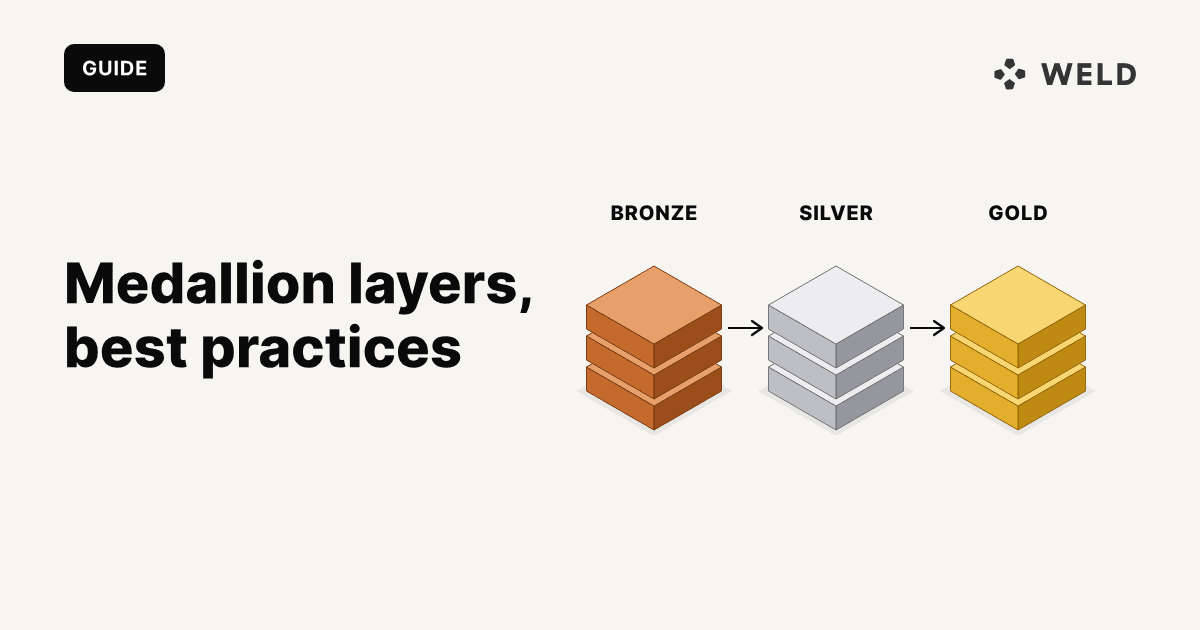
Medallion architecture is a way to organise the data in a warehouse or lakehouse into three layers: bronze for raw data as it arrives from the source, silver for cleaned and standardised tables, and gold for business-ready tables that dashboards, reports and AI agents read. Each layer is built only from the one before it, so data gets more trustworthy as it moves from bronze to gold.
| Layer | What lands there | Who uses it | Example table |
|---|---|---|---|
| Bronze | Source data as loaded by your ELT tool. Original column names, types and nesting. | Data engineers, and the models that build silver | shopify.order |
| Silver | One clean table per business entity: renamed columns, fixed types, test rows removed | Analytics engineers and analysts exploring data | stg_shopify__orders |
| Gold | Facts, dimensions and aggregates shaped around business questions | BI dashboards, business users, reverse ETL, agents | fct_daily_orders, dim_customers |
The pattern was popularised by Databricks for the lakehouse, but nothing about it is specific to Databricks. It works the same way in BigQuery, Snowflake or Postgres, and if you use dbt you probably already have it under different names: sources, staging and marts.
This guide explains each layer, then moves one source, Shopify orders, from bronze to silver to gold in SQL and dbt. After that: when the pattern is worth it, how it compares with Kimball, data vault and star schemas, and how it maps to a Weld setup.

The three layers of medallion architecture
Bronze layer: raw data
The bronze layer holds data exactly as the source system sent it. If you load data with an ELT tool, the tables it writes into your warehouse are your bronze layer: one table per source object, with the source's column names and types, plus whatever metadata the loader adds (such as a sync timestamp).
Rules for bronze:
- Don't transform it. No renaming, no filtering, no business logic. The point is a faithful copy you can rebuild everything else from.
- Don't let dashboards read it. Column names change when a vendor changes its API, and anything built straight on bronze breaks with them.
- Keep history if you need it. Some teams keep bronze append-only so they can see every version of a row. Others keep the current state and turn on history tables only for the objects where change over time matters.
Silver layer: cleaned and standardised data
The silver layer turns raw tables into tables you can trust. Each silver table describes one business entity (orders, customers, subscriptions) at a clear grain, with the same naming and types across every source.
Typical silver work:
- rename columns to one convention (
order_id,created_at,customer_email) - cast types (strings to timestamps, floats to numerics for money)
- remove duplicates, test records and soft-deleted rows
- flatten nested fields and split out child objects
- join small lookup tables that every consumer needs anyway
Silver should not contain business definitions like "active customer" or "net revenue". Those belong in gold, where they are defined once.
Gold layer: business-ready data
The gold layer holds the tables people actually query: fact tables (fct_orders), dimension tables (dim_customers) and aggregates (fct_daily_orders). This is where business logic lives: what counts as revenue, which orders are excluded, how a customer is attributed to a channel.
Gold tables are usually modelled as a star schema, documented, and tested. If a metric appears on a dashboard, it should come from a gold table, so that every dashboard and every agent gets the same number.
Example: Shopify orders from bronze to gold
Here is the whole flow for one source. The SQL uses dbt syntax and runs on BigQuery, Snowflake and Postgres with small changes.
Bronze: the synced Shopify order table
Your ELT tool syncs Shopify's order object into a raw schema. A Weld sync, for example, writes a table called order with one row per order and more than a hundred columns, including:
id, name, customer_id, email,
created_at, updated_at, cancelled_at,
financial_status, fulfillment_status,
currency, test, subtotal_price,
total_discounts, total_tax, total_price,
shipping_address_country_code,
_weld_synced, ...
You leave this table alone. In dbt you only declare it as a source. order is a reserved word in SQL, so tell dbt to quote it:
1# models/staging/shopify/_shopify__sources.yml
2version: 2
3
4sources:
5  - name: shopify
6    schema: shopify # the schema your ELT tool writes to
7    tables:
8      - name: order
9        quoting:
10          identifier: true
11
Silver: a staging model for orders
The silver model picks the columns you need, gives them consistent names and types, and removes test orders. One row per order, nothing else.
1-- models/staging/shopify/stg_shopify__orders.sql
2with
3    source as (
4        select
5            *
6        from
7            {{ source('shopify', 'order') }}
8    )
9select
10    id as order_id
11  , name as order_name
12  , customer_id
13  , lower(email) as customer_email
14  , cast(created_at as timestamp) as created_at
15  , cast(cancelled_at as timestamp) as cancelled_at
16  , cancelled_at is not null as is_cancelled
17  , financial_status
18  , fulfillment_status
19  , currency
20  , cast(subtotal_price as numeric) as subtotal_price
21  , cast(total_discounts as numeric) as total_discounts
22  , cast(total_tax as numeric) as total_tax
23  , cast(total_price as numeric) as total_price
24  , shipping_address_country_code as shipping_country_code
25from
26    source
27where
28    coalesce(test, false) = false
If your loader appends a new row every time an order changes, instead of keeping one current row per order, deduplicate here as well: number the rows per id by updated_at descending and keep row 1. That is silver's job, not gold's.
Add tests so silver stays trustworthy:
1# models/staging/shopify/_shopify__models.yml
2version: 2
3
4models:
5  - name: stg_shopify__orders
6    columns:
7      - name: order_id
8        tests:
9          - unique
10          - not_null
11      - name: created_at
12        tests:
13          - not_null
14
Gold: a daily orders table
The gold model applies the business rules (here: cancelled orders don't count) and shapes the data for the question people ask, which is how many orders and how much revenue per day.
1-- models/marts/fct_daily_orders.sql
2select
3    cast(created_at as date) as order_date
4  , currency
5  , count(*) as orders
6  , count(distinct customer_id) as customers
7  , sum(total_discounts) as discounts
8  , sum(subtotal_price) as subtotal_after_discounts
9  , sum(total_tax) as tax
10  , sum(total_price) as total_sales
11  , sum(total_price) / count(*) as average_order_value
12from
13    {{ ref('stg_shopify__orders') }}
14where
15    not is_cancelled
16group by
17    1
18  , 2
A dashboard now reads fct_daily_orders and never touches the raw table. When Shopify renames a field, you fix one staging model and every gold table and dashboard keeps working.
This table is deliberately simple. Refunds, returns and multi-currency stores need more work to match the numbers in the Shopify admin; our Shopify dbt sales model walks through that in full.
Where the layers live in a dbt project
| Medallion layer | dbt folder | Warehouse schema | Naming |
|---|---|---|---|
| Bronze | sources: in YAML, no models | shopify, raw | as the source names it |
| Silver | models/staging/ | staging | stg_<source>__<entity> |
| Silver | models/intermediate/ (optional) | intermediate | int_<entity>_<verb> |
| Gold | models/marts/ | marts | fct_<process>, dim_<entity> |
You can name the schemas bronze, silver and gold if that is the language your team uses. What matters is one convention, used everywhere, so anyone can tell from a table name which layer it belongs to.
Medallion architecture in BigQuery, Snowflake and Postgres
You don't need a lakehouse or separate storage per layer. In a warehouse, each layer is a schema:
- BigQuery: one dataset per layer (
raw_shopify,staging,marts). Queries across datasets work as long as they sit in the same location. - Snowflake: schemas in one database are the simplest setup. Some teams use one database per layer to manage access, which means fully qualified names and grants on every database.
- Postgres: use schemas within one database. Postgres can't query across databases without extensions, so separate databases per layer don't work.
Silver is usually built as views, which cost nothing to store and are always current. Gold is usually built as tables, since dashboards query it often and need it fast. Switch silver to tables only when views get slow.
When to use medallion architecture, and when not to
Medallion architecture is worth it when:
- you load data from several sources and more than one person builds on it
- dashboards break when a source changes, because they read raw tables directly
- the same metric gives different numbers in different reports
- you want to point an AI agent or a BI tool at a set of tables you trust
It is overkill when:
- you have one or two sources and a handful of reports. A staging view and a gold view per source is enough. Don't build three layers for their own sake.
- every layer would be persisted as a full copy of the data. Copying bronze into silver tables and then into gold tables triples storage and adds hours of latency for no benefit. Use views until you need tables.
- you need near real-time data. Each hop adds delay, so for operational use cases read closer to the source.
The common failure is treating the pattern as a rulebook: every table in every layer, separate environments per layer, and long debates about whether a table is "silver" or "gold". Use the layers as a naming and dependency rule (gold reads silver, silver reads bronze, nothing reads backwards) and keep the rest simple.
Medallion vs Kimball, star schema and data vault
These are not competing choices. Medallion architecture says where data sits by how ready it is. Kimball, star schemas and data vault say how tables are modelled inside a layer.
| Approach | What it describes | Where it fits in medallion |
|---|---|---|
| Medallion architecture | Layers by data readiness: raw, cleaned, business-ready | The overall structure |
| Kimball dimensional modelling | Fact and dimension tables built around business processes | The gold layer |
| Star schema | One fact table joined to several dimension tables | The shape of most gold tables |
| Data vault | Hubs, links and satellites that keep full, auditable history | A silver layer in large enterprises with many sources |
| dbt staging, intermediate, marts | The same layering, named by role | Staging and intermediate are silver, marts are gold |
| One big table | A wide, denormalised table per use case | A gold table built on top of a star schema |
For a small data team, the common setup is medallion layers with a Kimball-style star schema in gold. Data vault is rarely worth its complexity unless you integrate dozens of systems and need to audit every historical change.
How medallion architecture maps to a Weld setup
Weld loads data from your sources into your warehouse and lets you model it with SQL, so the layers map directly:
- Bronze: synced tables. Weld writes each source object to your warehouse as a table with the source's columns and a
_weld_syncedtimestamp. The table holds the current state of each row. If you need every version of a row, turn on history tables for that object. - Silver and gold: models. In Weld's SQL editor you write models that reference synced tables as
{{raw.shopify.order}}and other models by folder and name, then publish them to your warehouse as views or tables. A folder for staging models and one for marts gives you silver and gold. - dbt instead. If you model with dbt, Weld handles ingestion and can trigger dbt Cloud jobs or run alongside dbt Core. The synced tables are your dbt sources.
The silver model from the example above, written in Weld, only changes its first line:
1with
2    source as (
3        select
4            *
5        from
6            {{raw.shopify.order}}
7    )
FAQ
Medallion architecture is a data design pattern that organises data into three layers: bronze for raw data from source systems, silver for cleaned and standardised tables, and gold for business-ready tables used in reporting and analytics. Each layer is built from the one before it.
The silver layer cleans data without adding business meaning: one table per entity, consistent names and types, no duplicates. The gold layer applies business rules and shapes data for specific questions, such as daily revenue or customer lifetime value. Dashboards read gold, not silver.
No. Databricks popularised the name, but the pattern works in any warehouse. In BigQuery, Snowflake or Postgres each layer is usually a schema or dataset, and the transformations are SQL or dbt models.
You always have a bronze layer, because that is where your raw data lands. Most teams then need at least one modelled layer on top. Small setups often combine silver and gold into a single set of models and split them only when the same cleaning logic starts being repeated across reports.
Name schemas after the layer (raw, staging, marts, or bronze, silver, gold) and prefix models by role: stg_ for silver staging models, int_ for intermediate models, and fct_ and dim_ for gold facts and dimensions. Pick one convention and use it in every project.
Yes. The name is newer than the idea: raw, staging and presentation layers have been part of data warehousing for decades. What has changed is who reads the gold layer. Alongside dashboards, AI agents now query warehouse data, and a documented gold layer with one definition per metric is what keeps their answers consistent. Our post on the agent context stack covers that in more detail.