Apache Iceberg is now available as a Weld destination. Weld writes Iceberg tables through any Iceberg REST catalog, including Amazon S3 Tables and AWS Glue, as well as Polaris, Snowflake Open Catalog, Lakekeeper, Nessie, Cloudflare R2 Data Catalog and BigLake.
That means you can sync Shopify, HubSpot, Stripe, Postgres and the rest of Weld's 300+ sources straight into open tables in a bucket you own, and query them from whichever engine your team prefers. The data stays in one place. The engines come to it.
What Apache Iceberg is
Apache Iceberg is an open table format. It turns a folder of data files in object storage, such as Amazon S3, into something that behaves like a database table: you can add and rename columns without rewriting the data, every write is an atomic snapshot, and you can query the table as it looked at an earlier point in time.
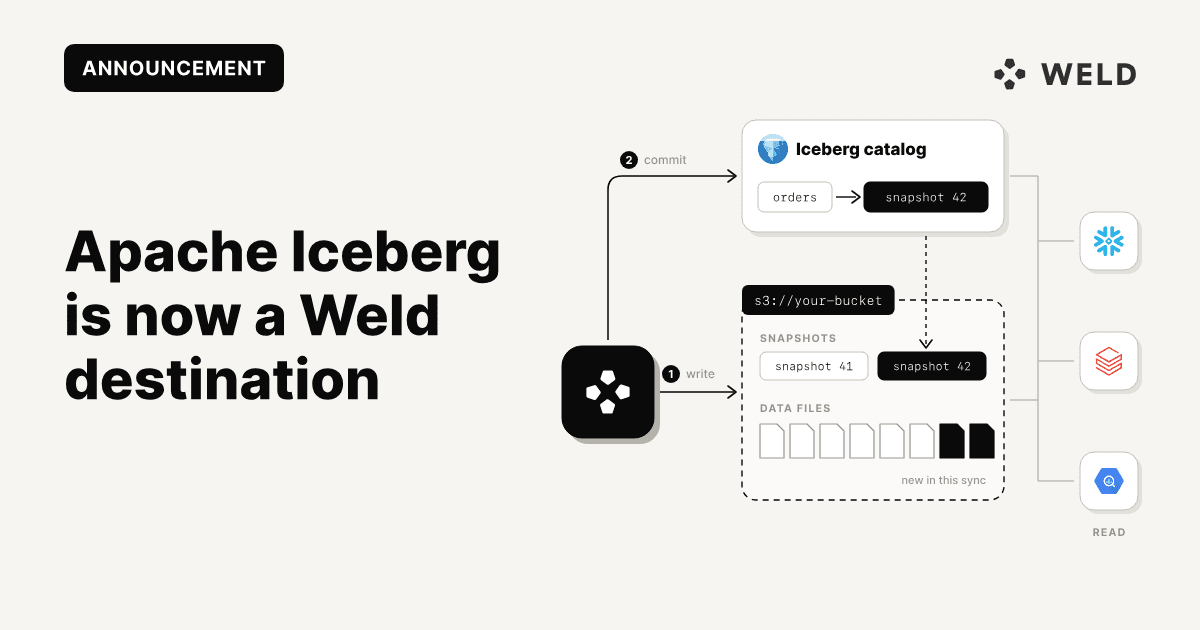
The part that makes Iceberg matter is the catalog. A catalog keeps track of which tables exist and where each table's current metadata lives. Because the Iceberg REST catalog is an open specification, any engine that speaks it can find and read the same tables: Snowflake, Databricks, Amazon Athena, Trino, Spark, DuckDB and more. Storage and compute stop being one product you have to buy together.
Why land your data in Iceberg
Your data lives in your own storage. Tables are files in your bucket, in an open format, so moving to a different query engine later does not mean exporting and reloading everything. There is no proprietary storage layer to migrate out of.
One copy, many engines. The analytics team can query in Snowflake, data science can work in Databricks or Spark, and an ad hoc question can go to Athena or DuckDB, all against the same tables. Nobody keeps a second copy in sync.
A lakehouse on the AWS stack you already have. With Amazon S3 Tables or AWS Glue as the catalog, Weld lands your SaaS and database data next to everything else in your AWS account, governed by the same IAM policies and queryable from Athena.
The hard part of an open lakehouse was never the query engine. It is getting forty SaaS sources into the catalog and keeping them there as APIs change. That is the part Weld takes on.
How it works
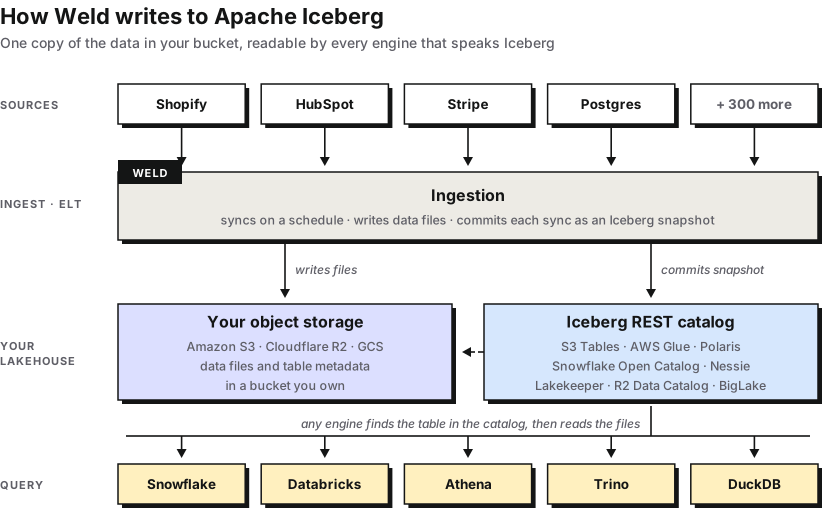
Weld syncs each source on the schedule you set. On every sync it writes the new data files to your storage and commits each table's changes to your catalog as a new Iceberg snapshot, so an engine reading a table always sees a complete, consistent version of it: either the state before the sync or the state after it, never something in between.
Supported catalogs
Weld works with any catalog that implements the Iceberg REST specification, including:
- Amazon S3 Tables
- AWS Glue
- Apache Polaris
- Snowflake Open Catalog
- Lakekeeper
- Nessie
- Cloudflare R2 Data Catalog
- BigLake
What to know before you start
Iceberg is a write-only destination in Weld. It is available as an ELT destination, not as a data source or a data warehouse connection. In practice:
- Weld syncs into Iceberg. Your sources land as Iceberg tables in your catalog.
- Modeling runs in your query engine. Weld's Model feature pushes SQL down to a warehouse, so on Iceberg you model in the engine you query with, for example with dbt on Snowflake, Databricks, Trino or Spark.
- Activate reads from a warehouse. To sync modeled data back out to your business tools with Activate, connect Weld to a warehouse such as Snowflake or Databricks that reads your Iceberg tables.
How to set it up
1. In your cloud account, create or pick the catalog you want Weld to write to, for example an S3 table bucket or a Glue database.
2. Create credentials for Weld that can create tables in that catalog and write their data files. Depending on the catalog, that means storage access keys, or short-lived storage credentials the catalog hands out itself. A dedicated service identity is better than a personal one, since it does not depend on any one person's access.
3. In Weld, add a new destination, choose Apache Iceberg, and connect it to your catalog with the credentials from step 2.
4. Create an ELT sync from any source to the Iceberg destination. Weld creates the tables in your catalog on the first sync and keeps them up to date from there.
FAQ
Which Iceberg catalogs does Weld support?
Any catalog that implements the Iceberg REST specification. That includes Amazon S3 Tables, AWS Glue, Apache Polaris, Snowflake Open Catalog, Lakekeeper, Nessie, Cloudflare R2 Data Catalog and BigLake.
Can I use Apache Iceberg as a source in Weld?
Not today. Iceberg is a write-only destination: Weld syncs data into Iceberg tables, but does not read from them as a source or run models on them as a data warehouse.
Which engines can query the tables Weld writes?
Any engine that can read Iceberg tables from your catalog. Common choices are Snowflake, Databricks, Amazon Athena, Trino, Spark and DuckDB.
Do I still need a data warehouse?
Not for storing and querying your data. You need a query engine to read the tables, and if you want Weld to model the data or sync it back out with Activate, connect Weld to a warehouse that reads your Iceberg tables.