
For a two to five person data team, Snowflake is the easier start when the work is SQL and dashboards, and Databricks is when Python, machine learning or heavy nightly table builds are on this year's plan. At small-team volumes the bill comes out close: the smallest warehouses cost $2.70 an hour on Snowflake and $2.80 on Databricks, and storage stays under $50 a month on either.
Every number below comes from the vendors' own price lists, with the assumptions stated, so you can redo the sums with your own volumes.
How we priced it. Every rate below is a list price from the vendor's own pricing page, documentation or Snowflake's Service Consumption Table (effective 4 November 2026), checked on 6 November 2026, for AWS US East (N. Virginia), pay as you go. Committed-use discounts, other regions and other clouds will change the numbers. Weld loads data into both Snowflake and Databricks, so we have no reason to prefer one.
Which one to start with, by team
| Your team | Start with | Why |
|---|---|---|
| Two to five analysts and analytics engineers, mostly SQL and dashboards | Snowflake | Least to run. One product, SQL first, and it ran BI-style queries faster in the most recent independent benchmark, and cheaper at Standard pricing. |
| A small team with a data scientist or ML work planned this year | Databricks | Notebooks, Spark and ML sit next to the SQL warehouse, on the same tables. |
| Heavy nightly transformations that rebuild big tables | Databricks | Large table builds ran faster and cheaper on Databricks in the same benchmark. |
| You already run on AWS and want the data in your own bucket | Either, on Apache Iceberg | Land the tables in Iceberg once and query them from Snowflake, Databricks or Athena. |
| One person doing everything, under 100 GB | Either, on its smallest size | At this size the bill is decided by how long the warehouse stays awake. |
Snowflake and Databricks at a glance
Snowflake is a cloud data warehouse and Databricks is a lakehouse platform; this table puts the facts that matter to a small team side by side (checked 6 November 2026, AWS US East).
| Snowflake | Databricks | |
|---|---|---|
| What it is | Cloud data warehouse | Lakehouse platform |
| Where the data lives | Snowflake-managed storage | Delta Lake or Iceberg files in your cloud bucket, or Databricks-managed default storage in a serverless workspace |
| Compute billed in | Credits: $2 Standard, $3 Enterprise, $4 Business Critical | DBUs: $0.70 for serverless SQL on Premium, cloud compute included |
| Smallest SQL warehouse | X-Small, $2.70 an hour (Gen2, the default for new warehouses, on Standard) | 2X-Small serverless, $2.80 an hour |
| Storage | $23 per TB a month, billed by Snowflake | Billed by your cloud provider: $23 per TB a month on S3 Standard |
| Python and ML | Snowpark, notebooks | Notebooks, Spark, MLflow, model serving |
| Catalog | Snowflake Horizon | Unity Catalog |
If BigQuery, Redshift or Postgres are also on your list, see BigQuery vs Snowflake, Snowflake vs Redshift, PostgreSQL vs BigQuery and the top 5 data warehouses.
Warehouse vs lakehouse, in plain terms
A warehouse keeps storage, compute and the catalog inside one product, while a lakehouse keeps the data as open files in storage you own and puts a catalog and compute on top. The two products now overlap on most features, so where the data lives and who looks after it is the difference that is left.

In a warehouse you never see the files. Snowflake compresses your data, keeps it, backs it up and bills you for it. For a small team this is the point: there is nothing underneath to manage.
In a lakehouse the files sit in object storage such as Amazon S3, Azure Data Lake Storage or Google Cloud Storage, readable by other engines. You get more control, and you also own a cloud account, a bucket and its permissions. A Databricks serverless workspace softens this: it comes with Databricks-managed default storage, so you can start without a bucket and connect one later.
Both separate storage from compute, both bill compute only while it runs, both run SQL, Python and AI features, and both read and write Apache Iceberg, which is the basis of the last section.
What it costs at small-team volumes
At 100 GB the two cost about the same on their defaults, $326 a month on Snowflake against $338 on Databricks; at 2 TB Databricks comes out about 21% cheaper, $1,054 against $1,342. The assumptions behind those numbers matter more than the rates, so they come first.
Assumptions
- AWS US East (N. Virginia), list prices, pay as you go, 30 days.
- Small setup, 100 GB: the warehouse is awake about 4 hours a day: a nightly transformation run, plus dashboards and ad hoc queries through the day, including the idle minutes before it shuts down.
- Growing setup, 2 TB: the warehouse is awake about 8 hours a day, one size up.
- Matched sizes. SELECT's April 2026 benchmark treats a Databricks serverless SQL warehouse as roughly equal to the Snowflake warehouse one size larger. It tested Snowflake Medium and up; we apply the same pairing to the smallest sizes: Snowflake X-Small with Databricks 2X-Small, Snowflake Small with Databricks X-Small.
- Snowflake Gen2 is the default for new warehouses, so it is the main column, with first-generation warehouses for comparison. Gen2 queries finish faster, but a small team's warehouse is mostly awake for short queries and idle minutes, so we keep the hours the same.
- Storage at $23 per TB a month on both: Snowflake's on-demand storage price, and S3 Standard ($0.023 per GB) for the Databricks files.
Rates used (checked 6 November 2026)
| Snowflake | Databricks | |
|---|---|---|
| Smallest warehouse | X-Small: 1.35 credits an hour on Gen2 ($2.70 on Standard), 1 credit on Gen1 ($2) | 2X-Small: 4 DBU an hour ($2.80) |
| Next size | Small: 2.7 credits an hour on Gen2 ($5.40 on Standard), 2 credits on Gen1 ($4) | X-Small: 6 DBU an hour ($4.20) |
| Billing | Per second, with a minimum of one minute each time a warehouse starts | Per DBU consumed |
| Idle shutdown | Auto-suspend, on by default | Auto stop, 10 minutes by default, 5 minutes minimum in the UI (1 minute through the API) |
Monthly cost
| Snowflake Standard, Gen2 (default) | Snowflake Standard, Gen1 | Snowflake Enterprise, Gen2 | Databricks Premium, serverless SQL | |
|---|---|---|---|---|
| 100 GB, 4 hours a day (120 hours) | 162 credits: about $326 | 120 credits: about $242 | 162 credits: about $488 | 480 DBU: about $338 |
| 2 TB, 8 hours a day (240 hours) | 648 credits: about $1,342 | 480 credits: about $1,006 | 648 credits: about $1,990 | 1,440 DBU: about $1,054 |
Each total is compute plus storage: $2.30 a month at 100 GB and $46 at 2 TB, on either platform.
- The smallest warehouses cost almost the same per hour; one size up, Databricks is cheaper. $5.40 an hour for a Snowflake Small against $4.20 for a Databricks X-Small is why Databricks comes out about 21% cheaper at 2 TB with the hours held equal. Gen1 or faster queries on Snowflake can close that gap, so test your own workload.
- Storage barely matters. At 2 TB it is $46 a month on either platform. Compute is more than 95% of every bill above.
- Idle time is the biggest lever. One extra hour a day of an idle smallest warehouse adds $81 a month on Snowflake (Gen2, Standard) and $84 on Databricks. A one-minute auto-suspend on Snowflake, or a short auto stop on Databricks, is worth more than any discount you can negotiate at this size.
- Edition and generation are the real Snowflake decisions. Enterprise costs 50% more per credit than Standard for multi-cluster warehouses, longer Time Travel and finer governance, which many small teams can skip at first. Gen1 is 26% cheaper per hour than Gen2, but slower.
Left out of these numbers: Snowflake's cloud services charge (billed only on days it exceeds 10% of warehouse use), Databricks compute for notebooks and jobs, S3 request charges, data transfer, AI features and the cost of loading the data. More on this in what to watch for in data warehouse pricing.
Which is faster, and for what
In the most recent independent benchmark, Snowflake was faster for analytical queries, concurrent queries, cold starts and small updates, and Databricks was faster for building large tables. That is SELECT's Snowflake vs Databricks showdown from April 2026, which ran the 22 TPC-H queries on about 6 billion rows, on matched sizes, with Snowflake at $2 or $3 a credit and Databricks serverless SQL at $0.70 a DBU. It did not test Gen2 warehouses. We leave out vendor benchmarks, which are written to win.
| Workload in the benchmark | Faster | Cheaper at $2 a credit (Standard) | Cheaper at $3 a credit (Enterprise) |
|---|---|---|---|
| 22 analytical queries, one after another | Snowflake | Snowflake | Databricks |
| 22 queries at once (many dashboard users) | Snowflake | Snowflake | Snowflake |
| Cold start: warehouse resumes for each query | Snowflake (it started in under a second, Databricks in about 7 seconds) | Snowflake | Not reported |
| Building large tables (CREATE TABLE AS SELECT) | Databricks | Databricks, by a wide margin | Databricks |
| Deleting and reinserting one month of rows | Snowflake | Snowflake | Snowflake |
If most of your compute goes to dashboards, ad hoc SQL and incremental updates, Snowflake did that work faster. If most of it goes to rebuilding large tables every night, Databricks did. A benchmark only tells you how the benchmark ran, so run your own top queries before you commit.
Cost traps that catch small teams
Most small-team overspend comes from compute left running and from comparing the wrong rates.
- A warehouse that never sleeps. A dashboard that refreshes every few minutes keeps the warehouse awake all day. Check refresh schedules before you blame the platform.
- The wake-up minimum. Snowflake bills at least one minute every time a warehouse starts. Many tiny queries spread across the day cost more than the same queries run together.
- Comparing the wrong Databricks rate. Classic SQL warehouses list a lower price per DBU ($0.22 for SQL Classic on Premium), but that rate excludes the cloud servers you pay AWS for separately. The serverless rate ($0.70) includes them. Compare serverless with serverless.
- Upgrading the edition by default. Snowflake Enterprise costs 50% more per credit for every query, including the ones that use none of its features.
- Two copies of the same data. Running both platforms with a full copy in each doubles storage and loading work. Iceberg, below, avoids that.
How to try both in a week
You can test both platforms on your own data in a week, at little or no cost.
- Open trials. Snowflake's trial runs for 30 days or until the free usage balance is spent. Databricks offers a 14-day free trial. Databricks Free Edition is free with no time limit, but it may not be used for commercial purposes and is capped at one 2X-Small SQL warehouse, so it suits learning more than your company's data.
- Load the same data into both. With Weld, one sync can load into more than one destination, so the same Shopify, HubSpot or Postgres tables land in Snowflake and Databricks on the same schedule. Loading into several destinations is in beta and available during the free trial and on the Business and Enterprise plans.
- Run your real workload. Point a copy of your BI tool, or your ten most used queries and your nightly models, at each one.
- Compare the bills. Look at credits and DBUs used per day in each platform's own usage views, with auto-suspend and auto stop set the way you would run them in production.
Where SQL, BI, Python and ML are easier
Snowflake is easier for SQL, dbt and running with nobody on infrastructure; Databricks for Python, ML and unstructured data; BI tools work equally well on both.
| Work | Easier on | Why |
|---|---|---|
| SQL modeling and dbt | Snowflake, slightly | Both are well supported by dbt. Snowflake has fewer settings to get right on day one. |
| BI dashboards (Looker, Power BI, Metabase, Tableau) | Tie | Both have standard connectors, and both warehouses start on demand when a dashboard queries them. |
| Sharing data with another company | Snowflake | Data sharing between Snowflake accounts is built in. Databricks has Delta Sharing, which works across platforms. |
| Python on tables | Databricks, slightly | Notebooks and Spark sit next to the SQL warehouse. Snowflake runs Python through Snowpark. |
| ML training and model serving | Databricks | MLflow, GPU compute and model serving are part of the platform. |
| Unstructured data (files, images, logs) | Databricks | Files in your bucket are already where the lakehouse works. |
| A Postgres database for an app, next to the analytics | Tie | Both now sell a managed Postgres option: Databricks Lakebase and Snowflake Postgres. |
| Running it with nobody on infrastructure | Snowflake | Nothing to set up underneath. Databricks serverless workspaces narrow the gap, but most setups still involve your own cloud account and Unity Catalog permissions. |
If your team is SQL-first and plans to stay that way, Snowflake asks less of you. If Python and ML are part of the plan this year, Databricks avoids a second platform later. For a small team the deciding question is usually who will look after the platform.
Keep the choice open with Apache Iceberg
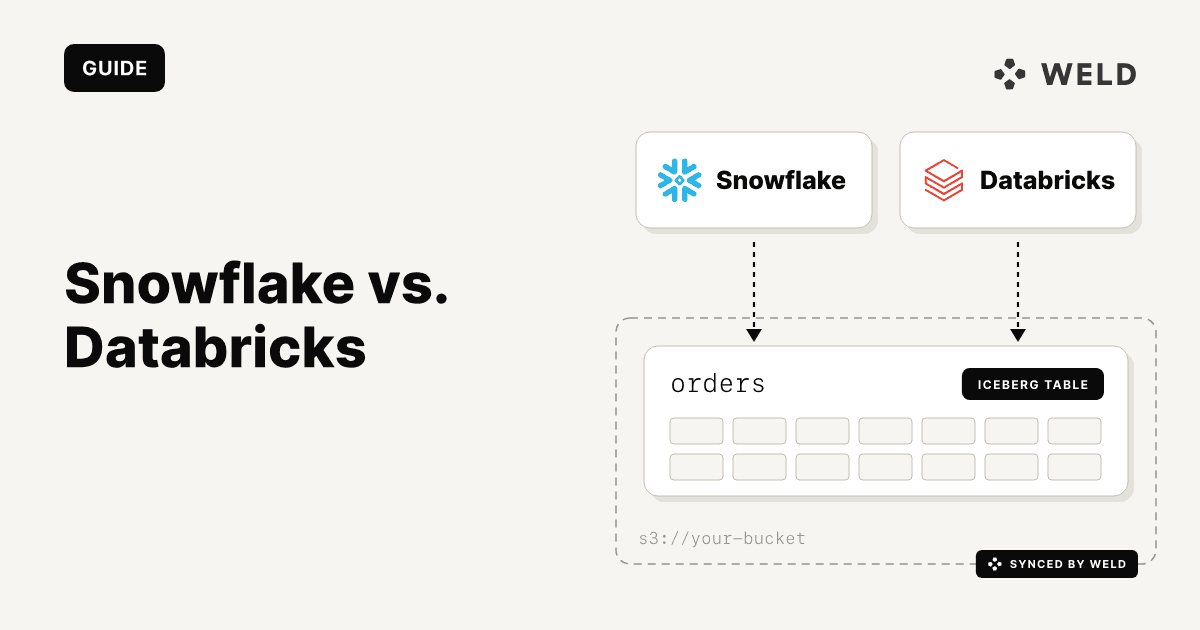
With Apache Iceberg you can keep one copy of your data and query it from both Snowflake and Databricks, so choosing an engine no longer decides where your data lives. Iceberg is an open table format: the data is Parquet files in your bucket, and an Iceberg catalog keeps track of each table's current version.

What each platform supports today, from their own documentation:
- Snowflake reads and writes Iceberg tables in an external Iceberg REST catalog, such as AWS Glue or Snowflake Open Catalog, through a catalog-linked database. When Snowflake is the catalog, other engines can read and write its tables through the Horizon Iceberg REST Catalog API. With your own bucket as storage, your cloud provider bills the storage.
- Databricks stores managed Iceberg tables in Unity Catalog and lets other engines read and write them through its Iceberg REST Catalog API. Iceberg tables in other catalogs, such as AWS Glue or Snowflake Horizon, can be read as foreign tables, read only.
For a small team, that allows a simple pattern:
- Pick one engine for day-to-day SQL and BI. Usually the one your team finds easiest.
- Keep the raw synced data in Iceberg in a catalog you control, such as AWS Glue or S3 Tables.
- Add the second engine only when a workload needs it, for example Databricks when the first ML project arrives, pointing it at the same tables.
Iceberg has costs of its own: a catalog and a bucket to look after, and uneven support (foreign tables in Databricks are read only). For most SQL-only teams a native table is still the simpler start. Treat Iceberg as insurance against a costly migration later; you don't need it on day one.
Who should pick which
- Pick Snowflake if your team is SQL-first, most compute goes to dashboards and incremental models, and nobody wants to run cloud infrastructure.
- Pick Databricks if Python or ML work is planned this year, or your nightly jobs rebuild large tables.
- Keep both options open by landing the raw data in Apache Iceberg in your own bucket, then adding the second engine when a workload needs it.
Weld syncs data from 300+ sources, such as Shopify, HubSpot, Stripe and Postgres, into Snowflake or Databricks as your data warehouse. A sync can also load into extra destinations, such as the other warehouse, Apache Iceberg or Amazon S3; that feature is in beta, on the Business and Enterprise plans and during the free trial. Databricks Unity Catalog is also available as a source, if you need to move tables out of Databricks later.
To compare the two on your own tables, start a free Weld trial and load the same sources into both.
FAQ
On the smallest warehouses they cost about the same: $2.70 an hour on Snowflake (Gen2, Standard) and $2.80 on Databricks (2X-Small serverless SQL, Premium), at AWS US East list prices checked in November 2026. One size up, Databricks is cheaper. In our worked example, 100 GB costs about $326 a month on Snowflake and $338 on Databricks, and 2 TB about $1,342 and $1,054. How long your warehouse stays awake moves the bill more than the platform does.
For SQL and dashboards the gap is small, thanks to serverless SQL warehouses. The extra work is underneath: most Databricks setups involve your own cloud account and Unity Catalog permissions, while Snowflake has nothing underneath to manage. Serverless workspaces with Databricks-managed storage make the start simpler.
Yes. Both read Apache Iceberg tables, so you can keep one copy of the data in your own bucket and query it from both: Snowflake through a catalog-linked database, Databricks as foreign tables from catalogs such as AWS Glue or Snowflake Horizon.
It depends on the work. In SELECT's independent April 2026 benchmark on matched sizes, Snowflake was faster for analytical queries, many queries at once, cold starts and small updates, and Databricks was faster and much cheaper for building large tables. Run your own top queries on both before deciding.
Snowflake is a data warehouse, but it can read and write Apache Iceberg tables stored in your own bucket, so it can be the query engine on top of a lakehouse. Databricks is built as a lakehouse from the start, with Delta Lake or Iceberg files in your storage.
A data warehouse keeps storage, compute and the catalog inside one product and manages the files for you. A lakehouse keeps data as open table files, such as Delta Lake or Iceberg, in object storage you own, with a catalog and compute engines on top.
No, but it is easier there. Snowflake runs Python through Snowpark and has its own AI features. Databricks has notebooks, Spark, MLflow, GPU compute and model serving in one platform, which suits teams with regular ML work.
Yes. Weld loads data from 300+ sources into either one as your data warehouse, and a sync can also load into extra destinations such as the other warehouse, Apache Iceberg or Amazon S3 (in beta, on the Business and Enterprise plans).