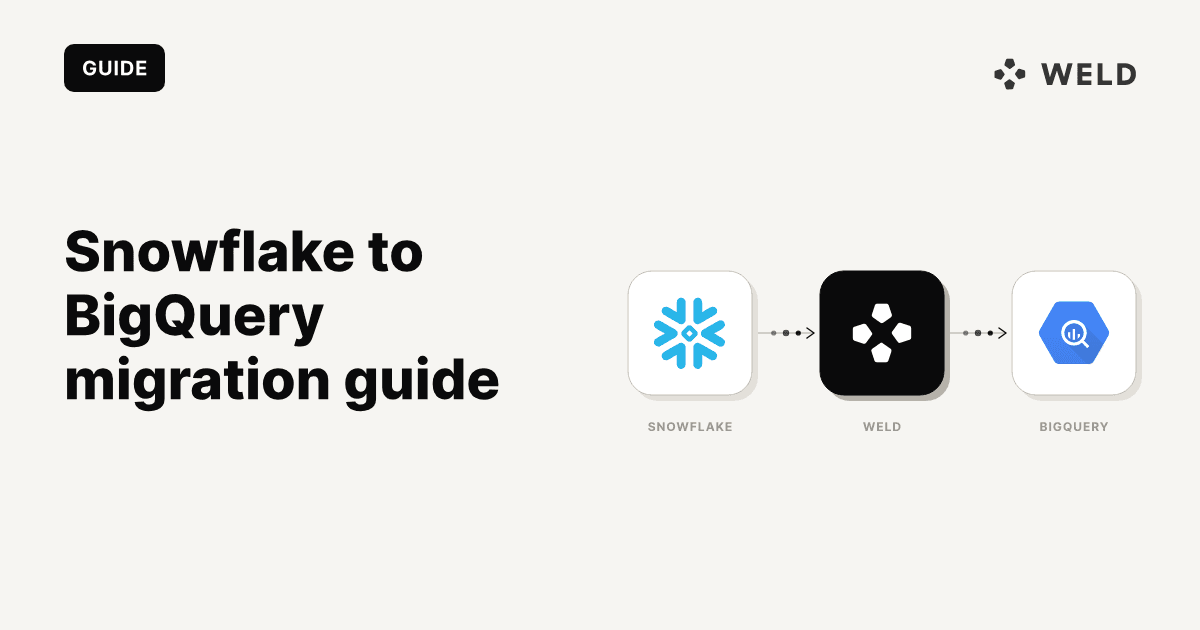
Moving from Snowflake to BigQuery involves more than copying tables. You need to map data types, keep both systems synchronised, translate SQL, re-point pipelines, and prove that the results still match. This guide explains when the migration makes sense and provides a practical six-step path from the initial audit to production cutover.
Already decided and planned? Skip ahead to Step 3: moving the data →
TL;DR
- Migrate when BigQuery aligns with your stack (Google Cloud, GA4, Google Ads) or lowers your total cost; stay if Snowflake is reliable and fairly priced.
- The migration runs in six steps: define scope → map schemas → move & synchronise → translate SQL → re-point tools → validate & cut over.
- Three ways to move the data: the managed Snowflake connector (Preview), manual Parquet exports via GCS, or re-syncing raw data from your sources. Most teams use a hybrid.
- The two most expensive mistakes are timestamp timezone handling and NUMBER precision.
- Dual-run both warehouses through at least one full business cycle before cutover, and keep Snowflake read-only through a rollback window.
- Set expectations: 2 to 4 weeks for a small stack, 2 to 6 months for a mature one.
Should you migrate? (honest decision framework)
Migrating a data warehouse can lower costs, improve performance, and better fit your current data stack. But the opposite can just as easily be true, which is why it's worth weighing the expected outcomes against the time and effort before you act. For a more in-depth comparison of the two warehouses, see Weld's BigQuery vs. Snowflake breakdown.
| Reasons to migrate | Reasons against migration |
|---|---|
| Strategic alignment: your stack runs on Google Cloud, where GA4 and Google Ads data lands natively in BigQuery. | Feature and capability gaps: Snowpark, data sharing, or multi-cloud workloads may require redesign around counterparts like BigQuery sharing or Omni. |
| Cost efficiency: workload modelling shows BigQuery would lower your total operating cost. | Limited business benefit: if Snowflake is reliable and fairly priced, migrating is a net loss of time and effort. |
| Reduced platform complexity: BigQuery is serverless, with no warehouses to size, suspend, or monitor. | Operational risk: data discrepancies, downtime, or broken integrations can disrupt operations during the transition. |
| Scalability or performance limits: your current setup restricts capacity, concurrency, or growth. | Migration and opportunity cost: months of engineering effort spent migrating is time not spent delivering new insight. |
Decided to migrate? Let's get started.
Snowflake vs BigQuery: translating the differences
Before migrating any data, here's a mental model of the most important technical differences between Snowflake and BigQuery, and where they can catch you out mid-migration.
| Snowflake | BigQuery | Watch out for |
|---|---|---|
| Account → Database → Schema → Table | Project → Dataset → Table | One level flatter: db.schema pairs collapse into datasets |
| Virtual warehouses | On-demand or slot pricing | No warehouse to resize; the cost model changes entirely |
| Time Travel (up to 90 days) & zero-copy cloning | Time travel (2–7 days), snapshots & clones | Shorter window; schedule snapshots for longer retention |
| Stages & Snowpipe | GCS load jobs & Storage Write API | Batch loads are free; streaming works and bills differently |
| Tasks & Streams | Scheduled queries / Dataform | No Streams equivalent; rethink CDC patterns |
| VARIANT / OBJECT | JSON / STRUCT | col:field::string syntax must be rewritten |
| Roles (RBAC) | Cloud IAM | Permissions attach to projects and datasets, not a role tree |
| Micro-partitions + clustering keys | Partitioning + clustering | You choose the partition column; it's the #1 cost lever |
Two points to keep in mind:
- Cost model: Snowflake bills on warehouse running time; BigQuery on-demand bills per byte scanned. A careless
SELECT *on an unpartitioned table is a direct cost in BigQuery. - Dataset location: every BigQuery dataset lives in a region you pick at creation and cannot easily change. Decide your region strategy before loading anything.
How to migrate from Snowflake to BigQuery in 6 steps
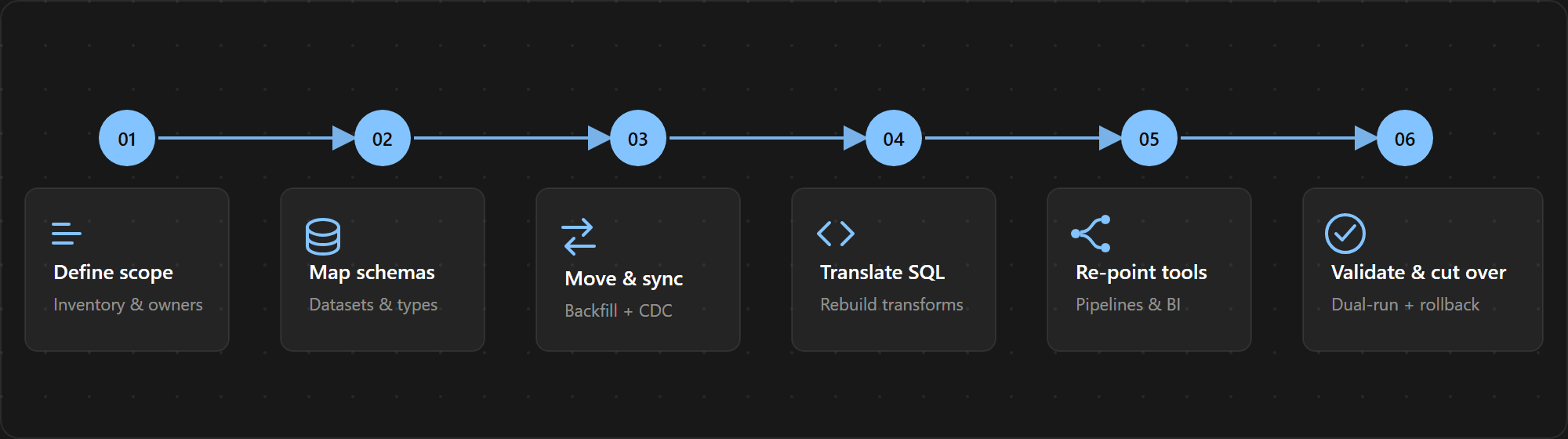
A blueprint and clear expectations go a long way. Weld has worked with a wide range of companies across diverse data stacks, and the conclusion is consistent: a step-by-step formula saves time and effort compared to improvising. As a rough guide, expect the whole process to take 2 to 4 weeks for a small stack (a handful of sources and one BI tool), or 2 to 6 months for a mature one with years of accumulated SQL. Here's a diagrammed overview of the six steps:
Step 1: Define the migration scope
Take note of what's currently in your data warehouse, including:
- Tables and views: tag each as raw (loaded from a source system) or derived (built by SQL from other tables).
- Outbound consumers: BI dashboards, reverse ETL syncs, ML jobs, and every service account with a Snowflake connection.
- Query patterns: what runs, how often, and who runs it. Snowflake's
ACCOUNT_USAGEviews hold the answers. - Spend baseline: your monthly Snowflake cost per warehouse, for the before/after comparison and for choosing BigQuery's pricing model later.
For a data-driven baseline, run Google's migration assessment first: it analyses Snowflake metadata and query logs to estimate translation effort and cost.
Think your current data warehouse has a lot of unused models? Here's a query to find unused tables in the past 90 days — then decide if they're worth keeping.
1-- Tables not queried in the last 90 days
2SELECT t.table_schema, t.table_name, t.bytes / 1e9 AS gb
3FROM snowflake.account_usage.tables t
4LEFT JOIN (
5  SELECT DISTINCT f.value:objectName::string AS table_name
6  FROM snowflake.account_usage.access_history,
7  LATERAL FLATTEN(base_objects_accessed) f
8  WHERE query_start_time > DATEADD(day, -90, CURRENT_TIMESTAMP())
9) used ON used.table_name = t.table_catalog || '.' || t.table_schema || '.' || t.table_name
10WHERE used.table_name IS NULL
11  AND t.deleted IS NULL
12ORDER BY t.bytes DESC;
13
Note that ACCESS_HISTORY requires Enterprise Edition and can lag by up to three hours, so treat the result as a signal rather than proof that a table is unused.
Step 2: Map schemas and data types
With the inventory in hand, write down how every schema and column type translates before moving anything.
Structure mapping: Reminder that Snowflake's database.schema.table hierarchy is one level deeper than BigQuery's project.dataset.table. Map each Snowflake schema to a BigQuery dataset, e.g. analytics.marketing.campaigns → my-project.marketing.campaigns, with naming prefixes if schema names collide across databases.
Type mapping:
| Snowflake | BigQuery | Differences |
|---|---|---|
| NUMBER(P, S) | NUMERIC / BIGNUMERIC | NUMERIC allows at most 29 integer and 9 fractional digits |
| VARCHAR / TEXT | STRING | No declared length; length checks move to your tests |
| TIMESTAMP_NTZ | DATETIME | No timezone attached; pick this deliberately |
| TIMESTAMP_TZ / TIMESTAMP_LTZ | TIMESTAMP | BigQuery stores UTC instants; original offsets are lost |
| VARIANT / OBJECT / ARRAY | JSON / STRUCT / ARRAY | Access syntax changes (col:field → JSON functions / UNNEST) |
| BINARY | BYTES | |
| FLOAT | FLOAT64 | |
| BOOLEAN | BOOL | |
| DATE | DATE |
Two points to keep in mind:
- Timestamp semantics: BigQuery's
TIMESTAMPis always a UTC instant andDATETIMEhas no timezone, while Snowflake keeps offsets and session timezones. If reports group by day in a local timezone, decide up front how that's computed in BigQuery (DATE(timestamp_col, 'Europe/Copenhagen')), otherwise reporting may be inaccurate. - NUMBER precision: map Snowflake
NUMBERcolumns using both precision and scale. BigQueryNUMERICsupports at most 29 integer digits and 9 fractional digits; useBIGNUMERICwhen either limit can be exceeded, unless a zero-scale column is known to fit intoINT64. Values with more than nine fractional digits are rounded during conversion, so check financial and other high-scale columns explicitly.
Step 3: Move and synchronise the data
There are many paths to choose from; this guide focuses on 3 recommended options. Choice is case specific depending on your environment. Whichever you pick, plan for two parts: an initial backfill, then ongoing synchronisation (incremental transfers, CDC, or parallel source ingestion) that keeps BigQuery current until cutover.
| Method | Best for | Effort | Historical coverage | Incremental sync | Main limitation |
|---|---|---|---|---|---|
| A: Managed connector | Fast direct migration | Low | Complete | Yes | Preview status and type limits |
| B: GCS export | Controlled backfill | Medium | Complete | Manual | Deletes and retries |
| C: Source re-sync | Clean future architecture | Medium | Source-dependent | Native | History may have expired |
| Hybrid (A/B + C) | Most production migrations | Medium | Complete | Yes | More coordination |
Option A: BigQuery Data Transfer Service (managed)
Google's BigQuery Data Transfer Service includes a dedicated Snowflake connector, currently in Preview. It unloads tables through a Google Cloud Storage bucket and loads them into BigQuery datasets on a schedule you define; scheduled incremental transfers then keep BigQuery synchronised until cutover.
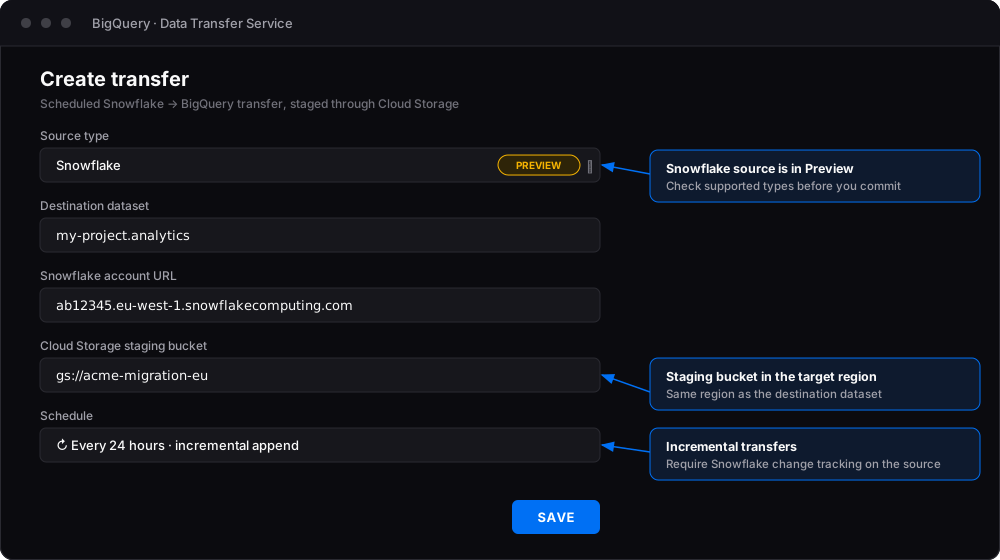
Prerequisites: a GCS bucket in your target region, a Snowflake user with read access plus a warehouse for the unload, a storage integration to the bucket, and a network allowlist entry if you use Snowflake network policies.
Know the limitations:
- One transfer configuration covers one Snowflake database/schema.
- Incremental transfers support append and upsert; upserts require unique keys.
- Incremental transfers require Snowflake change tracking on the source tables.
- Schema evolution is not automatic; handle new columns yourself.
TIMESTAMP_TZandTIMESTAMP_LTZneed special treatment, and several types map toSTRINGby default.- Load jobs default to 15 TB per table; very large tables may need a
PIPELINEreservation assignment.
When to choose it: bulk historical moves with managed retries, scheduling, and logging. Note that the unload runs on your Snowflake compute, and cross-cloud egress fees apply if your Snowflake account is hosted on AWS or Azure.
⚠️ Verify before you commit: the connector is in Preview, so capabilities and pricing change. Check the managed connector docs and incremental-transfer limitations against your table list first.
Option B: Manual export via Google Cloud Storage
The DIY path: unload from Snowflake to a GCS stage in Parquet, then load into BigQuery. Parquet compresses well and preserves common scalar types, but not every Snowflake semantic: timezone-aware timestamps and VARIANT/OBJECT/ARRAY columns need explicit conversion and testing against your schema mapping. Amazon S3 also works as the staging location, though GCS is the shortest path into BigQuery.
On the Snowflake side:
1-- One-time setup: allow Snowflake to write to your GCS bucket
2CREATE STORAGE INTEGRATION gcs_migration
3  TYPE = EXTERNAL_STAGE
4  STORAGE_PROVIDER = 'GCS'
5  ENABLED = TRUE
6  STORAGE_ALLOWED_LOCATIONS = ('gcs://your-migration-bucket/');
7
8-- Look up the service account Snowflake will use...
9DESC INTEGRATION gcs_migration;
10-- ...and grant it write access on the bucket:
11-- gcloud storage buckets add-iam-policy-binding gs://your-migration-bucket \
12--   --member="serviceAccount:<STORAGE_GCP_SERVICE_ACCOUNT>" \
13--   --role="roles/storage.objectAdmin"
14
15CREATE STAGE migration_stage
16  URL = 'gcs://your-migration-bucket/export/'
17  STORAGE_INTEGRATION = gcs_migration;
18
19-- Per table: unload as Parquet under a unique run prefix, so retries never mix files
20COPY INTO @migration_stage/run_20260714/orders/
21FROM analytics.public.orders
22FILE_FORMAT = (TYPE = PARQUET)
23MAX_FILE_SIZE = 268435456;
24
On the BigQuery side, load into a staging table first; --replace keeps retries idempotent:
bq load \
  --source_format=PARQUET \
  --autodetect \
  --replace \
  analytics_staging.orders \
  "gs://your-migration-bucket/export/run_20260714/orders/*"
Note: The command snippets above are illustrative; verify the latest Snowflake/Google docs (IAM grant flow and CLI flags) before running them in your environment.
Validate the staging table against your Step 2 spec, then replace or merge it into the destination. --autodetect is good but not perfect; pin explicit schemas for tables with NUMERIC/BIGNUMERIC edge cases. For synchronisation until cutover, repeat the export under a new run prefix. High-watermark exports suit append-only tables or tables with a reliable modification timestamp; to reproduce deletes and arbitrary updates, use change tracking, CDC, or periodic full reconciliation followed by a BigQuery MERGE.
When to choose it: full control, unusual edge cases, or compliance that requires the data path to stay within infrastructure you configure.
Option C: Re-sync raw data from your sources (the ELT reset)
Options A and B move what is already in Snowflake. But if your warehouse is mostly raw synced data with SQL transformations on top, translating those models is only half the job: the pipelines that feed them still need re-pointing to BigQuery.
So rather than exporting derived tables, re-sync the raw layer straight from the original sources (Shopify, Stripe, HubSpot, and so on) into BigQuery, then rebuild your transformations on top in Step 4. Reproducible derived tables are outputs, not inputs, so they don't need to make the trip. Synchronisation comes for free while the sources feed both warehouses until cutover, and you gain clean lineage plus a natural spring-clean of legacy tables.
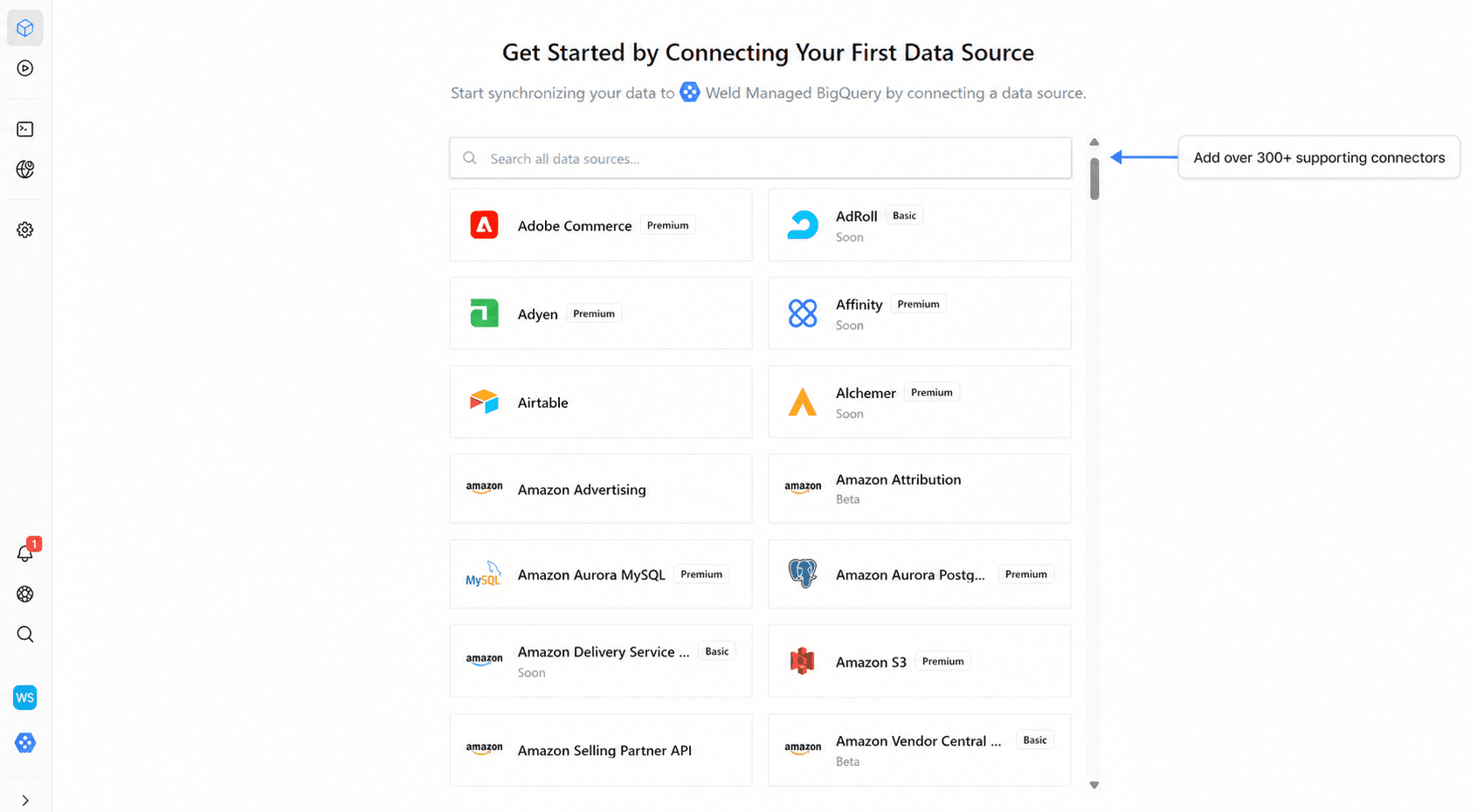
Our take (we build this): a managed ELT tool turns the re-sync into a configuration step rather than a scripting project. Weld connects to your existing sources and syncs them into BigQuery on the same schedules, so the raw-layer move and the dual-run run through one connector.
- Not everything can be rebuilt exactly 1:1, though. Historical snapshots and slowly changing dimensions, audit tables, manually corrected records, stateful operational outputs, and tables whose original inputs have expired might be copied as a record, not recreated.
- Backfills take time, and some connectors have rate limits or retention windows, but that cost is short-lived: run the syncs alongside Snowflake and most history is in place by cutover. What you gain is lasting, a data stack rebuilt clean from the ground up.
Step 4: Translate your SQL and rebuild transformations
With the data in BigQuery, the SQL that shapes it needs to speak the new dialect. This is the most underestimated part of the migration.
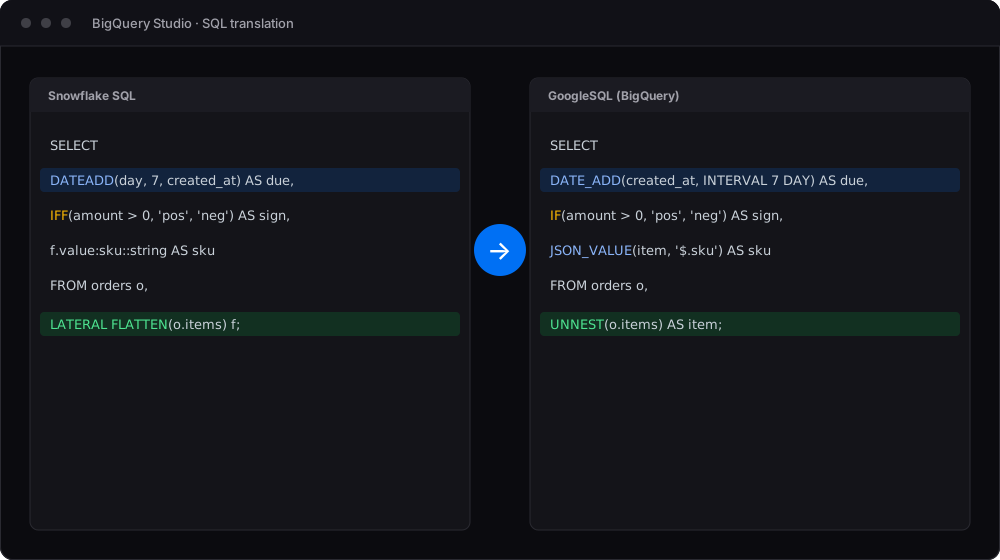
Start with the BigQuery Migration Service's SQL translator. It's free apart from supporting storage, and runs in batch mode (a folder of .sql files) or interactively inside BigQuery Studio. Snowflake dialect support is currently in Preview and translation is best-effort, so treat the output as a first draft rather than a finished conversion.
What survives auto-translation and needs human attention:
- Identifier quoting and case: Snowflake folds unquoted identifiers to uppercase; BigQuery uses backticks, and dataset and table names are case-sensitive.
- Date/time functions:
DATEADDbecomesDATE_ADD,DATETIME_ADD, orTIMESTAMP_ADDdepending on the input type;DATEDIFFlikewise becomesDATE_DIFF,DATETIME_DIFF, orTIMESTAMP_DIFF, with the argument order reversed. - Semi-structured data:
LATERAL FLATTENmaps toUNNESTfor arrays (JSON arrays first needJSON_QUERY_ARRAY), andpayload:customer.email::stringbecomesJSON_VALUE(payload, '$.customer.email'). - Stored procedures: Snowflake JavaScript procedures cannot be moved directly. Rewrite suitable logic as BigQuery SQL stored procedures or move application-style logic to an external service.
- Function renames:
IFF→IF,NVL→IFNULL, andILIKE→LOWER(x) LIKE LOWER(y)or a case-insensitive collation, plus stricter type checking overall.
For dbt users: creating a BigQuery target in profiles.yml is usually quick; the real work is the dialect fixes above, inside your models and macros. Run dbt build against a dev dataset early and work through the failures. If your transformations live in Weld, the translation work is the same, but re-publishing them against BigQuery is a configuration change rather than a re-platforming project.
Step 5: Re-point your pipelines and downstream tools
Everything that reads from or writes to Snowflake needs a new address. Work through the Step 1 inventory by category:
- Ingestion and reverse ETL: re-point to BigQuery and re-validate (done already if you took Option C).
- BI tools: new connection and service account, and re-check dashboards for dialect-specific SQL.
- ML jobs and notebooks: update every connection string and warehouse client.
- Security and governance: rebuild Snowflake grants as IAM, and recreate authorised views, row-level policies, masking, and audit logging.
Watch for consumers missing from the inventory: hardcoded strings, unowned service accounts, personal-login jobs. Snowflake's query history surfaces anything still connected before cutover.
Step 6: Validate, dual-run, and cut over
This step decides whether the migration is trusted, so give it the time it needs. A suggested sequence:
- Validate mechanically: compare row counts, null counts, and aggregate checksums per table, or use Google's Data Validation Tool. Focus on the timestamp and high-precision columns flagged in Step 2.
- Diff your business queries: run your top KPI queries on both warehouses. Matching counts prove completeness; matching results prove correctness.
- Dual-run through a full business cycle: cover month-end and quarter-end close, with BI on BigQuery and Snowflake as fallback. Compare at agreed watermarks so ingestion lag isn't mistaken for a discrepancy.
- Cut over with a rollback plan: agree in advance which pipelines flip, who owns each step, and the criteria that trigger a revert to Snowflake.
- Decommission gradually: keep Snowflake read-only through the rollback window, and retire it only after sign-off and against your contract date.
How to get the most out of BigQuery
A few habits keep BigQuery fast and affordable after the move:
- Pick the right pricing model: BigQuery bills either per TB scanned (on-demand) or per slot-hour (capacity). Occasional, ad-hoc querying favours on-demand; heavy, constant workloads favour capacity. Model both against your Step 1 audit and the current pricing page.
- Partition and cluster large tables: a date-partitioned table lets queries scan one day instead of the full history. It's the biggest cost lever in BigQuery; see our guide to partitioning and clustering.
- Set guardrails:
maximum_bytes_billedstops any query that would scan past your limit. Set it in BI connections and scheduled queries.
Common mistakes - and how to avoid them
- Timezone drift in reports: daily aggregates shift because session timezones didn't survive the trip. Avoid it by settling timezone handling in your Step 2 mapping spec.
- NUMBER precision lost in conversion: values beyond NUMERIC's limits are rounded. Avoid it by mapping precision and scale together, using BIGNUMERIC where either limit is exceeded.
- Unpartitioned tables on on-demand pricing: an unbounded
SELECT *scans the full table and bills accordingly. Avoid it by partitioning large tables and settingmaximum_bytes_billedfrom day one.
FAQ
For a small stack (a few sources, one BI tool, months of history), 2 to 4 weeks including the dual-run. A mature warehouse with years of SQL and many consumers typically runs 2 to 6 months. The long pole is rarely the data transfer; it's SQL translation (Step 4) and consumer re-pointing (Step 5).
Yes, and you should. Keep both warehouses ingesting through the dual-run, point BI at BigQuery, and keep Snowflake as reference and fallback. A few weeks of double-running is cheap insurance against a broken cutover.
No, but you have to touch most of it. Google's SQL translator handles much of the mechanical work for the Snowflake dialect. What's left: semi-structured (VARIANT) access patterns, stored procedures, macros, and anything relying on Snowflake's case-folding or implicit casting.
Final recommendation
For most teams, the safest path is hybrid: send current data directly from its original sources to BigQuery, backfill history from Snowflake, and keep both warehouses synchronised through a complete business cycle. If your ingestion already runs through Weld, you can add BigQuery as a destination and operate both paths during validation.
Sources
- Snowflake: Pricing
- Google Cloud: BigQuery pricing
- Google Cloud: Batch SQL translator
- Google Cloud: BigQuery time travel
- Google Cloud: BigQuery stored procedures
- Google Cloud: Pipeline migration guidance
- Google Cloud: BigQuery partitioned tables
- Google Cloud: BigQuery migration assessment
- Google Cloud: Schedule a Snowflake transfer
- Google Cloud: BigQuery migration validation
- Snowflake: Understanding & using Time Travel
- Google Cloud: Snowflake SQL translation reference
- Snowflake: Unloading data into Google Cloud Storage
- Google Cloud: Snowflake schema detection and mapping
- Google Cloud: Configure incremental Snowflake transfers
- Google Cloud: BigQuery Data Transfer Service introduction
- Google Cloud: Migrate from Snowflake to BigQuery — overview
- Snowflake: Configuring an integration for Google Cloud Storage