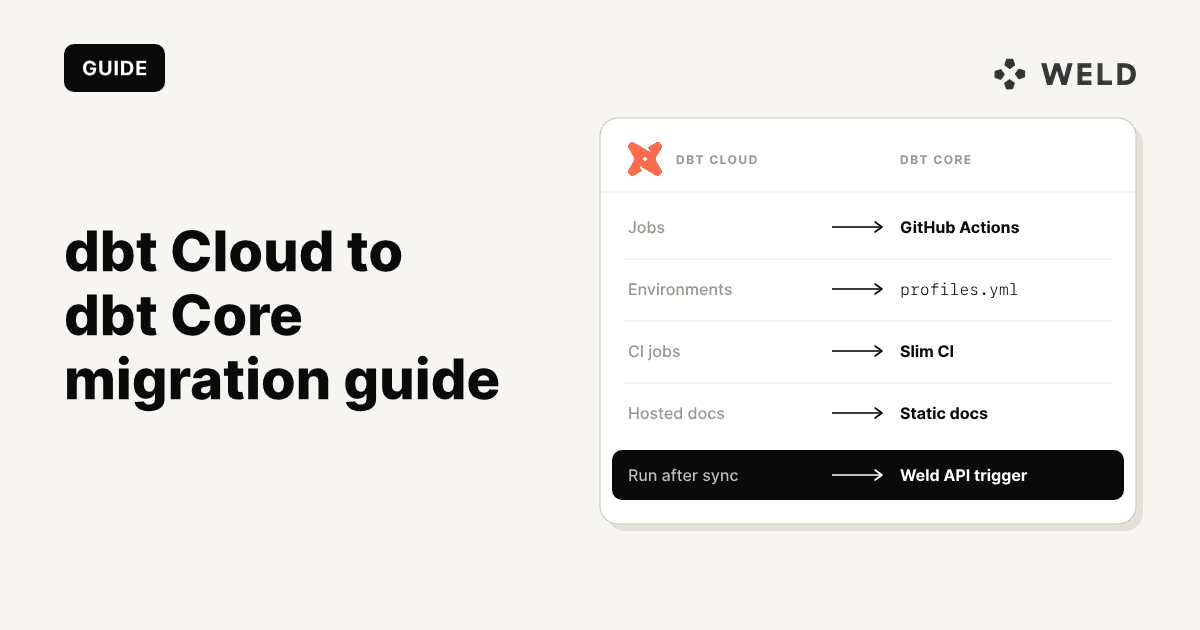
Moving from dbt Cloud to dbt Core is mostly not about your SQL. Your models, tests, macros and YAML run on both. What you are really migrating is everything dbt Cloud did around the code: the scheduler, environments, CI, credentials, run history, docs hosting and the browser IDE. This guide compares dbt Cloud vs dbt Core as they stand in 2026, then shows what to rebuild, what you can drop, and how to cut over without a broken morning dashboard.
Already decided? Skip ahead to Step 1: the inventory →
TL;DR
- Your dbt code moves as it is. The work is replacing the platform around it: jobs, environments, CI, secrets, docs and run history.
- Land on dbt v1 (the
dbt-core1.12 package) first. It is close to the engine your platform jobs run on a v1 release track, so the migration mostly changes where dbt runs, not how. Treat a move to dbt v2 as a separate project.- Three things break most often:
env_var('DBT_CLOUD_...')calls with no default, a differenttarget.name, and schema names that change becausegenerate_schema_namenow sees a different target.- GitHub Actions covers most teams' scheduling and Slim CI. Airflow (with Cosmos), Dagster or Prefect make sense if you already run one.
- Export your jobs, environment variables and the latest
manifest.jsonthrough the Admin API before you cancel, and run both setups side by side for at least a week.- Semantic Layer APIs, cross-project
ref(Mesh), Catalog and Advanced CI do not come with you. If you depend on them, that is a reason to stay.
First: the names changed in 2026
If you last looked at dbt a year ago, the product names have moved under you. People still search for "dbt Cloud" and "dbt Core", and this guide uses both, but here is what they map to today:
| What people call it | What dbt Labs calls it now | Package | Licence |
|---|---|---|---|
| dbt Cloud | dbt platform (the hosted product) | n/a | Commercial SaaS |
| dbt Core 1.x | dbt v1 | dbt-core + dbt-<adapter> | Apache 2.0 |
| dbt Fusion engine | dbt (v2) | dbt | Free to use, proprietary licence |
| dbt Core v2 | dbt OSS (v2) | dbt-oss | Apache 2.0 |
| Cloud IDE / Explorer | Studio IDE / Catalog | n/a | Platform only |
A little context on why. Fivetran and dbt Labs announced their merger in October 2025 and completed it on 1 June 2026. The Rust-based Fusion engine then reached general availability as dbt v2 in September 2026, in two distributions: the full dbt binary and the Apache 2.0 dbt-oss subset. The v1 line continues: 1.12 is in active support until 15 July 2027.
For a migration, "dbt Core" means any of the three self-hosted options. You run the CLI on your own machines and your own scheduler, against your own warehouse, with no dbt platform account involved. Which of the three to pick is covered below.
dbt Cloud vs dbt Core in 2026
Both run the same project. The difference is who operates everything around it.
| dbt Cloud (dbt platform) | dbt Core (self-hosted) | |
|---|---|---|
| Cost | Per developer seat plus models built per month | Free; you pay for runner compute and engineering time |
| Development | Studio IDE and Canvas in the browser | Your editor (VS Code, Cursor) and the CLI |
| Scheduling | Built-in jobs, triggers and run history | GitHub Actions, Airflow, Dagster, Prefect or cron |
| CI on pull requests | Built-in CI jobs, compare changes on Enterprise | Slim CI you configure with state:modified+ and --defer |
| Docs and lineage | Catalog, hosted for you | dbt docs generate --static, hosted by you |
| Semantic Layer | MetricFlow plus the APIs and BI integrations | MetricFlow and the mf CLI only |
| Multi-project (Mesh) | Cross-project ref on Enterprise | Not available |
| Access control | SSO, RBAC, SCIM on Enterprise | Git host permissions and warehouse roles |
| AI assistance | Built-in assistant, metered | Any coding agent; the dbt MCP server runs locally |
| Upgrades | Release tracks, applied for you | You pin and upgrade versions yourself |
| Lock-in | Jobs, environments and settings live in the platform | Everything lives in your repository |
Should you migrate? An honest decision framework
dbt Cloud is a good product. Teams leave it for specific reasons, and it is worth checking that yours is one of them before you take on the work.
| Reasons to move to dbt Core | Reasons to stay on dbt Cloud |
|---|---|
| Seat cost outgrows the value. You pay per developer seat, and most seats are used for a few commits a month. | You use the Semantic Layer APIs. Tableau, Hex, Power BI or Google Sheets read governed metrics through dbt's APIs. That service is platform only. |
| You already run an orchestrator. Airflow, Dagster or Prefect already schedules your ingestion and ML jobs, and dbt Cloud is a second scheduler you have to keep in step with the first. | Analysts work in the browser. People who never open a terminal build models in the Studio IDE or Canvas. Self-hosting turns every one of them into a local Python setup. |
| You outgrew the usage limits. Models built per month count against your plan, and frequent runs on a large project use that allowance up quickly. | You rely on Mesh or Catalog. Cross-project ref and column-level lineage across projects have no like-for-like open-source replacement. |
| Control and compliance. Code, credentials and logs must stay inside infrastructure you operate. | No one owns the plumbing. Self-hosting means someone maintains the CI pipeline, the runner, the secrets and the upgrades. If that person doesn't exist, the saving is imaginary. |
dbt Cloud pricing in 2026
From dbt's pricing page as of October 2026:
| Plan | Price | Seats | Successful models built per month |
|---|---|---|---|
| Developer | Free | 1 | 3,000 |
| Starter | $100 per seat per month | Up to 5 | 15,000 |
| Enterprise | Custom | Custom | 100,000 |
| Enterprise+ | Custom | Custom | 100,000 |
A full Starter team of five is $500 a month, or $6,000 a year, before any usage above 15,000 models built. Enterprise pricing is negotiated, and that is usually where the bills that trigger migrations come from.
On the other side of the ledger:
- Compute for runs. A daily 15-minute
dbt buildis about 450 runner minutes a month. Most GitHub plans include more minutes than that for private repositories, and a small VM or an existing Airflow worker costs little more. - Warehouse spend does not change. dbt Cloud doesn't run your queries; your warehouse does. Moving to Core saves platform fees, not Snowflake credits or BigQuery bytes.
- Engineering time is the real cost. Expect a few days to a couple of weeks for the migration, then a few hours a month for upgrades and the odd broken runner. Price that honestly before calling the move a saving.
Decided to migrate? Here is what you are leaving behind.
What you keep, what you lose, what replaces it
Everything in your Git repository runs on Core unchanged: models, tests, snapshots, seeds, macros, packages, YAML properties and dbt_project.yml. The table covers everything else.
| dbt Cloud feature | On dbt Core | Effort |
|---|---|---|
| Jobs and the scheduler | GitHub Actions cron, Airflow + Cosmos, Dagster, Prefect, or plain cron | Medium |
| Environments (dev, staging, prod) | Targets in profiles.yml, plus secrets per environment in your CI system | Low |
| Environment variables set in the UI | CI secrets and variables, or a .env file locally (dbt 1.12 loads it automatically) | Low |
| CI jobs on pull requests | A pull-request workflow running state:modified+ with --defer against production artifacts | Medium |
| Advanced CI ("compare changes") | The audit_helper package, or your own row-count and checksum queries | Medium |
| Run history, logs and artifacts | CI run logs, plus manifest.json and run_results.json stored as artifacts or in a bucket | Low |
| Hosted docs | dbt docs generate --static, hosted on GitHub Pages, S3, GCS or Netlify | Low |
| Studio IDE | VS Code (or any editor) with the dbt VS Code extension, and the CLI | Low |
| Canvas (visual editor) | No equivalent. Analysts write SQL. | n/a |
| dbt State / state-aware orchestration | state:modified+ selectors with --defer are free on every engine. dbt State, the managed version, needs a dbt platform login: free accounts get a monthly allowance, and usage beyond it is billed. | Low |
| Run notifications | A failure step in CI posting to Slack or email, or your orchestrator's alerting | Low |
| Managed repository | Your own GitHub, GitLab or Azure DevOps repository | Low |
| SSO and role-based access | Your Git host's permissions plus warehouse roles. There is no dbt-level access layer any more. | Low |
| Semantic Layer (defining metrics) | MetricFlow is Apache 2.0; dbt-metricflow gives you the mf CLI | Low |
| Semantic Layer APIs and BI integrations | No equivalent. The APIs need Starter or above (architecture docs). | Blocker |
Mesh (cross-project ref) | Not available. Merge the projects, or install one as a package and accept a single build. | High |
| Catalog (lineage across projects) | Per-project lineage in dbt docs; a data catalogue tool for anything wider | Medium |
| Copilot / AI assistance | Any coding agent with repository access. See Claude Code with dbt. | Low |
If any row you depend on says "Blocker" or "High", stop here and decide whether the migration is still worth it. Everything else is routine work.
Which dbt should you land on? v1, OSS or v2
You have three self-hosted choices:
- dbt v1 (
dbt-core1.12 + your adapter). Python-based, Apache 2.0, in active support until July 2027. If your platform environment runs a v1 release track (latest,compatible,extendedorfallback), this is close to the engine you already use. Thelatestandcompatibletracks can include features that are not in open-source 1.12 yet, which is one more reason to run both side by side in Step 8. - dbt OSS (
dbt-oss2.x). The Apache 2.0 Rust engine. Faster parsing and compilation, and strict SQL analysis. Use it if your organisation requires the open-source runtime. - dbt (
dbt2.x). The full v2 distribution. Free to use, including in production, but under dbt Labs' proprietary licence rather than Apache 2.0. Some features need a free login or a paid account.
Our recommendation: land on dbt v1 first. A migration should change one variable at a time. Moving off the platform and switching engines at once means that when a model breaks on day one, you cannot tell whether the cause is your new profiles, your new CI or the v2 engine's stricter SQL analysis. Get the project running on Core 1.12 with identical results, then plan the v2 upgrade as its own project. dbt's own upgrade path starts from 1.12 anyway: dbt parse --use-v2-parser tests whether the v2 parser accepts your project, and dbt-autofix fixes most deprecations in one pass.
If your platform environment is already on a fusion-* release track, the reverse applies: land on dbt or dbt-oss v2, matching what you run today.
The rest of this guide assumes dbt v1. The steps carry over to v2, with a few differences: v2 needs no separate adapter package, looks for profiles.yml only in the --profiles-dir flag, the project root and ~/.dbt/, and builds docs differently.
How to migrate from dbt Cloud to dbt Core in 8 steps
For a single project with a handful of jobs, plan on one to two weeks including the parallel run. A large project with several environments, many jobs and custom CI logic can take a month.
- Inventory your dbt Cloud account
- Move the code into your own Git repository
- Set up local development
- Remove the platform-specific code
- Rebuild your jobs in an orchestrator
- Rebuild CI with Slim CI
- Host docs and keep artifacts
- Run both in parallel, validate, and cut over
Step 1: Inventory your dbt Cloud account
The platform holds configuration that is not in your repository. Once you cancel, it is gone. Write down:
- Jobs: name, commands (
execute_steps), schedule, target name, threads, triggers (schedule, pull request, merge, or another job completing), and the environment each job runs in. - Environments: each environment's dbt version or release track, warehouse connection, default schema and Git branch.
- Environment variables: every variable at project, environment and job level, plus which ones hold secrets.
- Credentials: which warehouse user or service account each environment connects with.
- Notifications: who gets an email or Slack message when a job fails.
- Integrations: anything calling the dbt Cloud API, such as a BI tool's refresh hook, an Airflow operator, or an ELT tool triggering jobs after a sync.
Don't copy this from the UI by hand. The Admin API gives you all of it as JSON. Create a service token with read access, then:
# Your access URL, e.g. cloud.getdbt.com, emea.dbt.com, or <prefix>.us1.dbt.com
export DBT_HOST=cloud.getdbt.com
export DBT_ACCOUNT_ID=12345
export DBT_PROJECT_ID=67890
export DBT_TOKEN=...   # service token

api() { curl -sf -H "Authorization: Token $DBT_TOKEN" "https://$DBT_HOST$1"; }

# List endpoints return at most 100 records per call, so page through them
fetch_all() {
  local sep='?' offset=0 page all='[]'
  [[ $1 == *\?* ]] && sep='&'
  while :; do
    page=$(api "$1${sep}limit=100&offset=$offset") || return 1
    all=$(jq -n --argjson a "$all" --argjson p "$page" '$a + $p.data')
    [ "$(jq '.data | length' <<< "$page")" -lt 100 ] && break
    offset=$((offset + 100))
  done
  echo "$all"
}

# Full job records: commands, schedule, triggers, job-completion chains,
# target name, threads and environment
fetch_all "/api/v2/accounts/$DBT_ACCOUNT_ID/jobs/?project_id=$DBT_PROJECT_ID" > jobs.json

# Environments: dbt version, branch, schema
fetch_all "/api/v3/accounts/$DBT_ACCOUNT_ID/projects/$DBT_PROJECT_ID/environments/" > environments.json

# Environment variables: project defaults and per-environment values...
api "/api/v3/accounts/$DBT_ACCOUNT_ID/projects/$DBT_PROJECT_ID/environment-variables/environment/" \
  > env_vars.json

# ...and job-level overrides, one call per job
mkdir -p job_env_vars
for id in $(jq -r '.[].id' jobs.json); do
  api "/api/v3/accounts/$DBT_ACCOUNT_ID/projects/$DBT_PROJECT_ID/environment-variables/job/?job_definition_id=$id" \
    > "job_env_vars/$id.json"
done
Keep the full JSON rather than a trimmed projection: fields like job_completion_trigger_condition hold the "run after job X" chains you'll rebuild in Step 5. Don't count on the export for secret values; recover those from your password manager.
Then download the latest production manifest.json. You'll need it in Step 6 for the first Slim CI run, before your new production job has produced one:
PROD_JOB_ID=111   # your main production job
mkdir -p prod-artifacts
curl -s -H "Authorization: Token $DBT_TOKEN" \
  "https://$DBT_HOST/api/v2/accounts/$DBT_ACCOUNT_ID/jobs/$PROD_JOB_ID/artifacts/manifest.json" \
  -o prod-artifacts/manifest.json
While you are in the jobs list, note how often each job actually runs and how long it takes. Two hourly jobs that rebuild the same models are common, and a migration is a good moment to merge them.
Step 2: Move the code into your own Git repository
If your project already lives in GitHub, GitLab or Azure DevOps, skip this step: the platform was only reading from your repository.
If you used dbt Cloud's managed repository, export it: in Settings, open the repository link and choose Download repository (this needs Git write permission). Then push it to a repository you own:
unzip dbt-managed-repo.zip -d analytics && cd analytics
git init -b main   # skip if the download already contains .git
git add . && git commit -m "Import dbt project from dbt Cloud"
git remote add origin git@github.com:your-org/analytics.git
git push -u origin main
Set up branch protection on main before anyone else starts pushing: require a pull request and a passing CI check. On dbt Cloud the IDE enforced a branch workflow for you. On Core, your Git host does.
Step 3: Set up local development
This replaces the Studio IDE. Every developer needs Python 3.10 or newer, the dbt CLI and a connection profile.
Install dbt Core
Use one virtual environment per project and pin versions in a requirements file, so CI and every laptop run the same dbt:
python -m venv .venv
source .venv/bin/activate
python -m pip install --upgrade pip
python -m pip install -r requirements.txt
# requirements.txt
dbt-core~=1.12.0
dbt-snowflake~=1.12.0   # or dbt-bigquery, dbt-databricks, dbt-redshift, dbt-postgres
Since dbt 1.8, adapters are versioned separately from dbt-core, so their patch versions won't always match. Pin the minor version of each and let patches float. Then guard the project against someone running it on the wrong engine:
1# dbt_project.yml
2require-dbt-version: [">=1.12.0", "<1.13.0"]
3
The platform's release tracks ignored this setting. On Core it is enforced, which is the point. Widen the upper bound when you move to v2, since this range excludes 2.0.
Create profiles.yml
On dbt Cloud, connections lived in the UI. On Core they live in profiles.yml. dbt 1.12 looks for it in the --profiles-dir flag, then the DBT_ENGINE_PROFILES_DIR environment variable (or its older name, DBT_PROFILES_DIR), then the current directory, then ~/.dbt/. Keep a template in the repository that reads every credential from environment variables, so the same file works on laptops and in CI:
1# profiles.yml (committed, contains no secrets)
2analytics: # must match `profile:` in dbt_project.yml
3  target: dev
4  outputs:
5    dev:
6      type: snowflake
7      account: "{{ env_var('SNOWFLAKE_ACCOUNT') }}"
8      user: "{{ env_var('SNOWFLAKE_USER') }}"
9      private_key: "{{ env_var('DBT_ENV_SECRET_SNOWFLAKE_PRIVATE_KEY') }}"
10      private_key_passphrase: "{{ env_var('DBT_ENV_SECRET_SNOWFLAKE_KEY_PASSPHRASE') }}"
11      role: TRANSFORMER
12      warehouse: TRANSFORMING
13      database: ANALYTICS_DEV
14      schema: "dbt_{{ env_var('DBT_USER', 'dev') }}"
15      threads: 8
16    prod:
17      type: snowflake
18      account: "{{ env_var('SNOWFLAKE_ACCOUNT') }}"
19      user: "{{ env_var('SNOWFLAKE_USER') }}"
20      private_key: "{{ env_var('DBT_ENV_SECRET_SNOWFLAKE_PRIVATE_KEY') }}"
21      private_key_passphrase: "{{ env_var('DBT_ENV_SECRET_SNOWFLAKE_KEY_PASSPHRASE') }}"
22      role: TRANSFORMER
23      warehouse: TRANSFORMING
24      database: ANALYTICS
25      schema: analytics
26      threads: 16
27
A few details matter here:
- The
DBT_ENV_SECRET_prefix masks the value as*****in logs. dbt only allows these variables inprofiles.ymlandpackages.yml, and you can't apply Jinja filters to them. - Snowflake key-pair auth needs a PKCS#8 private key. Use it for every service user that CI or the scheduler connects with.
- For BigQuery, use
method: oauthlocally aftergcloud auth application-default login, andmethod: service-accountwith akeyfilepath in CI. - Locally, dbt 1.12 reads a
.envfile from the directory you run it in (variables already set in your shell win). Add.envto.gitignorebefore anyone creates one.
Check the connection:
dbt debug              # full check: profile, dependencies, connection
dbt debug --connection # connection only
dbt deps               # install packages
dbt build --target dev # first full build into your dev schema
Pick an editor
Most teams land on VS Code. The official dbt VS Code extension gives you lineage, compiled SQL previews and autocompletion, and its former 15-user cap has been removed. It supports v1 projects as long as they follow the v2 language spec, and has dbt-autofix built in for the ones that don't yet. The community extension dbt Power User is the common alternative. Plain VS Code with a SQL formatter and the CLI in a terminal works fine. So does a coding agent: Claude Code is very good at the build, read the error, fix the model loop. Give it the local dbt MCP server, which runs against your own CLI with no platform account, and it can read your lineage and run dbt commands.
Add linting and pre-commit
The Studio IDE formatted SQL with a button. On Core, make formatting automatic so reviews are about logic, not commas. SQLFluff with its dbt templater lints the compiled SQL, and pre-commit runs it before every commit:
1# .pre-commit-config.yaml
2repos:
3  - repo: https://github.com/sqlfluff/sqlfluff
4    rev: 4.4.0
5    hooks:
6      - id: sqlfluff-lint
7        additional_dependencies:
8          - sqlfluff-templater-dbt==4.4.0
9          - dbt-snowflake~=1.12.0
101# .sqlfluff
2[sqlfluff]
3templater = dbt
4dialect = snowflake
5Run pip install pre-commit && pre-commit install once per clone, and add pre-commit run --all-files as a step in the CI workflow so nothing skips it. The dbt templater compiles models, so it needs a working profile; in CI, run it after the profile environment variables are set.
Step 4: Remove the platform-specific code
This is the step that breaks first runs. The platform injects context your project may depend on without anyone remembering it does.
DBT_CLOUD_ environment variables
The platform sets these automatically on every run:
| Variable | What it held on dbt Cloud |
|---|---|
DBT_CLOUD_ENVIRONMENT_TYPE | dev, staging or prod (empty for general environments) |
DBT_CLOUD_INVOCATION_CONTEXT | dev, staging, prod or ci |
DBT_CLOUD_ENVIRONMENT_NAME, DBT_CLOUD_ENVIRONMENT_ID | The environment |
DBT_CLOUD_JOB_ID, DBT_CLOUD_RUN_ID, DBT_CLOUD_PROJECT_ID, DBT_CLOUD_ACCOUNT_ID | Run identifiers |
DBT_CLOUD_RUN_REASON, DBT_CLOUD_RUN_REASON_CATEGORY | Why the run started |
DBT_CLOUD_PR_ID, DBT_CLOUD_GIT_SHA | Pull request runs only |
DBT_CLOUD_GIT_BRANCH | IDE sessions only |
DBT_ENV | Reserved; always prod in deployment runs |
On Core none of them exist, and env_var() without a default fails the whole parse:
Env var required but not provided: 'DBT_CLOUD_ENVIRONMENT_TYPE'
Find every reference:
grep -rnE "DBT_CLOUD_|DBT_ENV\b" --include=*.sql --include=*.yml --include=*.yaml .
Then replace each with something your new setup controls. Most uses branch on the environment, and target.name is the Core-native way to do that:
1-- Before (works only on dbt Cloud)
2{% if env_var('DBT_CLOUD_ENVIRONMENT_TYPE') == 'prod' %}
3
4-- After
5{% if target.name == 'prod' %}
6
For run identifiers used in audit columns, pass your orchestrator's own IDs instead, such as GITHUB_RUN_ID in GitHub Actions, and give the call a default so local runs keep working:
1'{{ env_var("GITHUB_RUN_ID", "local") }}' as run_idtarget.name
On dbt Cloud the target name is a job setting, and it defaults to default unless someone changed it. On Core it is whichever output key in profiles.yml you run against. Search for target.name across models and macros, and compare every hard-coded value ('default', 'prod', 'ci') with the names in your new profile. A where filter that limits data in development, guarded by target.name != 'prod', will quietly run on full data, or on limited data in production, if the names don't line up.
Custom schema names
Check macros/ for a generate_schema_name override. Most mature projects have one, and many branch on target.name or a DBT_CLOUD_ variable. If you don't have one, dbt's default applies on both platforms: <target schema>_<custom schema>. Either way, compile against your production target and list where every model will land:
dbt compile --target prod
jq -r '.nodes[] | select(.resource_type == "model")
       | [.unique_id, .database, .schema, .alias] | @tsv' target/manifest.json
Then compare that list with the tables dbt Cloud built. A model landing in analytics_marketing instead of marketing creates a second copy of the table that nothing reads from, while dashboards keep reading the stale one.
Cross-project refs
If dependencies.yml contains a projects: key, you use Mesh cross-project ref, which is a platform feature. You have two options. Merge the upstream project into this one. Or install the upstream project as a regular package (packages: with a Git URL) and build its models in the same run. The second option means losing the boundary between teams, so it is a decision, not a fix.
Step 5: Rebuild your jobs in an orchestrator
Each dbt Cloud job becomes a scheduled workflow. Pick the orchestrator you already have before adding a new one.
| Option | Best for | What you get |
|---|---|---|
| GitHub Actions / GitLab CI | Most teams; dbt is the only scheduled workload | Cron, secrets, logs and artifacts in the tool you already use for CI |
| Airflow + Astronomer Cosmos | Teams already on Airflow | Each model as an Airflow task, with retries per model |
Dagster (dagster-dbt) | Asset-oriented platforms | Models as software-defined assets, lineage across tools |
Prefect (prefect-dbt) | Python-heavy teams on Prefect | dbt runs inside Prefect flows |
| cron on a VM | Very small projects | Simple to set up, but logs, alerts and secrets are all on you |
| A managed dbt Core host | Teams that want Core without running CI | A hosted IDE, scheduler and CI on top of open-source dbt, billed separately |
GitHub Actions: the production job
This workflow replaces a typical "daily build" job. It runs on a schedule, builds production, uploads the artifacts that Slim CI needs, and posts to Slack on failure.
1# .github/workflows/dbt-prod.yml
2name: dbt production
3
4on:
5  schedule:
6    - cron: "0 5 * * *" # 05:00 UTC daily; GitHub cron is always UTC
7  workflow_dispatch: {} # manual "Run now" button
8
9concurrency:
10  group: dbt-prod
11  cancel-in-progress: false # never start a second prod build on top of one
12
13jobs:
14  build:
15    runs-on: ubuntu-latest
16    timeout-minutes: 60
17    environment: production # holds the prod secrets
18    env:
19      DBT_PROFILES_DIR: ${{ github.workspace }}
20      SNOWFLAKE_ACCOUNT: ${{ vars.SNOWFLAKE_ACCOUNT }}
21      SNOWFLAKE_USER: ${{ vars.SNOWFLAKE_USER }}
22      DBT_ENV_SECRET_SNOWFLAKE_PRIVATE_KEY: ${{ secrets.SNOWFLAKE_PRIVATE_KEY }}
23      DBT_ENV_SECRET_SNOWFLAKE_KEY_PASSPHRASE: ${{ secrets.SNOWFLAKE_KEY_PASSPHRASE }}
24    steps:
25      - uses: actions/checkout@v4
26
27      - uses: actions/setup-python@v5
28        with:
29          python-version: "3.12"
30          cache: pip
31
32      - run: pip install -r requirements.txt
33
34      - run: dbt deps
35
36      - name: dbt build
37        run: dbt build --target prod
38
39      - name: Generate docs
40        if: success()
41        run: dbt docs generate --target prod --static
42
43      - name: Keep artifacts for Slim CI and debugging
44        if: always()
45        uses: actions/upload-artifact@v4
46        with:
47          name: dbt-prod-artifacts
48          path: |
49            target/manifest.json
50            target/run_results.json
51            target/static_index.html
52          retention-days: 30
53
54      - name: Alert on failure
55        if: failure()
56        run: |
57          curl -s -X POST "$SLACK_WEBHOOK_URL" \
58            -H 'Content-Type: application/json' \
59            -d "{\"text\": \"dbt production failed: ${GITHUB_SERVER_URL}/${GITHUB_REPOSITORY}/actions/runs/${GITHUB_RUN_ID}\"}"
60        env:
61          SLACK_WEBHOOK_URL: ${{ secrets.SLACK_WEBHOOK_URL }}
62
Translating the rest of your job list:
- Job commands become
run:steps. A job withdbt seed,dbt runanddbt teststeps is usually better as a singledbt build, which runs tests straight after each model and skips everything downstream of a failure. - Several schedules (hourly for marketing, daily for finance) become separate workflows, each with
--selecton a tag or folder:dbt build --select tag:hourly. - "Run on job completion" triggers become
needs:between jobs in one workflow, or aworkflow_runtrigger between workflows. - Threads move into
profiles.ymlper target, or--threadson the command. - Scheduled runs on GitHub can start several minutes late under load. If a report has a hard deadline, schedule the build with some slack, or trigger it from upstream instead (see the next section).
dbt retryre-runs only what failed in the previous run, usingrun_results.json. That is useful for flaky warehouse errors. It only works while thetarget/folder from the failed run still exists, so run it in the same job, not a fresh one.
Airflow with Cosmos, Dagster and Prefect
If you already run an orchestrator, use its dbt integration instead:
1# Airflow + Astronomer Cosmos: one Airflow task per dbt model
2from datetime import datetime
3
4from cosmos import DbtDag, ProjectConfig, ProfileConfig
5
6dbt_daily = DbtDag(
7    dag_id="dbt_daily",
8    project_config=ProjectConfig("/usr/local/airflow/dbt/analytics"),
9    profile_config=ProfileConfig(
10        profile_name="analytics",
11        target_name="prod",
12        profiles_yml_filepath="/usr/local/airflow/dbt/analytics/profiles.yml",
13    ),
14    schedule="@daily",
15    start_date=datetime(2026, 10, 1),
16    catchup=False,
17)
181# Dagster: every model becomes an asset
2from pathlib import Path
3
4from dagster import AssetExecutionContext, Definitions
5from dagster_dbt import DbtCliResource, DbtProject, dbt_assets
6
7analytics_project = DbtProject(project_dir=Path(__file__).parent / "analytics")
8analytics_project.prepare_if_dev() # builds the manifest when running `dagster dev`
9
10@dbt_assets(manifest=analytics_project.manifest_path)
11def analytics_dbt_assets(context: AssetExecutionContext, dbt: DbtCliResource):
12 yield from dbt.cli(["build"], context=context).stream()
13
14defs = Definitions(
15 assets=[analytics_dbt_assets],
16 resources={"dbt": DbtCliResource(project_dir=analytics_project)},
17)
181# Prefect: dbt inside a flow
2from prefect import flow
3from prefect_dbt import PrefectDbtRunner
4
5@flow
6def run_dbt():
7 PrefectDbtRunner().invoke(["build"])
8Check each library's current docs for your version: Cosmos, dagster-dbt, prefect-dbt.
Run dbt after your data lands, not on a guess
On dbt Cloud, many teams let their ELT tool trigger the dbt job when a sync finished. Weld's own dbt Cloud integration works that way. Once you move to Core, that trigger has nothing to call. The common fallback is a fixed schedule an hour after the syncs "usually" finish, which builds models on half-loaded data on the day a sync runs long.
Reverse the direction. Have your dbt workflow start the ingestion run, wait for it to finish, and only then build. With Weld, group the syncs your models read from into an orchestration, set your workspace's transformation tool to dbt Core, and add this step before dbt build.
Our take (we build this): Weld doesn't call dbt Core itself, but the Weld API lets any workflow trigger an orchestration and poll it until the data has landed. Your orchestrator stays the one place where the order of things is defined.
1- name: Run Weld syncs and wait for them to finish
2  env:
3    WELD_API_KEY: ${{ secrets.WELD_API_KEY }}
4    WELD_ORCHESTRATION_ID: ${{ vars.WELD_ORCHESTRATION_ID }}
5  run: |
6    RUN_ID=$(curl -sf -X POST \
7      "https://connect.weld.app/orchestrations/$WELD_ORCHESTRATION_ID/request_run" \
8      -H "x-api-key: $WELD_API_KEY" | jq -r .id)
9    echo "Weld orchestration run $RUN_ID"
10
11    for i in $(seq 1 120); do   # up to 60 minutes
12      STATUS=$(curl -sf "https://connect.weld.app/orchestration_runs/$RUN_ID" \
13        -H "x-api-key: $WELD_API_KEY" | jq -r .status)
14      echo "status: $STATUS"
15      case "$STATUS" in
16        COMPLETED) exit 0 ;;
17        FAILED|CANCELED) exit 1 ;;
18      esac
19      sleep 30
20    done
21    echo "Timed out waiting for Weld" && exit 1
22
If the syncs fail, dbt doesn't run, the workflow goes red, and the Slack alert fires. Yesterday's tables stay in place instead of being rebuilt on partial data.
Step 6: Rebuild CI with Slim CI
dbt Cloud's CI jobs built only the models changed in a pull request, plus everything downstream, into a temporary dbt_cloud_pr_<job>_<pr> schema. Everything unchanged was read from production through deferral. You can rebuild the same thing on Core with three flags:
--select state:modified+selects changed models and their children.--state <dir>points at production'smanifest.json, which is what "changed" is compared against.--deferresolvesref()to production for anything not built in this run.
1# .github/workflows/dbt-ci.yml
2name: dbt CI
3
4on:
5  pull_request:
6    branches: [main]
7
8permissions:
9  contents: read
10  actions: read # lets the job download the production run's artifacts
11
12concurrency:
13  group: dbt-ci-${{ github.event.pull_request.number }}
14  cancel-in-progress: true
15
16jobs:
17  slim-ci:
18    runs-on: ubuntu-latest
19    timeout-minutes: 45
20    environment: ci
21    env:
22      DBT_PROFILES_DIR: ${{ github.workspace }}
23      DBT_CI_SCHEMA: pr_${{ github.event.pull_request.number }}
24      SNOWFLAKE_ACCOUNT: ${{ vars.SNOWFLAKE_ACCOUNT }}
25      SNOWFLAKE_USER: ${{ vars.SNOWFLAKE_CI_USER }}
26      DBT_ENV_SECRET_SNOWFLAKE_PRIVATE_KEY: ${{ secrets.SNOWFLAKE_CI_PRIVATE_KEY }}
27      DBT_ENV_SECRET_SNOWFLAKE_KEY_PASSPHRASE: ${{ secrets.SNOWFLAKE_CI_KEY_PASSPHRASE }}
28    steps:
29      - uses: actions/checkout@v4
30
31      - uses: actions/setup-python@v5
32        with:
33          python-version: "3.12"
34          cache: pip
35
36      - run: pip install -r requirements.txt && dbt deps
37
38      - name: Fetch the latest production manifest
39        env:
40          GH_TOKEN: ${{ github.token }}
41        run: |
42          RUN=$(gh run list --workflow dbt-prod.yml --branch main --status success \
43                 --limit 1 --json databaseId --jq '.[0].databaseId')
44          gh run download "$RUN" --name dbt-prod-artifacts --dir prod-artifacts
45
46      - name: Build changed models against production
47        run: |
48          dbt build --target ci \
49            --select state:modified+ \
50            --defer --state prod-artifacts
51
Add a ci output to profiles.yml whose schema comes from the variable the workflow sets:
1ci:
2  type: snowflake
3  # ...same connection fields as prod, with a CI service user...
4  database: ANALYTICS_CI
5  schema: "{{ env_var('DBT_CI_SCHEMA') }}"
6  threads: 8
7
A few things the platform did that you now own:
- The first run. Until your new production workflow has succeeded once, there is no artifact to download. Use the
manifest.jsonyou exported in Step 1 for those first pull requests. - Cleaning up schemas. dbt Cloud dropped
dbt_cloud_pr_schemas when the PR closed. On Core, add a workflow onpull_request: types: [closed]that runsdbt run-operationwith a small macro droppingpr_<number>schemas, or keep CI in its own database and drop old schemas on a weekly schedule. - Incremental models in CI. A modified incremental model has no table in the PR schema, so it does a full rebuild. That can be slow and expensive. Run
dbt clone --target ci --select state:modified+,config.materialized:incremental --state prod-artifactsbefore the build step, so the clones land in the PR schema: it creates zero-copy clones of the production tables on Snowflake, BigQuery and Databricks, and the build then runs incrementally on top. - Cheaper checks.
dbt build --emptycompiles and runs every selected model against zero rows. That is a fast way to catch SQL errors and missing columns. dbt 1.10 and later also support--sample="3 days"on models with anevent_timeconfigured. - Comparing results. "Compare changes" was an Advanced CI feature on Enterprise plans. On Core, the audit_helper package's
compare_relationsandcompare_all_columnsmacros give you the same row-by-row diff between the PR schema and production.
Step 7: Host docs and keep artifacts
Docs. dbt docs generate --static writes a single target/static_index.html with the manifest and catalog embedded. It needs no server and opens straight from a file or a bucket. The production workflow above already builds it. To publish:
- GitHub Pages only if the docs can be public. A Pages site is public on the internet even when its repository is private, unless your organisation is on GitHub Enterprise Cloud and you set the site's visibility to private.
- A private bucket (S3, GCS, Azure Blob) behind your SSO, for anything that shouldn't be public. Upload
static_index.htmlasindex.html. - Netlify or Cloudflare Pages with access control, if you already use them.
Docs include your column descriptions and model SQL. Treat them as internal unless you know otherwise.
On dbt v2, docs work differently: they are built from Parquet with DuckDB in the browser, generated with dbt docs generate --output-dir site. Plan that change with the engine upgrade, not now.
Artifacts. manifest.json and run_results.json are your run history now. CI artifacts expire (on GitHub, after 90 days by default and 400 at most on private repositories), so if you want long-term run history, such as model duration trends or test failures over time, upload run_results.json to a bucket after each run, or load it into your warehouse with a package such as dbt_artifacts.
Step 8: Run both in parallel, validate, and cut over
Don't switch off dbt Cloud the day your workflow goes green. Run both side by side, writing to different databases or schemas, so you can compare them on real data.
Start with a pilot: move three or four jobs first, ideally the ones furthest upstream, since everything else depends on them. Once those match, move the rest in one go.
- Point Core's prod target at a shadow location (for example
ANALYTICS_SHADOW) and let it run on the same schedule as dbt Cloud for at least a week, including a Monday after a weekend's backlog. If you have month-end models, include a month-end. - Compare outputs mechanically. For each important model, compare row counts and a few aggregates.
audit_helperdoes this at scale:
1-- analyses/compare_orders.sql
2{{ audit_helper.compare_relations(
3    a_relation=api.Relation.create(database='ANALYTICS', schema='marts', identifier='fct_orders'),
4    b_relation=api.Relation.create(database='ANALYTICS_SHADOW', schema='marts', identifier='fct_orders'),
5    primary_key='order_id'
6) }}
7
Compile it with dbt compile --select compare_orders and run the SQL in target/compiled/. A matching run shows 100% of rows in both relations. Small differences on recent rows usually mean the two runs started at different times. Differences in old rows mean a real logic change, almost always from Step 4.
- Compare schemas and object lists. Every table that dbt Cloud built should exist in the shadow location with the same name. A missing table usually means a
generate_schema_namedifference; an extra one means atarget.namebranch went the other way. - Cut over. Pause the dbt Cloud jobs (don't delete them yet), switch Core's prod target to the real production database, and run. Watch the first two or three scheduled runs closely.
- Re-point integrations. Anything that called the dbt Cloud API, such as a BI refresh hook or an ELT trigger, now needs its trigger to come from your workflow.
- Cancel last. Keep the platform account, with jobs paused, for two to four weeks as a rollback option, long enough to see a weekly and a monthly cycle on Core. Before you cancel, re-run the Step 1 exports (the account and its run history go with it), revoke the platform's service tokens and warehouse credentials, and remove its webhooks from Git and Slack.
Roll it out to the team
The technical cutover is the easy part. The developers who lived in the Studio IDE now need a working local setup, and the first week decides whether they keep using it.
- Write one setup page in your repository's README: clone, virtual environment,
.env,dbt debug, firstdbt build. Test it on a fresh laptop, including Apple Silicon Macs and Windows if your team uses them. - Hold a setup session where everyone installs together, and keep a support channel open for the first two weeks.
- Pair the analysts who never used a terminal with someone who has. Show them the editor's run buttons and the coding agent before the CLI flags.
- Remove seats in stages. Drop platform seats once each person has shipped a change through the new pull-request flow, not on cutover day.
Common mistakes, and how to avoid them
- Parse failures on the first run. An
env_var('DBT_CLOUD_...')call with no default stops the whole project from parsing. Grep forDBT_CLOUD_in Step 4 and replace or default every hit. - Tables landing in the wrong schema.
generate_schema_namebehaves differently becausetarget.nameor a platform variable changed. Comparedbt lsoutput with what's in the warehouse before the first production run. - Development filters running in production. A
{% if target.name != 'prod' %}limit that never matches because your production target is called something else. Name targets deliberately and search for every literal. - Version drift. The platform kept everyone on one release track. Without pinned requirements, a laptop on 1.12 and CI on 1.11 produce different results. Pin versions and set
require-dbt-version. - Secrets in the repository.
profiles.ymlgets committed with a password "just for now". Commit only theenv_var()template, and add.envandtarget/to.gitignoreon day one. - dbt running before the data lands. A fixed schedule that used to be a sync-completion trigger. Chain ingestion and dbt in one workflow.
- Changing the engine at the same time. Moving to dbt v2 during the migration makes every difference ambiguous. One change at a time.
FAQ
Is dbt Core still free and open source?
Yes. dbt v1 (the dbt-core package, currently 1.12) is Apache 2.0, and so is dbt-oss, the open-source distribution of the v2 engine. The full v2 distribution, published as dbt, is free to use in production but under dbt Labs' proprietary licence. When Fivetran and dbt Labs announced their merger, they committed to keeping dbt Core under its current licence.
How much does dbt Cloud cost in 2026?
The Developer plan is free for one seat and 3,000 successful models built a month. Starter is $100 per seat per month for up to five seats and 15,000 models built. Enterprise and Enterprise+ are custom-priced. See dbt's pricing page for the current numbers.
Can dbt Core replace dbt Cloud?
For running, testing and documenting models, yes: it is the same dbt. What it doesn't replace is the hosted layer: the browser IDE, the scheduler, Catalog, Mesh and the Semantic Layer APIs. You rebuild the first three with open-source tools; the last two have no direct equivalent.
Can I migrate from dbt Cloud to dbt Core without changing my SQL?
Mostly. Models, tests, macros and YAML run unchanged. What usually needs editing is code that relies on the platform: DBT_CLOUD_ environment variables, hard-coded target.name values, generate_schema_name overrides that depend on either, and cross-project ref in dependencies.yml.
How long does a dbt Cloud to dbt Core migration take?
For one project with a few jobs, one to two weeks including a week of running both side by side. Larger setups with several environments, many jobs and custom CI take three to four weeks. The parallel run, not the setup, decides the timeline.
What replaces dbt Cloud's scheduler?
Usually GitHub Actions or GitLab CI with a cron trigger, since you already need them for CI. Teams already running Airflow, Dagster or Prefect should use those tools' dbt integrations (Cosmos, dagster-dbt, prefect-dbt) instead.
Can I still use the dbt Semantic Layer on dbt Core?
You can define metrics and query them locally, because MetricFlow is open source and dbt-metricflow provides the mf CLI. You lose the Semantic Layer APIs and the BI integrations built on them (Tableau, Power BI, Hex, Google Sheets), which require a paid dbt platform plan.
Is running dbt Core in GitHub Actions free?
On public repositories, standard GitHub-hosted runners are free. On private repositories, GitHub Free includes 2,000 minutes a month and Team includes 3,000, which covers a daily build of most projects. Pull-request CI adds up faster than the scheduled job, so check usage after the first month.
What did the Fivetran and dbt Labs merger change for dbt Core?
Nothing that breaks a self-hosted project. The merger closed on 1 June 2026, and dbt v1 and dbt-oss remain Apache 2.0. What changed around the same time is the engine line-up: dbt v2 became generally available, and the dbt-core package now points new users to the v2 distributions.
Should I move to dbt v2 (Fusion) at the same time?
No. Land on dbt v1 first so your only variable is where dbt runs. Once results match, upgrade the engine as a separate project, starting with dbt parse --use-v2-parser on 1.12 to test whether the v2 parser accepts your project, then dbt-autofix for the deprecations it reports.
Final recommendation
If you use dbt Cloud mostly as a scheduler and a CI runner, moving to Core is a well-understood project. Inventory the account through the API, land on the same dbt v1 engine you already run, rebuild jobs and Slim CI in the CI system you already have, and run both setups in parallel until the numbers match. If you depend on the Semantic Layer APIs, Mesh, or analysts who work only in the browser, the platform earns its fee, and staying is the better call.
Whichever way you go, make dbt start when your data lands rather than at a time you hope it has. If your ingestion runs on Weld, one API call at the top of your workflow handles that.
Sources
- dbt: Pricing
- dbt: dbt v2.0 is GA
- dbt: Licensing for dbt, dbt OSS and dbt v1
- dbt: About dbt versions and support
- dbt: Release tracks on the dbt platform
- dbt: Environment variables
- dbt: env_var Jinja function
- dbt: Custom schemas
- dbt: Connection profiles
- dbt: Snowflake setup
- dbt: BigQuery setup
- dbt: Defer
- dbt: clone command
- dbt: retry command
- dbt: The --empty flag
- dbt: The --sample flag
- dbt: Continuous integration on the dbt platform
- dbt: Advanced CI
- dbt: Project dependencies (Mesh)
- dbt: Semantic Layer architecture
- dbt: Open-sourcing MetricFlow
- dbt: Managed repository
- dbt Labs: dbt platform OpenAPI specification
- Fivetran: Fivetran and dbt Labs complete merger
- Business Wire: Fivetran and dbt Labs unite
- Astronomer: Cosmos
- Dagster: dbt integration
- Prefect: prefect-dbt
- GitHub: download-artifact and cross-run artifacts
- GitHub: Actions billing and included minutes
- dbt: dbt State
- dbt: Local dbt MCP server
- SQLFluff: pre-commit hooks