
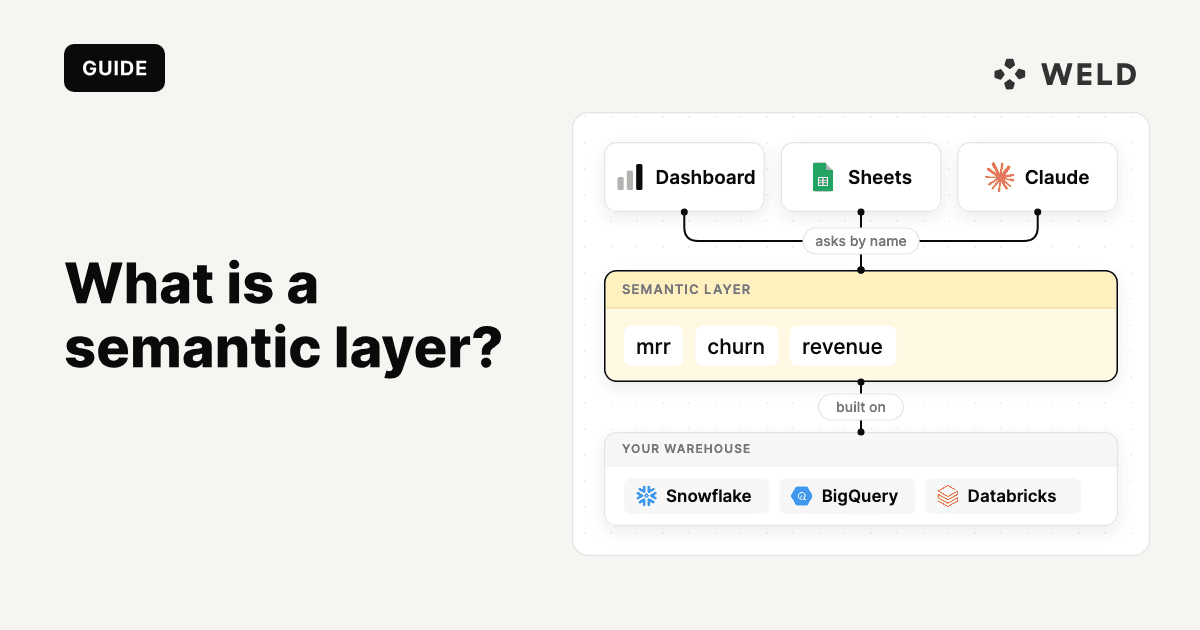
A semantic layer is where a company defines its metrics in code, so dashboards, spreadsheets and AI agents all calculate them from one definition. Without one, a simple question can get three different answers.
Ask finance what MRR was in September: €41,250. The BI dashboard says €44,900. An AI agent connected to the warehouse says €43,600 on Monday and €41,900 on Tuesday.
Each one is using its own definition. Finance excludes trials and divides annual plans by twelve, the dashboard counts annual invoices in the month they were paid, and the agent writes a fresh query every time. A semantic layer gives all three one definition to ask instead.
Summary: A semantic layer holds each metric's definition in code, and dashboards, spreadsheets and AI agents ask it for metrics by name. You need one when a metric is calculated in several tools, or when people start asking agents business questions.
What is a semantic layer?
A semantic layer is a layer between your data warehouse and the tools that read from it, where business metrics are defined and calculated in one place.
Instead of every dashboard, spreadsheet and agent writing its own SQL for "revenue", they ask the semantic layer for revenue by name. The semantic layer knows which tables to read, how to join them, which rows to filter out and how to aggregate, and it writes the SQL for them.

The idea goes back to the 1990s, when Business Objects called its version a "universe", and Looker's LookML made it popular again in the 2010s. For most of that time it lived inside one BI tool, so only that tool's dashboards could use it. The current generation sits outside any one tool, as its own service or inside the warehouse, so dashboards, notebooks, spreadsheets and AI agents can all use it.

What a semantic layer holds
It holds four kinds of definition.
| What | Example | Without it |
|---|---|---|
| Metrics | mrr = sum(mrr_eur), trials excluded | Every query re-derives the formula, and small differences add up |
| Dimensions | month, plan, country | One team slices by billing country, another by signup country |
| Joins | subscriptions to customers on customer_id | A join on the wrong key duplicates rows and inflates the total |
| Access rules | A sales lead sees their own region | The agent shows numbers the user can't see in the dashboard |
Most semantic layers also add caching, so a popular metric isn't recalculated from scratch on each request, and descriptions of the metrics and dimensions. Those descriptions matter more than they used to, because they are what an AI agent reads to decide which metric answers the question.
A semantic layer doesn't hold the data itself, and it doesn't replace your transformation layer. It reads from your modelled tables, so the clean-up work (deduplicating customers, converting currencies, removing test accounts) still belongs in the models underneath.
Why AI agents need one more than people do
Agents need a semantic layer more than people do because they start from zero on every question, and nobody checks their numbers before they're sent. An analyst who has been at a company for a year knows that finance's MRR excludes trials, and checks a number that looks too high. An agent sends whatever its query returns.
An agent working on raw tables tends to fail in three ways:
- Different answers to the same question. With no fixed definition, the agent writes new SQL for each question, and small choices (which statuses count as active, which date to group by) change the result.
- Numbers that don't match the dashboard. The dashboard and the agent each use their own logic, and users notice when the numbers differ.
- Numbers the user shouldn't see. If the agent queries with a shared service account, it can see more than the person asking.
A semantic layer removes all three problems, because the agent stops writing revenue SQL and asks for mrr by name. The dashboard uses that definition too, and the access rules apply to the person asking. dbt Labs measured the difference in a 2026 benchmark: 11 business questions, each asked 20 times, with the model either writing SQL against the tables or asking the semantic layer.

The semantic layer's misses on the original tables were the three questions it didn't cover yet, and on those it said it couldn't answer instead of guessing. Writing SQL against the tables gave a plausible wrong number some of the time. On the eight questions it did cover, the semantic layer was right every time, and three extra dbt models were enough to cover the rest.
Gartner points the same way. In its press release "Gartner Says Lack of Semantics Causes Inaccurate AI Agents and Wasted Spending", issued 11 May 2026, it wrote: "Gartner predicts that by 2027, organizations that prioritize semantics in AI-ready data will increase their agentic AI accuracy by up to 80% and reduce costs by up to 60%."
Worked example: MRR, defined once
Back to the September MRR question, asked of three tools before and after they share one definition.

Step 1: the model does the hard part
Start with a model in the warehouse with one row per active customer per month and the hard decisions already made: trials removed, annual and quarterly plans converted to a monthly amount, discounts applied, currencies converted. If you haven't settled what those decisions should be, how to calculate MRR covers the usual pitfalls, and defining core business metrics covers getting finance and the rest of the company to agree on them.
1-- gold.mrr_by_customer_month: one row per active customer per month
2select
3    customer_id
4  , month
5  , plan
6  , country
7  , mrr_eur -- monthly value after discounts, in EUR
8from
9    silver.stripe_subscription_months
10where
11    is_active
12    and not is_trial
This can be a dbt model or a SQL model in Weld, which syncs Stripe on a schedule and runs the model after each sync. Weld's open-source Stripe models build MRR along the same lines, so you don't have to start from scratch.
Step 2: the semantic layer defines the metric
On top of the model, the semantic layer says what mrr is and how it can be sliced. Here it is in the dbt Semantic Layer's latest YAML spec (dbt 1.12 and later, and the dbt platform's Latest release track), where the semantic model sits on the model itself:
1models:
2  - name: mrr_by_customer_month
3    semantic_model:
4      enabled: true
5    agg_time_dimension: month
6    primary_entity: customer_month
7    columns:
8      - name: customer_id
9        entity:
10          type: foreign
11          name: customer
12      - name: month
13        granularity: month
14        dimension:
15          type: time
16      - name: plan
17        dimension:
18          type: categorical
19    metrics:
20      - name: mrr
21        description: "MRR in EUR, trials excluded, annual plans divided by 12."
22        type: simple
23        agg: sum
24        expr: mrr_eur
25
There's very little logic in it: the metric is a sum, and the hard decisions were made in the model, where they can be tested. It's worth keeping it that way, because a semantic layer full of complicated SQL turns into a second transformation layer that's harder to debug.
When a tool asks for mrr by month, the semantic layer writes the query itself, along these lines (simplified):
1select
2    date_trunc('month', month) as metric_time__month
3  , sum(mrr_eur) as mrr
4from
5    gold.mrr_by_customer_month
6group by
7    1
Any tool that asks for mrr by month gets this query, which is why the numbers match.
Step 3: the dashboard, Claude and Ed ask for it
The dashboard asks the semantic layer for mrr by month, through the semantic layer's API or the BI tool's integration with it. Nobody has to write MRR SQL in the BI tool.
Claude connects to the semantic layer's MCP server. dbt, Cube and Snowflake all offer one. With dbt's, asked "what was MRR in September?", Claude calls list_metrics, finds mrr and its description, and calls query_metrics for September. It doesn't touch the subscription tables at all, so it can't invent a different filter.
Connect Claude to the Weld MCP server as well, and it can also check that the Stripe sync ran this morning and read the SQL behind mrr_by_customer_month before it trusts the number.
Ed, the agent in Weld, doesn't call a semantic layer: it searches your models and runs read-only queries (once an admin lets it read data values). Pointed at mrr_by_customer_month, the model the metric is built on, it also gets €41,250 for September, because the trial, discount and currency logic lives in the model.
All three return €41,250. And when finance decides next year that paused subscriptions don't count, the change goes into one definition, and every tool picks it up.
The MRR figures in this post are made up for illustration.
Where your semantic layer can live: dbt, Cube, the warehouse or a BI tool
Semantic layers come in four types, and they differ most in where the definitions live: in your transformation code (dbt), in a standalone service (Cube), inside the warehouse (Snowflake, Databricks) or inside a BI tool (Power BI, Looker).

| Option | Definitions live in | Runs on | How agents reach it | Row-level access |
|---|---|---|---|---|
| dbt Semantic Layer | YAML in your dbt project | Most major cloud warehouses | dbt MCP server (list_metrics, query_metrics) | Through the warehouse credential it queries with |
| Cube | YAML or JavaScript in a Cube project | Most warehouses and databases | Cube MCP server, on all plans | Access policies with row filters per user |
| Snowflake semantic views | SQL objects in the warehouse | Snowflake only | Cortex Analyst and Snowflake-managed MCP servers | Row access and masking policies on the tables |
| Databricks metric views | YAML inside a SQL view in Unity Catalog | Databricks only | Genie, plus Power BI, Tableau and Sigma | Unity Catalog permissions on the view |
| Power BI semantic models | The model in Power BI Desktop or Fabric | Power BI and Fabric | Fabric IQ MCP server | Roles with DAX filters, object-level security for columns |
| Looker (LookML) | LookML files in a Git project | The databases Looker connects to | Looker's managed MCP server | access_filter on a user attribute |
Checked on each vendor's documentation on 29 October and 13 November 2026.
dbt Semantic Layer
It suits teams that already model in dbt. Metrics live in YAML next to the models they're built on, and go through your usual pull requests, tests and CI. Tableau, Power BI, Excel, Google Sheets and Hex query it directly, and the dbt MCP server gives agents list_metrics and query_metrics. It's on dbt's Starter plan (5,000 queried metrics a month) and Enterprise (20,000), not the free Developer plan.
The catch is access: it queries the warehouse with a configured credential, so per-user row filtering has to happen in the warehouse.
Cube semantic layer
Cube is a standalone layer between any warehouse and any tool, with an open-source core and a managed Cube Cloud. Its strengths are caching and access rules based on who is asking. This is MRR in Cube, with a rule that shows a sales lead only their own country, in a dashboard or through an agent:
1cubes:
2  - name: mrr
3    sql_table: gold.mrr_by_customer_month
4    measures:
5      - name: total
6        type: sum
7        sql: mrr_eur
8    dimensions:
9      - name: month
10        sql: month
11        type: time
12      - name: country
13        sql: country
14        type: string
15    access_policy:
16      - group: sales
17        row_level:
18          filters:
19            - member: country
20              operator: equals
21              values: ["{ securityContext.country }"]
22
Cube Cloud has a free tier, Starter at $40 per developer per month and Premium at $80, and its MCP server is on all plans.
In return, you run one more service, with its own repository, deployment and monitoring.
Warehouse-native: Snowflake and Databricks
Snowflake's semantic views are database objects, created with CREATE SEMANTIC VIEW and governed by the roles, grants, row access and masking policies you already use for your tables. They suit teams that run everything in Snowflake and want the fewest moving parts.
Defining them has been generally available since June 2025, querying since August 2025. Cortex Analyst and Snowflake's managed MCP servers use them to answer questions in plain English. The views cost nothing extra: queries run on your warehouse compute, and Cortex Analyst is billed per message.
Databricks has its own version, Unity Catalog metric views, generally available since April 2026 as part of Unity Catalog Business Semantics. Metrics are defined as YAML inside a SQL view and queried with MEASURE(). Databricks' Genie and AI/BI dashboards build on them, and Sigma, Hex and Omni read them.
Either way, the definitions only work in the warehouse that holds them. On BigQuery, Google's semantic layer is Looker, covered next.
Inside a BI tool: Power BI and Looker
Power BI semantic models (Microsoft) and LookML (Google's Looker) are the older pattern, with measures, relationships and security defined inside the BI tool. They make the most sense where one BI tool is already where most people work.
Both now reach agents too. Microsoft points agents to its Fabric IQ MCP server, which answers questions from Power BI semantic models and keeps their row-level and object-level security. Looker's managed MCP server has been generally available since October 2026, and its Open SQL Interface lets JDBC tools query LookML models built on BigQuery.
The definitions live in that tool's format and licence, so tools and teams outside it get the metrics only through what the BI tool exposes.
How to choose
- You already run dbt, and most questions come from dashboards and agents: start with the dbt Semantic Layer. Your definitions sit next to your models.
- You need caching, fine-grained row-level access, or many different consumers: Cube, which has more of this built in than the others.
- Everything lives in Snowflake or Databricks and you want the fewest moving parts: the warehouse's own semantic or metric views, as long as you're happy for the definitions to only work there.
- Your BI tool already has a good model (LookML, Power BI semantic models): keep it for dashboards, and only add a separate layer when agents or other tools need the same definitions.
Choosing one is also less of a lock-in than it used to be. In September 2025, Snowflake, dbt Labs, Salesforce, Cube and others started the Open Semantic Interchange, a shared format for semantic definitions. It's now an incubating Apache project called Apache Ossie, dbt open-sourced MetricFlow under Apache 2.0 alongside it, and dbt 1.12 already reads semantic models written as Ossie documents from an osi/ folder in the project.
How to set up a semantic layer
- Pick one domain. Finance is usually the best start, because people already check its numbers.
- List the ten metrics people ask about most, and agree each definition with the person who owns it.
- Put the hard logic in Gold models (trials, currencies, discounts) and test it there.
- Define the metrics in the semantic layer, with a description for each one, because that's what an agent reads.
- Connect dashboards and agents with each person's own login, so access rules follow the user.
- Test with real questions and compare the answers with what finance reports.
When you don't need a semantic layer yet
Plenty of teams are better off waiting. A semantic layer is a commitment: every metric needs an owner, and every change needs a review. The first metric usually takes the longest, because it forces the definition argument everyone has been putting off.
| Wait if… | You need one when… |
|---|---|
| You have one BI tool and no agents. That tool is your semantic layer already. | The same metric is calculated in more than two places. |
| Finance and sales still disagree on what counts as revenue. Settle that first. | People have started asking AI agents business questions. |
| The models underneath are shaky: late syncs, duplicate customers. | Someone has asked "why doesn't this match the dashboard?" |
| You have a handful of metrics and one analyst. A documented Gold model is enough. | Teams need the same numbers with different access. |
Where the semantic layer sits in the agent context stack
The semantic layer is one layer of the agent context stack, the layers an AI agent needs before it can answer "what is our revenue?" reliably:

The semantic layer tells the agent how to calculate MRR, but it can't explain why September looks strange because a large customer moved to annual billing. That belongs in the business context layer. And if the Stripe sync failed on Tuesday, the problem sits in the foundation underneath, where no metric definition can fix it.
Weld runs the foundation: it syncs Stripe, HubSpot, your product database and 300+ other sources into your warehouse, runs the SQL or dbt models your semantic layer is built on, and gives agents an MCP server to check that the data behind a number is fresh. The semantic layer sits on top, in whichever tool you choose, and our forward deployed engineers can set it up with you, starting with one domain, usually finance.
OMHU, a Weld customer, runs this setup: Weld syncs Shopify, payment providers and marketing tools into BigQuery, dbt models the data, and Cube defines the metrics once for daily reporting, finance reconciliation and the team's AI agents in Slack. Their customer story walks through it.
If you're deciding where to begin, start with finance's ten most requested metrics on top of your Gold models, and add the other layers as agents need them. The agent context stack covers those layers.
FAQ
A semantic layer is a single place where a company's metrics are defined, in code. Instead of every dashboard, spreadsheet and AI agent writing its own SQL for "revenue", they ask the semantic layer for revenue by name, and it gives all of them one answer.
There are four. A semantic layer can be defined in your transformation code, like the dbt Semantic Layer; run as a standalone service between the warehouse and every tool, like Cube; live inside the warehouse, like Snowflake semantic views and Databricks metric views; or sit inside a BI tool, like Power BI semantic models and Looker's LookML. The first three serve any tool, while a BI-tool layer mainly serves that tool's own dashboards.
The terms are often used interchangeably. Strictly, a metrics layer holds only metric definitions, while a semantic layer also holds dimensions, joins between entities and access rules. Most current tools, including the dbt Semantic Layer and Cube, are semantic layers in the broader sense.
A data catalog lists and describes the data you have: tables, columns, owners and lineage, so people can find what exists and judge whether to trust it. A semantic layer defines how metrics are calculated from that data and runs the queries. Many teams use both, with the catalog pointing to the metrics the semantic layer defines.
No. A semantic layer reads from your modelled tables. The cleaning, deduplication and business logic still belong in the models underneath, built with SQL or dbt. The semantic layer adds the last step: how each metric is aggregated, sliced and secured.
MRR is the classic one. The semantic layer defines MRR once, as the sum of monthly subscription value for active subscriptions with trials excluded, and says it can be sliced by month and plan. A dashboard, a spreadsheet and an AI agent then ask for MRR by name and all get the same number. The worked example in this post walks through it from Stripe to Claude.
The dbt Semantic Layer is dbt's way of defining metrics in YAML next to your dbt models, powered by the open-source MetricFlow engine. Tools query it through JDBC, GraphQL or a Python SDK, and AI agents through the dbt MCP server. It's included in dbt's Starter and Enterprise plans, not in the free Developer plan.
No. The warehouse stores and processes the data. The semantic layer stores definitions and generates the queries the warehouse runs. Warehouse-native options such as Snowflake semantic views keep those definitions inside the warehouse, but they are still a separate layer of definitions on top of the tables.
Because without a fixed definition, the agent writes new SQL for every question, and small choices about filters, joins and dates change the result. A semantic layer gives the agent a named metric to ask for instead, so it calculates the metric one way, the way the dashboard does.
For a few metrics, well-documented models with clear descriptions can be enough, and agents do read them. Once several tools and agents ask for the same metrics, documentation alone leaves each one to write its own SQL. A semantic layer makes the definition executable, so it can't be interpreted differently.
Through access rules applied before the query runs, based on who is asking. Cube does this with access policies and row-level filters on the user's identity, warehouse-native semantic views use the warehouse's own roles and row access policies, and BI tools have their own rules, such as Power BI's row-level security roles and Looker's access filters. For this to work, the agent has to act as the user, with the user's own login, rather than through a shared service account.
Weld runs the data foundation a semantic layer is built on: syncing sources into your warehouse, running the SQL or dbt models underneath, and giving agents an MCP server to query those models and check data freshness. The semantic layer itself runs in the tool of your choice, such as the dbt Semantic Layer, Cube or your warehouse's semantic views, and Weld's forward deployed engineers can set one up with you.