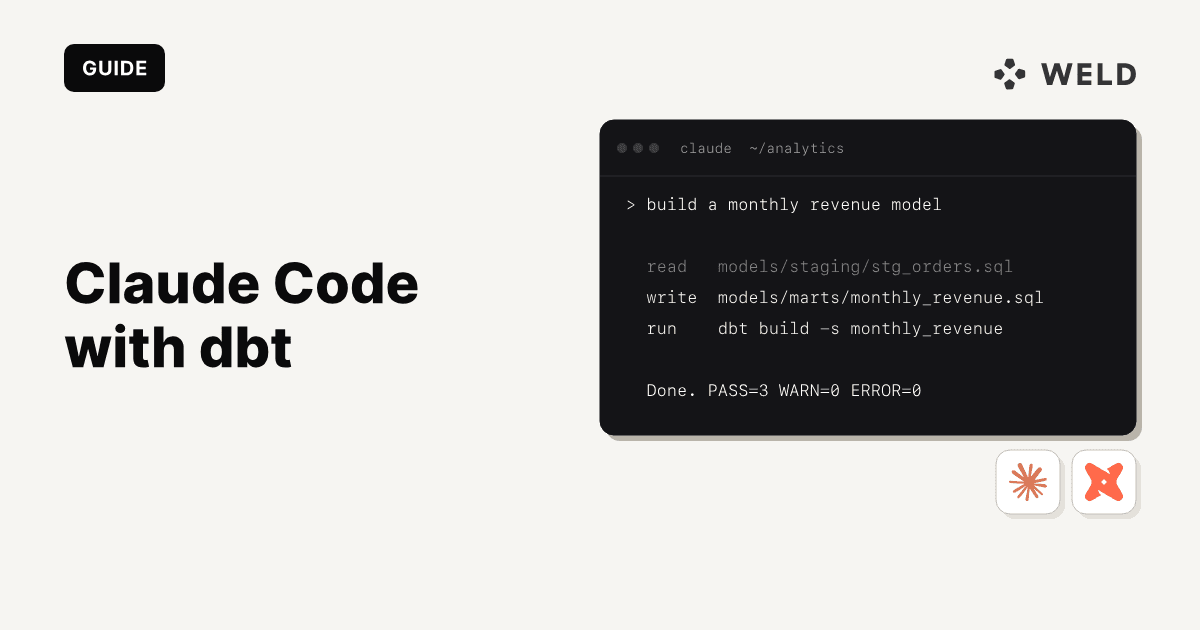
dbt projects are mostly SQL, YAML, and Jinja, but the surrounding work (writing tests, documenting models, debugging build failures, maintaining consistency across dozens of staging models) adds up fast. Claude Code is well suited for this: it can read your entire dbt project, run CLI commands, iterate on errors, and produce correct SQL + YAML in one shot.
This guide covers how to set up Claude Code for dbt development, the different CLI methods you can use, how to connect the dbt MCP server for project-aware context, and how Weld fits in as the data ingestion layer.
What you'll learn:
- How to set up Claude Code in a dbt project
- Different CLI methods: dbt Core, dbt Fusion (
dbtf), and dbt Cloud CLI - Using the dbt MCP server to give Claude deep project context
- Practical prompts and agentic workflows for dbt
- How to connect Weld for automated data ingestion and orchestration

Why Claude Code for dbt?
Most AI coding tools work at the file level which means that you paste code, get a suggestion, copy it back. Claude Code works differently: it operates as an agentic CLI that can read your full project, run commands, see errors, and fix them in a loop.
For dbt, this means Claude Code can:
- Explore your existing models, sources, and macros before writing new ones
- Run
dbt build, read the error output, and fix the SQL, all of this without you copy-pasting anything - Generate model + YAML test + documentation files that are consistent with your project conventions
- Refactor models while verifying the output doesn't change
Setting Up Claude Code for a dbt Project
1. Install Claude Code
npm install -g @anthropic-ai/claude-code
Then navigate to your dbt project directory and start a session:
cd ~/my_dbt_project
claude
Claude Code will index your project files and be ready to work.
2. Add a CLAUDE.md for dbt Context
Create a CLAUDE.md in your project root to give Claude persistent instructions about your conventions:
1# CLAUDE.md — dbt project instructions
2
3## Project structure
4
5- Staging models: models/staging/stg\_\*.sql
6- Marts models: models/marts/fct*\*, dim*\*
7- Each model should have a corresponding .yml file with tests and descriptions
8
9## SQL style
10
11- Use CTEs with clear names: source, renamed, final
12- Always alias tables and qualify columns
13- Prefer explicit column lists (avoid SELECT \* in marts)
14- Use {{ source() }} for raw tables, {{ ref() }} for model references
15
16## dbt CLI
17
18- Use `dbt build --select <model>` to build and test a specific model
19- Use `dbt build --select state:modified+` to build only changed models
20- Use `dbt test --select <model>` to run tests only
21- Use `dbt compile --select <model>` to see compiled SQL
22
23## Safety
24
25- Never hardcode credentials, instead use env_var() in profiles.yml
26- Never modify profiles.yml or dbt_cloud.yml directly
27
3. Configure profiles.yml
Your profiles.yml at ~/.dbt/profiles.yml defines the warehouse connection. Use environment variables for credentials:
Snowflake:
1my_dbt_project:
2  target: dev
3  outputs:
4    dev:
5      type: snowflake
6      account: "{{ env_var('SNOWFLAKE_ACCOUNT') }}"
7      user: "{{ env_var('SNOWFLAKE_USER') }}"
8      password: "{{ env_var('SNOWFLAKE_PASSWORD') }}"
9      role: "{{ env_var('SNOWFLAKE_ROLE', 'TRANSFORMER') }}"
10      warehouse: "{{ env_var('SNOWFLAKE_WAREHOUSE') }}"
11      database: "{{ env_var('SNOWFLAKE_DATABASE') }}"
12      schema: "{{ env_var('SNOWFLAKE_SCHEMA', 'DEV_' ~ env_var('USER')) }}"
13      threads: 4
14
BigQuery:
1my_dbt_project:
2  target: dev
3  outputs:
4    dev:
5      type: bigquery
6      method: oauth
7      project: "{{ env_var('GCP_PROJECT') }}"
8      dataset: "{{ env_var('BQ_DATASET', 'dev_' ~ env_var('USER')) }}"
9      threads: 4
10      location: EU
11
4. Set Up dbt_project.yml
1name: "my_dbt_project"
2version: "1.0.0"
3config-version: 2
4
5profile: "my_dbt_project"
6
7model-paths: ["models"]
8analysis-paths: ["analysis"]
9test-paths: ["tests"]
10seed-paths: ["seeds"]
11macro-paths: ["macros"]
12snapshot-paths: ["snapshots"]
13
14target-path: "target"
15clean-targets:
16  - "target"
17  - "dbt_packages"
18
19models:
20  my_dbt_project:
21    staging:
22      +materialized: view
23    marts:
24      +materialized: table
25
dbt CLI Methods: Core, Fusion, and Cloud CLI
Claude Code runs shell commands directly, so it works with whichever dbt CLI you have installed. Here's what's available and when to use each:
dbt Core (dbt)
The open-source, self-hosted CLI. Works with any warehouse adapter.
pip install dbt-core dbt-snowflake  # or dbt-bigquery, dbt-databricks, etc.
dbt --version
Best for: Teams running dbt independently, open-source setups, full control over the execution environment.
dbt Fusion CLI (dbtf)
A rewrite of the dbt runtime from dbt Labs focused on speed. Powers the official dbt VS Code extension.
# macOS / Linux
curl -fsSL https://public.cdn.getdbt.com/fs/install/install.sh | sh -s -- --update
exec $SHELL
dbtf --version
1# Windows
2irm https://public.cdn.getdbt.com/fs/install/install.ps1 | iex
3Start-Process powershell
4dbtf --version
5
Best for: Fast local iteration, teams using the official dbt VS Code extension, projects migrated to Fusion.
Note: dbt Fusion is not compatible with dbt Core. If you're using Fusion, the CLI command is
dbtf, notdbt. YourCLAUDE.mdshould reflect which CLI to use.
dbt Cloud CLI
A CLI backed by dbt Cloud infrastructure. Runs against the dbt Cloud API rather than your local environment.
# Install via dbt Cloud docs, then:
dbt environment show
Best for: Teams using dbt Cloud for governance, CI, and managed environments.
Tell Claude Code Which CLI to Use
Update your CLAUDE.md to specify the CLI. For example, for dbt Core:
1## dbt CLI
2
3- This project uses dbt Core. Run commands with `dbt`.
4- Example: `dbt build --select stg_orders`
5
Or for Fusion:
1## dbt CLI
2
3- This project uses dbt Fusion. Run commands with `dbtf`.
4- Example: `dbtf build --select stg_orders`
5
Claude Code reads CLAUDE.md at the start of every session, so it will always use the right CLI.
Connect the dbt MCP Server
The Model Context Protocol (MCP) gives Claude Code structured access to your dbt project's metadata (models, columns, lineage, documentation) without needing to parse files manually.
Set Up the dbt MCP Server
Add the dbt MCP server to your Claude Code configuration.
In your project's .mcp.json:
1{
2  "mcpServers": {
3    "dbt": {
4      "command": "uvx",
5      "args": [
6        "dbt-mcp"
7      ],
8      "env": {
9        "DBT_HOST": "YOUR-ACCESS-URL"
10      }
11    }
12  }
13}
Or configure it globally via the CLI:
claude mcp add dbt -- uvx dbt-mcp
What the MCP Server Gives Claude Code
Without MCP, Claude Code can still read your .sql and .yml files directly, since it's a capable file reader. But with the dbt MCP server, Claude gets:
- Compiled model definitions: resolved Jinja, not raw templates
- Column-level lineage: which columns flow where
- Test results and run history: from your dbt Cloud environment
- Documentation: model and column descriptions from your YAML
This is especially useful for large projects where reading every file would be slow.
Troubleshooting MCP
spawn uvx ENOENT —> Use the full path to uvx. Run which uvx to find it, then update your config:
1{
2  "mcpServers": {
3    "dbt": {
4      "command": "/full/path/to/uvx",
5      "args": [
6        "dbt-mcp"
7      ],
8      "env": {
9        "DBT_HOST": "YOUR-ACCESS-URL"
10      }
11    }
12  }
13}
Practical Workflows: Claude Code + dbt
Write a Model from Scratch
Ask Claude Code to generate a complete staging model with tests:
"Create a
stg_customers.sqlstaging model from sourceraw.customers. Use the CTE pattern (source → renamed → final). Addstg_customers.ymlwithunique+not_nulltests oncustomer_idand brief column descriptions. Then rundbt build --select stg_customersto verify it works."
Claude Code will:
- Read your existing source definitions and project conventions
- Create the SQL and YAML files
- Run the build command
- If there's an error, read the output and fix it automatically
The Build-Fix Loop (Agentic)
This is the top feature of Claude Code. Instead of manually copying errors between terminal and editor:
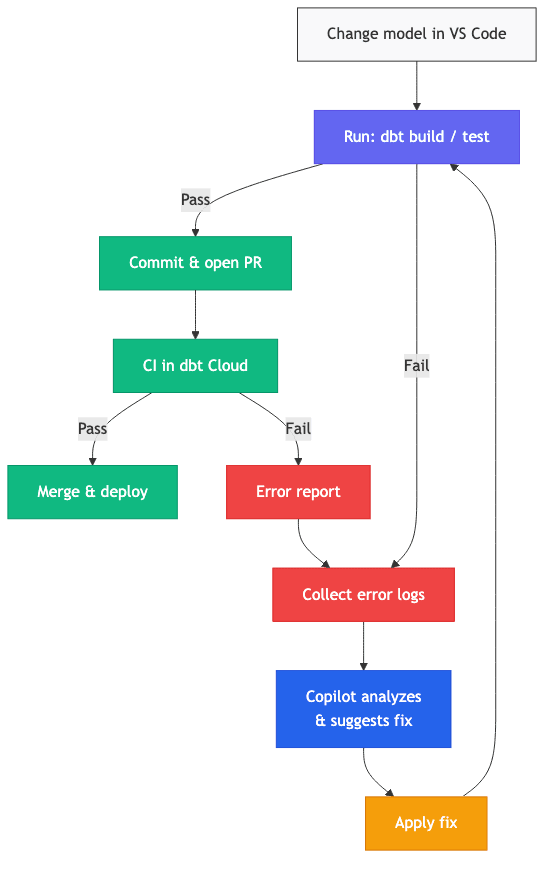
"Run
dbt build --select +fct_ordersand fix any errors. Keep iterating until the build passes."
Claude Code will run the command, read the error output, edit the relevant file, and re-run it in a loop until it's green or it needs your input. This can resolve common issues like:
- Column name mismatches between models
- Missing source definitions
- Failed tests (unique, not_null violations in dev data)
- Jinja syntax errors
Refactor Without Breaking Things
"Refactor
fct_monthly_revenue.sqlfor readability: name CTEs clearly, remove duplicated logic, add comments for complex joins. Output columns and semantics must not change. After refactoring, rundbt build --select fct_monthly_revenueto verify."
Generate Tests and Documentation in Bulk
"For every model in
models/staging/that doesn't have a corresponding.ymlfile, create one with:uniqueandnot_nullon the primary key, and a one-line description for each column based on the SQL."
Debug a Failing CI Pipeline
"The CI build is failing on
fct_orders. Here's the error log: [paste]. Read the model, its upstream dependencies, and the test definitions. Diagnose the root cause and apply a minimal fix."
Using Claude Code in VS Code
Claude Code also works as a VS Code extension, giving you the same agentic CLI experience inside your editor. If you use the official dbt VS Code extension (Fusion) for live previews and lineage, Claude Code complements it by handling multi-file generation, build-fix loops, and bulk documentation.
For a full guide on the dbt VS Code extension with LLM-assisted workflows, see our companion post: dbt in VS Code: The Official Extension, LLMs & Agentic Workflows.
Connect Weld for Data Ingestion
dbt handles transformation, but your models need data to transform. Weld connects to your data sources (APIs, databases, SaaS tools) and syncs raw data into your warehouse, so it is ready for dbt to pick up.
How Weld + dbt Work Together
- Weld syncs raw data from 300+ connectors into your warehouse
- dbt reads from those raw tables and transforms them into staging models, marts, and metrics
- Weld can trigger dbt jobs after syncs complete, and handle reverse ETL to push transformed data back to downstream tools
Using Weld with dbt Cloud
If you're using dbt Cloud, Weld integrates directly via webhooks:
- Set up the dbt connector in Weld: go to Settings → Transform → select dbt and connect with your service account token
- Create an orchestration workflow: add your data source syncs, then attach a dbt webhook that triggers after ingestion completes
- Your dbt jobs run automatically after every Weld sync, ensuring your models always use the freshest data
For the full setup guide, see the Weld dbt Cloud documentation.
Using Weld with dbt Core
With dbt Core, Weld and dbt operate independently on the same warehouse:
- Weld handles ingestion by syncing data from your sources into raw schemas
- dbt Core handles transformations by reading from those same raw schemas
No direct connection is needed since both tools point at the same warehouse. Configure this in Weld under Settings → Account → select dbt Core as your transformation tool.
For details, see the Weld dbt Core documentation.
Troubleshooting
Claude Code doesn't know which dbt CLI to use
Add a CLAUDE.md to your project root specifying dbt, dbtf, or the Cloud CLI. Claude reads this at session start.
Claude Code can't find the dbt binary
Make sure the CLI is on your $PATH. Run which dbt (or which dbtf) to verify. If it's installed in a virtualenv, activate it before starting Claude Code.
MCP server fails to start
Check that uvx is installed and on your PATH. Use the full path in your .mcp.json if needed.
Build errors in a loop If Claude Code keeps failing on the same error, it may be a data issue (e.g., legitimately duplicate keys in dev data) rather than a code issue. Check the underlying data.
"dbt language server is not running" (VS Code extension) This applies if you're using the dbt VS Code extension alongside Claude Code. Open the project as a VS Code workspace (Add Folder to Workspace → Save Workspace As).
FAQ
Does Claude Code work with all dbt CLIs?
Yes. Claude Code runs shell commands, so it works with dbt Core (dbt), dbt Fusion (dbtf), and the dbt Cloud CLI. Specify which one to use in your CLAUDE.md.
Do I need the dbt MCP server?
No. Claude Code can read your .sql and .yml files directly. The MCP server adds compiled metadata, lineage, and test results — useful for large projects, but not required.
Can Claude Code run dbt against my production warehouse?
It can run whatever CLI commands you allow. Use a dev target in profiles.yml and add a note in CLAUDE.md that Claude should never target production.
What warehouses are supported?
dbt supports BigQuery, Snowflake, Databricks, Redshift, PostgreSQL, and more via adapters. Weld supports all major warehouses you can see the full connector list.
How do I trigger dbt jobs after a Weld sync?
In Weld, go to Orchestration → Create a workflow → add a webhook → select dbt as the external system → choose the dbt job to trigger. The webhook fires after your selected sync jobs complete.