Why rebuild Shopify's sales report in dbt?
Summary: Shopify's sales reports are the numbers your finance team trusts and your board deck repeats, but they live behind an admin UI with a date picker and a CSV button. This guide is the production dbt blueprint for reproducing them in your warehouse: the sales equation component by component, why order_line is the wrong source table, the raw → staging → core → analytics lineage, annotated SQL for every metric, the parity gotchas that cost a week, and multi-store plus multi-currency handling. Every example is dbt on BigQuery; the logic ports to Snowflake, Databricks, Redshift or Postgres with minor dialect changes.
You need your own model once you have to do any of these:
- Join sales to ad spend, COGS or shipping cost to get real profit per SKU
- Report across multiple Shopify stores as one business
- Report in a single reporting currency across stores that sell in many
- Keep history at daily grain beyond Shopify's retention
- Put sales next to marketing, support and supply-chain data in one BI layer
And this is where nearly everyone gets it wrong the first time: they SUM(price * quantity) off order_line, compare it to the admin, and find they're off by anywhere from 2% to 20%.
Just want a working query? If you're not on dbt and you have a single store, the standalone SQL version of this report is one query you can paste in and run today. This guide is what you graduate to when you have several storefronts, several currencies, and a finance team asking why the numbers moved.
Part 1 — The Shopify sales equation
Before writing a line of SQL, know exactly what you're reproducing. Shopify's sales reports are built on one equation, applied at whatever grain you slice by (day, product, channel, location, staff):
  Gross sales        product price x quantity, before anything else
- Discounts          order- and line-level discounts (shown negative)
- Returns            value of returned items (shown negative)
-----------------
= Net sales
+ Shipping charges
+ Duties
+ Additional fees
+ Taxes
-----------------
= Total sales
The definitions that trip people up
| Component | What it actually is | Common mistake |
|---|---|---|
| Gross sales | Line price × quantity, excluding tax, shipping, discounts and returns | Including tax, or netting discounts out of it |
| Discounts | All discounts applied before tax - code, automatic and manual. Stored negative | Only counting discount codes, missing automatic and manual discounts |
| Returns | Value of items returned or refunded, attributed to the refund date, stored negative | Attributing returns back to the original order date |
| Net sales | Gross sales – Discounts – Returns (with negative signs, this is arithmetic addition) | Subtracting positive numbers twice and double-counting |
| Shipping charges | What the customer paid for shipping, excluding tax | Confusing it with what shipping cost you - a different metric entirely |
| Duties | Import duties charged to the customer | Rolling them into shipping |
| Additional fees | Local or regulatory fees (bottle deposits, e-waste levies) | Ignoring; usually 0 for most stores |
| Taxes | VAT or sales tax collected | Including in gross sales |
| Total sales | Net sales + shipping + duties + fees + taxes | Comparing against payouts, which are net of processing fees |
Sign conventions: pick one and enforce it
The single biggest source of "why is my number wrong" is inconsistent signs. Adopt Shopify's own convention and never deviate:
- Discounts are negative. A 100 discount is stored as
-100. - Returns are negative. A 500 return is stored as
-500. - Therefore
net_sales = gross_sales + discounts + returnsarithmetically, which is why in SQL you'll seegross_salesderived asnet_sales - discounts - returns- subtracting a negative adds it back.
Once the convention is fixed, every downstream formula is a plain sum and every BI tool aggregates correctly without special-casing.
Total sales vs "total Shopify sales"
Worth building both:
1-- Shopify's Total sales (matches the UI)
2net_sales + shipping_charges + duties + return_fees + additional_fees + taxes as total_shopify_sales
3  , -- Revenue-recognition friendly: excludes tax and duties (pass-through money)
4net_sales + shipping_charges + return_fees + additional_fees as total_sales
Finance almost always wants the second. The UI shows the first. Ship both columns and let each consumer pick - arguing about which is "correct" wastes a quarter.
Part 2 — The source tables that actually matter
Why order_line is the wrong table
The intuitive model is: an order has lines, lines have price and quantity, sum them up. It fails for a specific structural reason.
order_line is a current-state table. It tells you what the order looks like right now. Shopify's sales reports are event-based - they attribute value to the day the value changed. An order placed on the 1st, edited on the 3rd and partially refunded on the 20th produces value on three separate days. A current-state table can only tell you the end state.
Sum order_line and you get returns silently netted back to the original order date, invisible order edits, no way to reproduce a sales-over-time chart that matches the admin, and restated history - yesterday's report changes when someone refunds an old order.
The tables you actually need
Shopify exposes an event log through order agreements. Every change to an order's financial state creates an agreement, and each agreement carries the sale lines that changed.
| Table | Role in the sales report | Required? |
|---|---|---|
order | Order header: status, currency, location, channel, addresses, test flag | Yes |
order_agreement | The event log: one row per financial event, with happened_at + reason | Yes |
order_agreement_sale | Line-level financial deltas per event - the heart of the report | Yes |
order_line | Product identity (SKU, title, variant), gift-card flag, requires_shipping | Yes |
order_refund / order_line_refund | Refund dates, restock type, per-line refund amounts | Yes |
shop | Store's base currency (fallback only) | Yes |
location | Physical and virtual location names, used to resolve location_name | Recommended |
product / product_variant | Canonical SKU, product status | Recommended |
order_shipping_line | Shipping method chosen - used to classify delivery type | Optional |
transaction / transaction_fees | Payment processor fees - needed for profit, not for sales | Optional |
| FX rates (external) | Daily exchange rates for multi-currency reporting | If multi-currency |
The two columns that decide everything
Inside order_agreement_sale, two enum columns drive the entire report.
line_type — what kind of money this is:
line_type | Meaning | Feeds |
|---|---|---|
PRODUCT | A product line | Gross sales, discounts, net sales, quantity |
SHIPPING | Shipping charged to the customer | Shipping charges |
DUTY | Import duties | Duties |
FEE | Fees, typically return or restocking fees | Return fees |
GIFT_CARD | Gift card purchase | Gift card sales (excluded from product sales) |
ADJUSTMENT | Return adjustments not tied to a product line | Returns |
TIP | Tips | Usually excluded from sales |
action_type — which direction the money moved:
action_type | Meaning | Row type |
|---|---|---|
ORDER | Original sale | SALE |
UPDATE | Order edit adding or changing value | SALE |
RETURN | Refund or return | RETURN |
Combine them and you get a matrix every metric selects a cell from:
PRODUCT | SHIPPING | DUTY | FEE | GIFT_CARD | ADJUSTMENT | |
|---|---|---|---|---|---|---|
SALE (ORDER, UPDATE) | gross sales, discounts, net sales, qty | shipping charges | duties | fees | gift card sales | — |
RETURN (RETURN) | returns, reversals, returned qty | shipping reversals | — | return fees | — | returns (no SKU) |
None of this exists in isolation - order_agreement_sale sits inside Shopify's full relational model alongside order, order_line, customer, product and everything else Weld syncs. Here's the live schema, the same explorer you'd get from Shopify's connector page:
Click through to the full-page schema explorer for the interactive version - pan, zoom, and search across every table and relationship.
Part 3 — The model architecture
Four layers, each with one job.
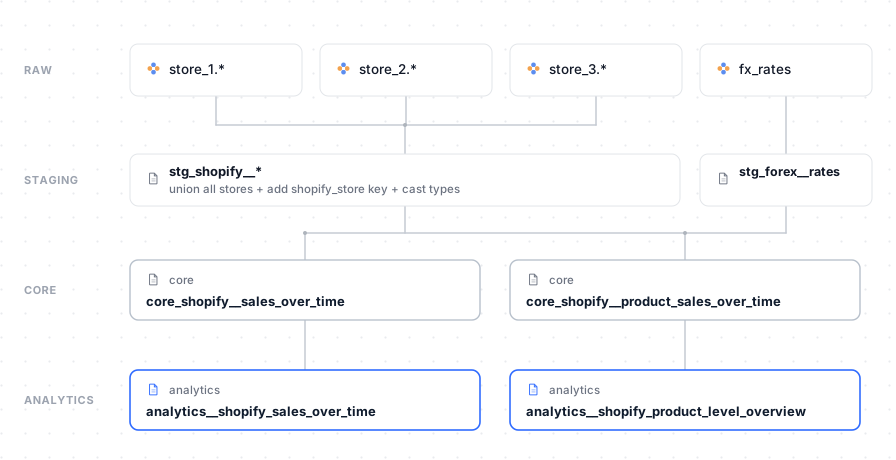
Each Shopify storefront lands in its own raw schema. Staging unions them behind a shopify_store key, so the two core models - and everything downstream - never know how many stores there are.
Raw — untouched ELT output. One schema per store. Never queried except by staging.
Staging — one model per source table. Union all stores, add a shopify_store key, cast types, nothing else. No business logic, no filters, no joins. This is what makes adding a fourth storefront a ten-minute job.
Core — where the reports live. core_shopify__sales_over_time is the Sales report at order × day × row-type grain. core_shopify__product_sales_over_time is the Sales-by-product report at order × line × day grain.
Analytics — thin and stable. Usually a SELECT * plus a join or two. The point is that dashboards bind to a contract you control, so you can refactor core freely.
1-- analytics__shopify_sales_over_time.sql
2select
3    *
4from
5    {{ ref('core_shopify__sales_over_time') }}
Part 4 — Staging: unioning multiple stores
If you run one Shopify store, skip to Part 5. If you run regional storefronts - and most scaling DTC brands do - solve this first, because it affects every model above it.
Whatever you do, do it here. Staging is the only layer that should know how many stores exist; core just carries a shopify_store key through every join.
The simple version: UNION ALL
Each store lands in its own schema, so a staging model becomes one block per store, each labelling its rows:
1-- stg_shopify__order_agreement_sale.sql
2{{ config(materialized='table') }}
3select
4    'store_1' as shopify_store
5  , /* ...columns... */
6from
7    {{ source('shopify_store_1', 'order_agreement_sale') }}
8union all
9select
10    'store_2' as shopify_store
11  , /* ...same columns... */
12from
13    {{ source('shopify_store_2', 'order_agreement_sale') }}
That is what the ready-made templates do. It is plain SQL, there is nothing to configure, and adding a storefront touches staging only.
When UNION ALL isn't enough
It breaks the moment the stores' columns diverge - and they do. A store connected last month has fields one connected two years ago doesn't, and UNION ALL fails on the column count rather than degrading gracefully.
If you're maintaining more than two or three storefronts, that stops being hypothetical and the fix is a macro that introspects each source's columns, takes the union of all column names, and fills missing ones with NULL:
1{% macro shopify_union(table_name, store_sources, store_column='shopify_store') %}
2  {# store_sources = [('raw_schema_a', 'store_a'), ('raw_schema_b', 'store_b'), ...] #}
3
4  {% set refs = [] %}
5  {% for source_name, _ in store_sources %}
6    {% do refs.append(source(source_name, table_name)) %}
7  {% endfor %}
8
9  {% if not execute %}
10    SELECT * FROM {{ refs[0] }} WHERE 1 = 0
11  {% else %}
12
13    {# Collect every column name across every store #}
14    {% set relation_columns = {} %}
15    {% for source_name, _ in store_sources %}
16      {% do relation_columns.update({
17           source_name: adapter.get_columns_in_relation(refs[loop.index0])
18         }) %}
19    {% endfor %}
20
21    {% set all_columns = [] %}
22    {% set seen = [] %}
23    {% for source_name, _ in store_sources %}
24      {% for column in relation_columns[source_name] %}
25        {% if column.name | lower not in seen %}
26          {% do all_columns.append(column.name) %}
27          {% do seen.append(column.name | lower) %}
28        {% endif %}
29      {% endfor %}
30    {% endfor %}
31
32    {# Emit one SELECT per store, NULL-filling anything it lacks #}
33    {% for source_name, store_label in store_sources %}
34      {% set present = relation_columns[source_name]
35                       | map(attribute='name') | map('lower') | list %}
36      SELECT
37        {% for col in all_columns %}
38          {% if col | lower in present %}
39            {{ adapter.quote(col) }},
40          {% else %}
41            NULL AS {{ adapter.quote(col) }},
42          {% endif %}
43        {% endfor %}
44        '{{ store_label }}' AS {{ store_column }}
45      FROM {{ refs[loop.index0] }}
46      {% if not loop.last %}UNION ALL{% endif %}
47    {% endfor %}
48
49  {% endif %}
50{% endmacro %}
51
Each staging model then becomes three lines:
1-- stg_shopify__order_agreement_sale.sql
2{{ config(materialized='table') }}
3
4{% set store_sources = [
5    ('shopify_raw_store_1', 'store_1'),
6    ('shopify_raw_store_2', 'store_2'),
7    ('shopify_raw_store_3', 'store_3')
8] %}
9
10{{ shopify_union('order_agreement_sale', store_sources) }}
11
Either way, two rules will save you pain:
shopify_storejoins everywhere. Order IDs are only unique within a store. Every join, window partition andGROUP BYin every downstream model must includeshopify_store. Forget it once and rows silently fan out across storefronts - every number inflates and nothing errors. Two related traps: yourshopCTE must group by store rather than collapsing withANY_VALUE, because currency and timezone vary between storefronts; and location IDs are per store, so those joins need the key too.- Materialize the big ones as tables.
order_agreement_saleandproduct_variantget hit repeatedly by the core models; leaving them as views makes the warehouse re-scan raw on every reference.
Part 5 — Building the sales-over-time model
The model, CTE by CTE:
orders      filter test + pending/voided/expired; resolve currency, country, location
agreements  exclude reason = 'voided'; carry happened_at + reason
sales       agreement sale lines; shop money + presentment money
    |
joined      agreements . sales . orders
            convert happened_at -> local date; flag checkout-flow edits
    |
typed       classify SALE vs RETURN
    |
agg         GROUP BY day, store, order, location, channel, row type
            -> every sales component
    |
final       components + parity variants + reporting currencies
            (joined with: dimensions, nearest-day FX)
Step 1 — Filter orders correctly
Your first CTE decides which orders exist at all. Get this wrong and nothing downstream can save you.
1with
2    shop as (
3        select
4            cast(shopify_shop as string) as shopify_shop
5          , any_value(upper(nullif(trim(cast(currency as string)), ''))) as shop_currency
6        from
7            {{ ref('stg_shopify__shop') }}
8        group by
9            1
10    )
11  , orders as (
12        select
13            cast(o.shopify_store as string) as shopify_store
14          , cast(o.id as int64) as order_id
15          , cast(o.name as string) as order_name
16          , cast(o.location_id as int64) as location_id
17          , lower(cast(o.source_name as string)) as source_name
18          , -- Currency resolution: the ORDER's own recorded currency wins over the
19            -- shop's CURRENT currency. Stores that changed base currency, or imported
20            -- historical orders from another platform, have orders genuinely
21            -- denominated in a different currency than the shop is today. Falling back
22            -- to the shop's current currency silently mislabels those amounts and can
23            -- inflate converted figures by the entire FX factor.
24            upper(
25                nullif(
26                    trim(
27                        coalesce(
28                            cast(
29                                o.current_total_price_set_shop_money_currency_code as string
30                            )
31                          , cast(o.currency as string)
32                          , sh.shop_currency
33                          , cast(
34                                o.current_total_price_set_presentment_money_currency_code as string
35                            )
36                          , cast(o.presentment_currency as string)
37                          , '{{ var("default_currency", "USD") }}'
38                        )
39                    )
40                  , ''
41                )
42            ) as shop_currency
43          , o.created_at
44          , lower(cast(o.financial_status as string)) as financial_status
45          , lower(cast(o.fulfillment_status as string)) as fulfillment_status
46          , upper(
47                nullif(
48                    trim(cast(o.shipping_address_country_code as string))
49                  , ''
50                )
51            ) as shipping_country_code
52          , upper(
53                nullif(
54                    trim(cast(o.billing_address_country_code as string))
55                  , ''
56                )
57            ) as billing_country_code
58          , cast(o.cancelled_at as timestamp) as cancelled_at
59        from
60            {{ ref('stg_shopify__order') }} o
61            left join shop sh on sh.shopify_shop = cast(o.shopify_store as string)
62        where
63            lower(cast(o.financial_status as string)) not in ('pending', 'voided', 'expired')
64            and o.test = false
65    )
Three decisions embedded there, all of which matter:
test = FALSE— test orders from theme development and gateway testing are real rows in raw data, and Shopify's reports exclude them. Miss this and your early history is junk.- Excluding
pending,voided,expired— these never became revenue. Note thatrefundedandpartially_refundedorders stay in: their refunds show up as RETURN events on the refund date, which is exactly what you want. - Currency precedence — the order's own currency beats the shop's current currency. This is the nastiest multi-currency bug: if your store ever changed base currency, or you migrated orders in from another platform, those historical orders carry a different currency, and defaulting to today's shop currency mislabels them by the full FX factor.
Step 2 — The event log
1agreements as (
2    select
3        cast(shopify_store as string) as shopify_store
4      , cast(id as string) as order_agreement_id
5      , cast(order_id as int64) as order_id
6      , cast(happened_at as timestamp) as happened_at
7      , lower(cast(app_handle as string)) as app_handle
8      , cast(reason as string) as reason
9    from
10        {{ ref('stg_shopify__order_agreement') }}
11    where
12        lower(reason) != 'voided'
13)
14  , sales as (
15    select
16        cast(shopify_store as string) as shopify_store
17      , cast(order_id as int64) as order_id
18      , cast(order_agreement_id as string) as order_agreement_id
19      , upper(cast(line_type as string)) as line_type
20      , upper(cast(action_type as string)) as action_type
21      , cast(quantity as int64) as quantity
22      , -- Shop money = the store's own base currency
23        cast(total_amount_shop_money_amount as numeric) as total_amount
24      , cast(total_tax_amount_shop_money_amount as numeric) as total_tax
25      , cast(
26            total_discount_amount_before_taxes_shop_money_amount as numeric
27        ) as discount_before_tax
28      , -- Presentment money = what the customer actually saw and paid
29        cast(total_amount_presentment_money_amount as numeric) as presentment_total_amount
30      , cast(
31            total_tax_amount_presentment_money_amount as numeric
32        ) as presentment_total_tax
33      , cast(
34            total_discount_amount_before_taxes_presentment_money_amount as numeric
35        ) as presentment_discount_before_tax
36      , upper(
37            cast(
38                total_amount_presentment_money_currency_code as string
39            )
40        ) as presentment_currency
41    from
42        {{ ref('stg_shopify__order_agreement_sale') }}
43)
reason = 'voided' agreements are cancellations of the agreement itself - they never represented money. Excluding them at the source is cleaner than netting them out later.
Step 3 — Join and localise the date
1-- Earliest ORDER agreement per order - used to detect checkout-flow edits
2order_first_time as (
3    select
4        shopify_store
5      , order_id
6      , min(happened_at) as order_created_at
7    from
8        agreements
9    where
10        lower(reason) = 'order'
11    group by
12        1
13      , 2
14)
15  , joined as (
16    select
17        -- Localise BEFORE truncating to a date. This is not optional.
18        date(datetime(a.happened_at, '{{ var("report_timezone", "UTC") }}')) as event_day
19      , a.shopify_store
20      , a.order_id
21      , a.order_agreement_id
22      , o.location_id
23      , o.source_name
24      , s.line_type
25      , s.action_type
26      , a.reason
27      , coalesce(s.quantity, 0) as quantity
28      , coalesce(s.total_amount, 0) as total_amount
29      , coalesce(s.total_tax, 0) as total_tax
30      , coalesce(s.discount_before_tax, 0) as discount_before_tax
31      , (
32            coalesce(s.total_amount, 0) - coalesce(s.total_tax, 0)
33        ) as amount_ex_tax
34      , -- Presentment equivalents, carried in parallel
35        coalesce(s.presentment_total_amount, 0) as presentment_total_amount
36      , coalesce(s.presentment_total_tax, 0) as presentment_total_tax
37      , coalesce(s.presentment_discount_before_tax, 0) as presentment_discount_before_tax
38      , s.presentment_currency
39      , -- Checkout-flow edit: an ORDER_EDIT within 90 seconds of order creation is
40        -- part of the original purchase (upsell widget, post-purchase offer), not a
41        -- later restatement of the order.
42        case
43            when a.reason = 'ORDER_EDIT'
44            and timestamp_diff(a.happened_at, oft.order_created_at, second) <= 90 then true
45            else false
46        end as is_checkout_edit
47    from
48        agreements a
49        join sales s on s.order_agreement_id = a.order_agreement_id
50        and s.order_id = a.order_id
51        and s.shopify_store = a.shopify_store
52        join orders o on o.order_id = a.order_id
53        and o.shopify_store = a.shopify_store
54        left join order_first_time oft on oft.order_id = a.order_id
55        and oft.shopify_store = a.shopify_store
56)
57  , typed as (
58    select
59        *
60      , case
61            when action_type in ('ORDER', 'UPDATE') then 'SALE'
62            when action_type = 'RETURN' then 'RETURN'
63            else 'OTHER'
64        end as report_row_type
65    from
66        joined
67    where
68        action_type in ('ORDER', 'UPDATE', 'RETURN')
69)
amount_ex_tax = total_amount - total_tax is the workhorse expression. Shopify's total_amount on an agreement sale line is tax-inclusive; every sales component except taxes is tax-exclusive. Subtract once, here, and reuse.
The 90-second window is the kind of rule you only discover by diffing against the admin UI. Post-purchase upsells and checkout-flow adjustments arrive as ORDER_EDIT agreements seconds after the order, and Shopify's UI treats them as part of the order. A genuine order edit three days later is a restatement. Ninety seconds separates the two cleanly in practice - tune it if your checkout has slower post-purchase flows.
Part 6 — Every sales component, in SQL
The core aggregation. Grain: day × store × order × location × channel × row type.
Keeping report_row_type in the grain (rather than collapsing to one row per order-day) means a day where an order both sells and refunds produces two rows, which keeps the SALE and RETURN sides independently auditable.
Orders count
1max(
2    case
3        when report_row_type = 'SALE'
4        and line_type = 'PRODUCT'
5        and action_type = 'ORDER'
6        and reason not in ('RETURN', 'ORDER_EDIT') then 1
7        else 0
8    end
9) as orders
MAX not SUM - one order is one order regardless of how many product lines it has. Excluding ORDER_EDIT prevents an edited order being counted a second time on the edit date.
For a clean AOV denominator that counts every order exactly once across its whole lifetime, add a window-function flag in the final SELECT:
1-- Flags exactly ONE row per order, on its first SALE day. Summing this over any
2-- window gives "orders placed" - the denominator Shopify uses for AOV. Counts
3-- edit-only orders that have no ORDER row, ignores return-only orders, and
4-- never double-counts across locations or days.
5case
6    when report_row_type = 'SALE'
7    and row_number() over (
8        partition by
9            shopify_store
10          , order_id
11        order by
12            case
13                when report_row_type = 'SALE' then 0
14                else 1
15            end
16          , day_date asc
17          , location_id asc
18          , source_name asc
19          , reason asc
20    ) = 1 then 1
21    else 0
22end as is_order_placed
Quantity — three variants, and why you need all three
1-- 1. Net quantity: sales minus returns. The "real" unit movement.
2sum(
3    case
4        when report_row_type = 'SALE'
5        and line_type in ('PRODUCT', 'GIFT_CARD') then quantity
6        when report_row_type = 'RETURN'
7        and line_type in ('PRODUCT', 'ADJUSTMENT') then quantity
8        else 0
9    end
10) as quantity
11  , -- 2. Strict "units ordered": excludes returns AND all order edits.
12--    Matches the Shopify admin UI's units-ordered figure.
13sum(
14    case
15        when report_row_type = 'SALE'
16        and line_type = 'PRODUCT'
17        and action_type = 'ORDER'
18        and coalesce(reason, '') not in ('RETURN', 'ORDER_EDIT') then quantity
19        else 0
20    end
21) as quantity_ordered_shopify_compat
22  , -- 3. Export parity: keeps checkout-flow edits, drops post-order edits.
23--    Matches Shopify's CSV export, which differs from the UI. Yes, really.
24sum(
25    case
26        when report_row_type = 'SALE'
27        and line_type in ('PRODUCT', 'GIFT_CARD')
28        and action_type = 'ORDER'
29        and coalesce(reason, '') != 'RETURN'
30        and (
31            coalesce(reason, '') != 'ORDER_EDIT'
32            or is_checkout_edit
33        ) then quantity
34        else 0
35    end
36) as quantity_ordered_shopify_export_parity
Shopify's UI and its CSV export do not always agree on units. Rather than picking a winner, materialise both and document which is which. When finance asks why this doesn't match the export, you have an answer and a column.
Net sales, returns, discounts
1sum(
2    case
3        when report_row_type = 'SALE'
4        and line_type = 'PRODUCT' then amount_ex_tax
5        when report_row_type = 'RETURN'
6        and line_type in ('PRODUCT', 'ADJUSTMENT') then amount_ex_tax
7        else 0
8    end
9) as net_sales
10  , sum(
11    case
12        when report_row_type = 'RETURN'
13        and line_type in ('PRODUCT', 'ADJUSTMENT') then amount_ex_tax
14        else 0
15    end
16) as returns
17  , -- Split out separately: useful for diagnosing "unattributed" refund value
18sum(
19    case
20        when report_row_type = 'RETURN'
21        and line_type = 'ADJUSTMENT' then amount_ex_tax
22        else 0
23    end
24) as return_adjustments
25  , (-1) * sum(
26    case
27        when report_row_type = 'SALE'
28        and line_type = 'PRODUCT' then greatest(discount_before_tax, 0)
29        else 0
30    end
31) as discounts
RETURN rows carry negative total_amount, so they reduce net sales automatically. ADJUSTMENT lines are return-side amounts Shopify can't attribute to a specific product line (partial refunds, goodwill credits) - including them is what makes returns tie out. Returns land on the refund date, not the order date; that's the whole point of the event grain and what makes your daily chart match the admin.
On discounts, two details: GREATEST(x, 0) guards against negative discount values, which appear on some edit and return events and would otherwise inflate the total; (-1) * enforces the sign convention.
Gross sales, shipping, duties, fees, taxes, totals
1-- In the final SELECT, derived from the aggregates. Since discounts and
2-- returns are both stored negative, this ADDS them back.
3(net_sales - discounts - returns) as gross_sales
4  , -- No report_row_type filter on these four: shipping and fees can occur on both
5-- SALE and RETURN events, and both belong in the totals. A refunded shipping
6-- charge arrives as a SHIPPING line on a RETURN action and correctly reduces
7-- the shipping total.
8sum(
9    case
10        when line_type = 'SHIPPING' then amount_ex_tax
11        else 0
12    end
13) as shipping_charges
14  , sum(
15    case
16        when line_type = 'DUTY' then amount_ex_tax
17        else 0
18    end
19) as duties
20  , sum(
21    case
22        when line_type = 'FEE' then amount_ex_tax
23        else 0
24    end
25) as return_fees
26  , cast(0 as numeric) as additional_fees
27  , sum(total_tax) as taxes
28  , (
29    net_sales + shipping_charges + duties + return_fees + additional_fees + taxes
30) as total_shopify_sales
31  , (
32    net_sales + shipping_charges + return_fees + additional_fees
33) as total_sales
additional_fees is hardcoded to zero for most stores. Keep the column so the schema stays stable and the sales equation stays complete; populate it if your market has regulatory fees.
Reversal columns (the returns detail block)
Shopify's reports include a returns breakdown. These columns let you build it without a second model:
1sum(
2    case
3        when report_row_type = 'RETURN'
4        and line_type in ('PRODUCT', 'ADJUSTMENT') then amount_ex_tax
5        else 0
6    end
7) as sales_reversals
8  , (-1) * sum(
9    case
10        when report_row_type = 'RETURN'
11        and line_type = 'PRODUCT' then discount_before_tax
12        else 0
13    end
14) as discount_reversals
15  , sum(
16    case
17        when report_row_type = 'RETURN' then total_tax
18        else 0
19    end
20) as tax_reversals
21  , sum(
22    case
23        when report_row_type = 'RETURN'
24        and line_type = 'SHIPPING' then amount_ex_tax
25        else 0
26    end
27) as shipping_reversals
28  , sum(
29    case
30        when report_row_type = 'RETURN'
31        and line_type in ('PRODUCT', 'ADJUSTMENT') then quantity
32        else 0
33    end
34) as reversed_quantity
And in the final SELECT:
1sales_reversals as net_sales_reversals
2  , sales_reversals - discount_reversals as gross_sales_reversals
3  , sales_reversals + tax_reversals + shipping_reversals + return_fees as total_sales_reversals
Gift cards — keep them separate
Gift card sales are not product sales. Selling a gift card is deferred revenue; redeeming it is a discount on a future order. Shopify keeps them out of the sales equation, and so should you:
1sum(
2    case
3        when line_type = 'GIFT_CARD' then (
4            amount_ex_tax - (-1) * greatest(discount_before_tax, 0)
5        )
6        else 0
7    end
8) as gift_card_gross_sales
9  , sum(
10    case
11        when line_type = 'GIFT_CARD' then amount_ex_tax
12        else 0
13    end
14) as gift_card_net_sales
15  , (-1) * sum(
16    case
17        when line_type = 'GIFT_CARD' then greatest(discount_before_tax, 0)
18        else 0
19    end
20) as gift_card_discounts
21  , sum(
22    case
23        when line_type = 'GIFT_CARD' then total_tax
24        else 0
25    end
26) as gift_card_taxes
27  , -- Convenience column: tax on gift cards behaves differently by jurisdiction
28taxes - gift_card_taxes as taxes_excluding_gift_cards
The complete component reference
| Output column | Source rows | Sign |
|---|---|---|
orders | MAX over SALE + PRODUCT + ORDER, excluding edits | positive |
is_order_placed | window flag, first SALE day per order | 0/1 |
quantity | SALE (PRODUCT, GIFT_CARD) + RETURN (PRODUCT, ADJUSTMENT) | net |
quantity_ordered_shopify_compat | SALE + PRODUCT + ORDER, no edits or returns | positive |
quantity_ordered_shopify_export_parity | as above, keeping checkout edits | positive |
gross_sales | net_sales − discounts − returns | positive |
discounts | SALE + PRODUCT, GREATEST(discount, 0) | negative |
returns | RETURN + (PRODUCT, ADJUSTMENT) | negative |
return_adjustments | RETURN + ADJUSTMENT only | negative |
net_sales | SALE + PRODUCT, plus RETURN + (PRODUCT, ADJUSTMENT) | net |
shipping_charges | any SHIPPING line | net |
duties | any DUTY line | net |
return_fees | any FEE line | positive |
additional_fees | constant 0 unless your market needs it | positive |
taxes | SUM(total_tax) across all lines | net |
total_shopify_sales | net + shipping + duties + fees + taxes | net |
total_sales | net + shipping + fees (no tax, no duties) | net |
sales_reversals … reversed_quantity | RETURN rows by line type | negative |
gift_card_* | GIFT_CARD lines, excluded from product sales | positive |
Part 7 — The implementation gotchas that cost you a week
These separate a model that's "roughly right" from one finance signs off on. For the conceptual version of why Shopify and your warehouse disagree in the first place - attribution windows, event aggregation, metric definitions - see Shopify analytics discrepancies. What follows is the SQL-level fix for each.
1. Timezone: localise before you truncate
happened_at is UTC. Shopify's reports use the store's timezone. If you DATE(happened_at) directly, every order placed after your local midnight offset lands on the wrong day - a systematic daily drift that averages out over a month but makes daily comparison impossible and breaks day-of-week analysis.
1-- WRONG
2date(happened_at)
3-- RIGHT
4date(datetime(happened_at, '{{ var("report_timezone") }}'))
Set the timezone once as a dbt var and reference it everywhere. Never inline it.
2. Order edits: three different behaviours
| Scenario | Shopify UI | What to do |
|---|---|---|
| Post-purchase upsell, seconds after checkout | Part of the original order | Include via is_checkout_edit |
| Support agent adds an item 3 days later | New value on the edit date | Include as a SALE on the edit date, exclude from "orders placed" |
| Edit that removes an item | Negative value on the edit date | Include; it correctly reduces that day's sales |
That's the reason for the parity columns:
1-- Shopify-parity net sales: exclude POST-ORDER edits, keep checkout edits
2sum(
3    case
4        when report_row_type = 'SALE'
5        and line_type = 'PRODUCT'
6        and (
7            coalesce(reason, '') != 'ORDER_EDIT'
8            or is_checkout_edit
9        ) then amount_ex_tax
10        when report_row_type = 'RETURN'
11        and line_type in ('PRODUCT', 'ADJUSTMENT') then amount_ex_tax
12        else 0
13    end
14) as net_sales_shopify_parity
Ship both net_sales (everything, correct for finance) and net_sales_shopify_parity (matches the UI, correct for reconciliation).
3. Refund vs return vs cancellation
Shopify's data lumps these together; your business doesn't. order_line_refund.restock_type distinguishes them:
1refund_reversal_type_ranked as (
2    select
3        event_day
4      , shopify_store
5      , order_id
6      , case
7            when restock_type = 'cancel' then 'CANCELLATION' -- never shipped
8            when restock_type = 'return' then 'RETURN' -- came back, restocked
9            else 'REFUND' -- money back, no restock
10        end as reversal_type
11    from
12        refund_reversal_type
13        -- Dominant restock type wins when a refund mixes them
14    qualify
15        row_number() over (
16            partition by
17                event_day
18              , shopify_store
19              , order_id
20            order by
21                qty desc
22              , restock_type
23        ) = 1
24)
Return rate calculated on RETURN alone is a product-quality signal. Calculated on all three it's noise - cancellations say something about fulfillment speed, not product fit.
4. Blank product titles
Some orders carry lines with no title - deleted products, custom line items from draft orders, API artifacts. Shopify's product reports drop them. Filter at the order level so partial orders don't half-appear:
1order_product_title_flag as (
2    select
3        cast(shopify_store as string) as shopify_store
4      , cast(order_id as int64) as order_id
5      , max(
6            case
7                when coalesce(cast(gift_card as bool), false) then 1
8                when trim(
9                    coalesce(cast(title as string), cast(name as string), '')
10                ) != '' then 1
11                else 0
12            end
13        ) as has_product_title
14    from
15        {{ ref('stg_shopify__order_line') }}
16    group by
17        1
18      , 2
19)
20-- ... then in the final query:
21where
22    coalesce(opt.has_product_title, 0) = 1
5. Fulfillment status is NULL for digital goods
An order of only digital products never gets a fulfillment status, which reads as "unfulfilled" in every dashboard and panics ops. Distinguish it:
1case
2    when fulfillment_status is null
3    and coalesce(order_any_line_requires_shipping, true) = false then 'fulfillment_not_required'
4    else fulfillment_status
5end as fulfillment_status
fed by a LOGICAL_OR(COALESCE(requires_shipping, TRUE)) rollup of order_line per order.
6. Cancelled orders
cancelled_at doesn't remove sales value - a cancelled order that was refunded produces RETURN events that net it out. Expose the flag and let consumers filter:
1datetime(cancelled_at, '{{ var("report_timezone") }}') as cancelled_at
2  , cancelled_at is not null as is_cancelled
Don't filter cancelled orders out of the model. If you do, your sales-over-time chart stops matching Shopify and you can't explain the gap.
Part 8 — Multi-currency: shop money vs presentment money
Shopify records every amount twice: shop money (the store's base currency) and presentment money (the currency the customer actually saw and paid in).
The double-conversion trap
Say your store's base currency is GBP and a customer checks out in EUR. Shopify records shop money in GBP and presentment money in EUR. If you want to report in EUR and you convert GBP → EUR at your own daily rate, you get a number that doesn't match what the customer paid, because Shopify used its own rate at checkout.
The fix: when the presentment currency already equals your target currency, use the presentment amount directly. Only convert when it doesn't.
An alternative that scales better across many currencies is to derive Shopify's own implied FX rate per order and reuse it:
1order_presentment as (
2    select
3        shopify_store
4      , order_id
5      , any_value(presentment_currency) as presentment_currency
6      , safe_divide(
7            sum(presentment_total_amount)
8          , nullif(sum(total_amount), 0)
9        ) as shopify_fx_rate -- presentment per 1 unit of shop money
10    from
11        agreement_sales
12    group by
13        1
14      , 2
15)
Then every conversion becomes:
1coalesce(
2    case
3        when presentment_currency = 'EUR' then net_sales * shopify_fx_rate
4    end
5  , safe_divide(net_sales * shop_to_base, eur_rate)
6) as net_sales_eur
This uses Shopify's actual checkout rate when the target currency matches what the customer paid in, and falls back to your daily reference rate otherwise. Cross-currency totals then tie to the payment processor far more closely.
Nearest-day FX with no gaps
FX feeds skip weekends and holidays. A naive equi-join on date silently NULLs those rows and quietly deletes a large slice of your converted revenue.
1fx_shop_to_base_ranked as (
2    select
3        dc.rate_day
4      , dc.shop_currency
5      , case
6            when p.source_currency = dc.shop_currency
7            and p.target_currency = 'BASE' then p.exchange_rate
8            when p.source_currency = 'BASE'
9            and p.target_currency = dc.shop_currency then safe_divide(1, p.exchange_rate) -- invert if only the reverse pair exists
10        end as shop_to_base
11      , row_number() over (
12            partition by
13                dc.rate_day
14              , dc.shop_currency
15            order by
16                abs(date_diff(p.rate_day, dc.rate_day, day))
17              , p.rate_day desc
18        ) as rn
19    from
20        fx_day_currency dc
21        join fx_pairs_by_day p on dc.shop_currency != 'BASE'
22        and (
23            (
24                p.source_currency = dc.shop_currency
25                and p.target_currency = 'BASE'
26            )
27            or (
28                p.source_currency = 'BASE'
29                and p.target_currency = dc.shop_currency
30            )
31        )
32)
33  , fx_shop_to_base as (
34    select
35        rate_day
36      , shop_currency
37      , cast(1 as numeric) as shop_to_base
38    from
39        fx_day_currency
40    where
41        shop_currency = 'BASE'
42    union all
43    select
44        rate_day
45      , shop_currency
46      , shop_to_base
47    from
48        fx_shop_to_base_ranked
49    where
50        rn = 1
51)
Three things this handles that a naive join doesn't: nearest-day fallback (weekends and holidays), rate inversion (your feed may only carry one direction), and identity (base currency to itself is 1, not a lookup).
One BigQuery-specific note: resolving several currency pairs in separate ranked CTEs can blow the query planner's complexity limit on large tables. Rank all target currencies in a single pass instead.
Part 9 — Testing and validating against Shopify
A sales model nobody has reconciled is a rumour. Here's the validation ladder.
Level 1 — internal consistency (dbt tests)
1version: 2
2
3models:
4  - name: core_shopify__sales_over_time
5    tests:
6      - dbt_utils.unique_combination_of_columns:
7          combination_of_columns:
8            - date
9            - shopify_store
10            - order_id
11            - location_id
12            - source_name
13            - report_row_type
14    columns:
15      - name: date
16        tests: [not_null]
17      - name: shopify_store
18        tests: [not_null]
19      - name: net_sales
20        tests: [not_null]
21      - name: discounts
22        tests:
23          - dbt_utils.expression_is_true:
24              expression: "<= 0"        # sign convention enforced
25      - name: returns
26        tests:
27          - dbt_utils.expression_is_true:
28              expression: "<= 0"
29
Level 2 — the sales equation holds
1-- Should return zero rows
2select
3    date
4  , shopify_store
5  , sum(net_sales) as net_sales
6  , sum(gross_sales + discounts + returns) as recomputed
7from
8    {{ ref('core_shopify__sales_over_time') }}
9group by
10    1
11  , 2
12having
13    abs(
14        sum(net_sales) - sum(gross_sales + discounts + returns)
15    ) > 0.01
Level 3 — reconcile against Shopify itself
The one that actually matters. Export a month of the Sales report from the Shopify admin, load it into a seed table, and diff:
1with
2    mine as (
3        select
4            date
5          , sum(gross_sales_shopify_parity) as gross_sales
6          , sum(discounts_shopify_parity) as discounts
7          , sum(returns) as returns
8          , sum(net_sales) as net_sales
9          , sum(total_shopify_sales) as total_sales
10        from
11            {{ ref('core_shopify__sales_over_time') }}
12        where
13            shopify_store = 'store_1'
14            and date between '2026-01-01' and '2026-01-31'
15        group by
16            1
17    )
18  , theirs as (
19        select
20            *
21        from
22            {{ ref('shopify_export_january') }}
23    )
24select
25    m.date
26  , m.net_sales as mine
27  , t.net_sales as shopify
28  , round(m.net_sales - t.net_sales, 2) as diff
29  , round(
30        safe_divide(m.net_sales - t.net_sales, nullif(t.net_sales, 0)) * 100
31      , 2
32    ) as diff_pct
33from
34    mine m
35    join theirs t using (date)
36order by
37    abs(m.net_sales - t.net_sales) desc
Reading the diffs
| Symptom | Almost certainly |
|---|---|
| Uniform small daily offset, cancels over a month | Timezone not localised before DATE() |
| Your numbers consistently higher | Test orders not excluded, or pending/voided included |
| Returns land on the wrong days | Attributing returns to order date instead of refund date |
| Gross sales too high, net correct | Tax not subtracted - check amount_ex_tax |
| Units off but revenue right | Order-edit handling - compare the parity quantity columns |
| Off by an exact FX factor on a subset | Currency resolution - orders denominated in an old base currency |
| One day wildly off | A single large order edit or refund - find it and trace it end to end |
Expect to land within 0.5% on the first serious pass and within 0.05% after handling edits and timezone. Exact-to-the-cent parity across all history is not a realistic goal; Shopify restates some historical figures and rounds in places you can't observe. Agree an acceptable tolerance with finance up front and monitor it.
Part 10 — Performance and materialization
These models scan every order event you've ever had. Configure accordingly.
1{{ config(
2    materialized='table',
3    partition_by={'field': 'date', 'data_type': 'date', 'granularity': 'month'},
4    cluster_by=['shopify_store']
5) }}
6- Monthly partitions, not daily. These are moderate-sized tables queried in month and quarter ranges. Daily partitioning creates thousands of small partitions and metadata overhead that costs more than it saves.
- Full-refresh tables beat incremental - until they don't. Returns, edits and refunds mutate history, so incremental models need a lookback window and merge logic. Below roughly 50M order-event rows a nightly full rebuild is simpler, cheaper in engineering time, and immune to drift. Above that, go incremental on
datewith a 90-day lookback. - Materialize hot staging models as tables.
order_agreement_salegets referenced many times; as a view it re-scans raw every single time. - Watch the planner on wide CTE chains. BigQuery has a query-complexity ceiling. If you hit it, the usual culprit is many near-identical ranked CTEs - collapse them into one ranked pass, as in the FX section.
- Keep the analytics layer thin. A
SELECT *view over a materialized core table costs nothing and gives you a stable contract to refactor behind.
The order to build in
- Staging models for the eight core tables. One evening.
sales_over_timewith just net sales. Reconcile that one number against the admin before adding anything else.- Add components one at a time - discounts, returns, shipping, taxes - reconciling after each. Adding all of them then debugging is how a two-day job becomes a two-week job.
- Handle the gotchas: timezone first, then test orders, then order edits.
- Add currencies once single-currency numbers are signed off.
- Build the product-level model at order × line × day grain, and immediately add a test that diffs it against the order-level model daily.
- Layer COGS and profit on top.
The payoff is that "what were sales last Tuesday" and "what's the fully-loaded margin on SKU X in Q3" become the same query against the same grain - and both tie to the number in the Shopify admin.
Running dbt on top of your Shopify sync
The models are only useful if they run after fresh data lands. Weld's Shopify connector syncs the raw streams, and the dbt Cloud integration triggers your dbt jobs directly after each sync completes, so the sales report rebuilds on the same schedule your data arrives on. If you'd rather not run dbt at all, Weld transforms with GitHub Sync give you push-to-deploy SQL models with lineage and no dbt project to maintain - that's the path the standalone SQL guide takes.
FAQ: Shopify dbt models
There are community packages, and they're a reasonable starting point for order and customer models. Where they tend to fall short is exactly what this guide covers: the agreement event grain, order-edit parity with the admin UI, multi-store unions with schema drift, and presentment-vs-shop-money currency handling. If you need finance sign-off, expect to own the sales model yourself.
order_agreement_sale, for anything time-based. order_line describes an order's current state and cannot express when value changed, so returns, edits and cancellations can't be attributed to the day they happened. Use order_line only for product identity - SKU, title, variant, vendor.
The usual four, in order of frequency: (1) timezone - happened_at is UTC and must be converted to the store's timezone before truncating to a date; (2) test orders not excluded via test = FALSE; (3) orders with financial_status of pending, voided or expired included; (4) order edits handled differently than Shopify handles them. Fix those and you should be inside 0.5%.
Gross sales is product price × quantity before any reduction - no discounts, no returns, no tax, no shipping. Net sales is gross sales minus discounts and minus returns, still excluding tax and shipping. Net sales is the closest thing Shopify reports to "revenue" in the accounting sense.
Total sales is net sales plus shipping, duties, fees and taxes. Your payout is total sales minus payment processing fees, minus refunds already paid out, minus chargebacks, adjusted for your processor's settlement timing. They will never match without a reconciliation model that brings in transaction and processor payout data.
Union the raw tables in staging with a shopify_store key derived from the source schema, use a column-union macro so schema drift between stores doesn't break the build, and include shopify_store in every downstream join key. Order IDs are only unique within a store.
Both. Shop money is the store's base currency and is what Shopify's own reports use. Presentment money is what the customer actually paid. Report in shop money by default, and use presentment money directly whenever the presentment currency equals your target reporting currency - that avoids double-converting through your own FX rate and keeps totals close to processor settlement.
Attribute them to the refund date, not the original order date, and store them as negative values so they flow through net sales arithmetically. That's how Shopify does it, and it's why your daily chart shouldn't change retroactively when someone processes an old refund.
No. A gift card sale is deferred revenue, not product revenue; the sale is recognised when the card is redeemed. Track gift card gross sales, net sales, discounts and taxes in separate columns so you can report on them without contaminating the sales equation.
Not until you have to. Returns, edits and refunds mutate historical rows, so incremental builds need a lookback window and merge logic that can drift. Below roughly 50M order-event rows a nightly full rebuild is simpler and cheaper overall. Above that, go incremental on date with a 90-day lookback and full-refresh monthly.
Related reading
- The models, ready to copy →
- Build the same report as a single SQL query (no dbt) →
- How to migrate from dbt Cloud to dbt Core →
- Why Shopify's reports don't match your data warehouse →
- Shopify's official sales report documentation →
- BigQuery partitioning and clustering →
- BigQuery vs. Snowflake →
- How to build a modern data stack →