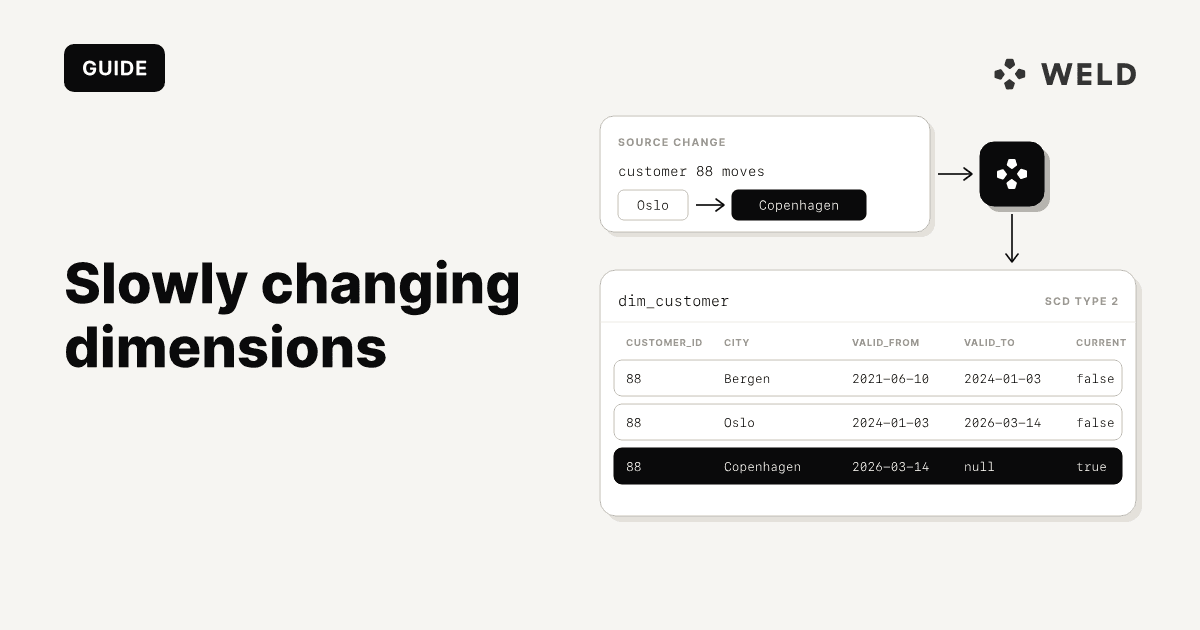
A slowly changing dimension Type 2 keeps every version of a record as its own row, with the dates each version was true. It is the pattern behind questions like "which plan was this customer on when they placed that order?", and it is simple to describe and fiddly to build.
This guide builds one customer dimension three ways, each ready to paste: a plain SQL MERGE for BigQuery, Snowflake and Postgres, a dbt snapshot, and Weld history tables with no code. Then it covers the parts most answers leave out: hard deletes, rows that arrive late or out of order, history you never captured, and querying the table "as of" a date.
If you want the overview of Type 1, 2, 3 and 4 first, start with slowly changing dimensions explained. This post is the hands-on part.
How we tested it. Every query below was run on Postgres 18 and DuckDB against the same four loads of sample data, and the BigQuery versions were dry run on BigQuery. The dbt snapshot was run with dbt Core 1.12 on DuckDB. The Snowflake syntax was checked against Snowflake's
MERGEreference but not run on Snowflake.
What a Type 2 table stores
Start with a source table, customers, that your app updates in place:
| customer_id | name | plan | country | updated_at |
|---|---|---|---|---|
| 42 | Acme | free | DK | 2026-01-05 09:00 |
| 43 | Birch | pro | SE | 2026-01-05 09:00 |
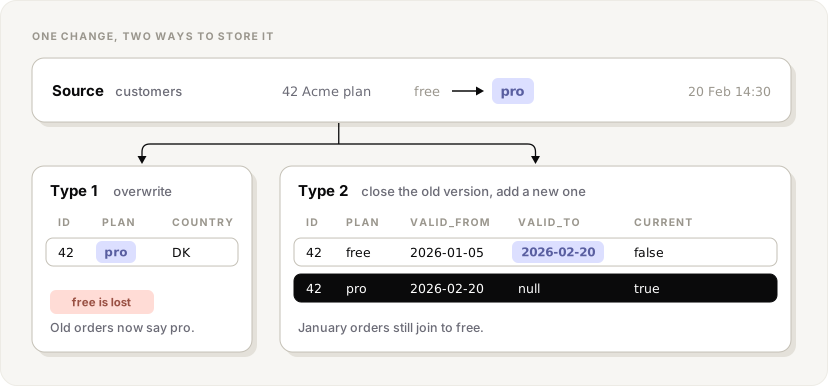
When Acme upgrades to pro on 20 February, the app overwrites the row. A dimension built the same way (Type 1) forgets the free plan. A Type 2 dimension closes the old version and adds a new one:
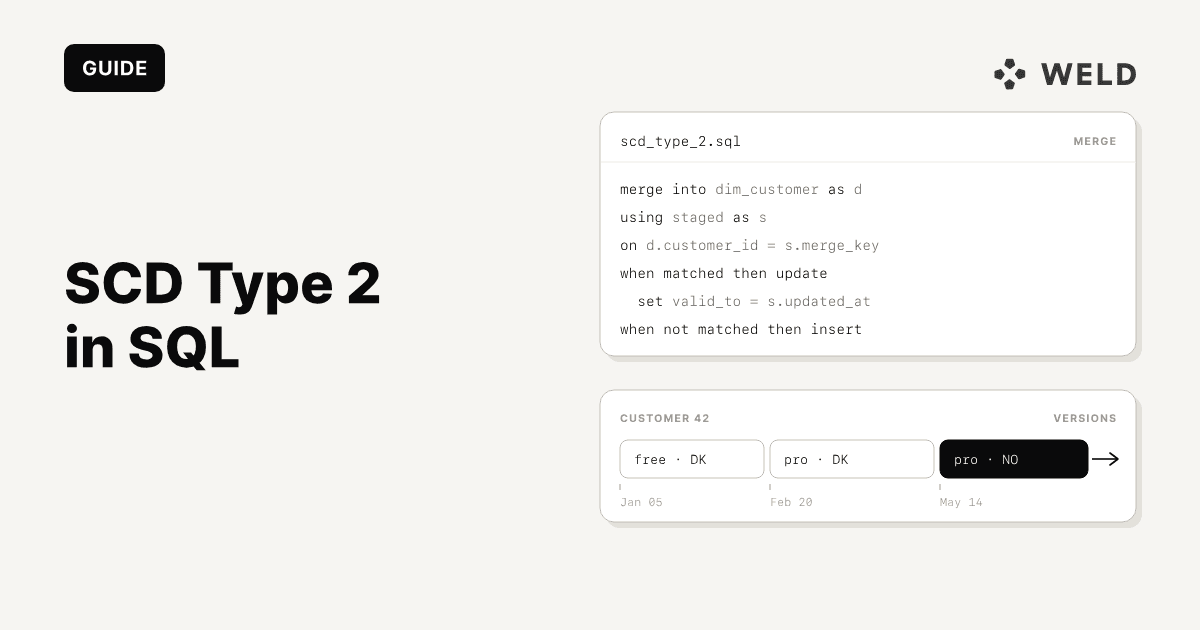
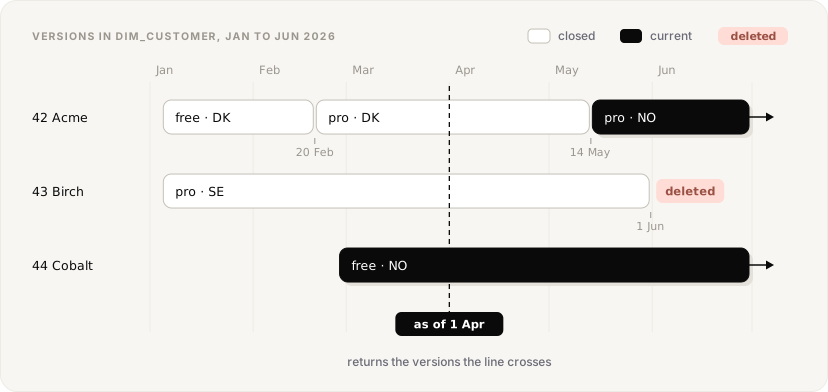
Over the next months more happens: Cobalt signs up on 27 February, Acme moves to Norway on 14 May, and Birch is deleted from the app before the load on 1 June. The source table only ever shows the latest state. The Type 2 dimension, dim_customer, shows all of it:
| customer_id | plan | country | valid_from | valid_to | is_current |
|---|---|---|---|---|---|
| 42 | free | DK | 2026-01-05 09:00 | 2026-02-20 14:30 | false |
| 42 | pro | DK | 2026-02-20 14:30 | 2026-05-14 11:00 | false |
| 42 | pro | NO | 2026-05-14 11:00 | null | true |
| 43 | pro | SE | 2026-01-05 09:00 | 2026-06-01 00:00 | false |
| 44 | free | NO | 2026-02-27 08:00 | null | true |
Drawn on a time axis, every version is a window, and the windows of one customer line up end to end:
Three columns do the work:
valid_fromis when this version became true. Use the source's own change timestamp (updated_at) when you have one you trust, and the load time when you don't.valid_tois when the next version replaced it. The current version hasnullhere. Some teams use9999-12-31instead so range filters need nonullcheck; both work, pick one and use it everywhere.is_currentis redundant withvalid_to is null, but it makes the common "latest version" filter cheap and obvious.
The windows are half open: a version is true from valid_from up to, but not including, valid_to. That way a timestamp exactly on a boundary belongs to one version only.
Two rules keep the table correct. Each customer_id has at most one row with is_current = true. And the windows for one customer never overlap and leave no gaps, except after a delete. Every implementation below is a way of keeping those two rules on each load.
1. SCD Type 2 with MERGE (BigQuery, Snowflake, Postgres)
The table:
1create table
2    dim_customer (
3        customer_id integer
4      , name varchar
5      , plan varchar
6      , country varchar
7      , valid_from timestamp
8      , valid_to timestamp
9      , is_current boolean
10    );
In BigQuery use int64, string and timestamp, and qualify the table with its dataset (analytics.dim_customer). In Snowflake varchar and timestamp work as written.
Each load lands the latest copy of the source in a staging table, stg_customers, with one row per customer_id. The tricky part is that one change needs two actions on the dimension: close the current row and insert the new version. A single MERGE can only do one thing per source row, so the usual trick is to feed it changed rows twice:
1merge into
2    dim_customer as d using (
3        -- every incoming row, keyed on its id
4        select
5            c.customer_id as merge_key
6          , c.*
7        from
8            stg_customers as c
9        union all
10        -- changed rows a second time, with a key that never matches
11        select
12            null as merge_key
13          , c.*
14        from
15            stg_customers as c
16            join dim_customer as cur on cur.customer_id = c.customer_id
17            and cur.is_current
18        where
19            c.updated_at > cur.valid_from
20            and (
21                c.name is distinct from cur.name
22                or c.plan is distinct from cur.plan
23                or c.country is distinct from cur.country
24            )
25    ) as s on d.customer_id = s.merge_key
26    and d.is_current
27    -- 1. a tracked column changed: close the current version
28when matched
29    and s.updated_at > d.valid_from
30    and (
31        s.name is distinct from d.name
32        or s.plan is distinct from d.plan
33        or s.country is distinct from d.country
34    ) then
35update set
36    valid_to = s.updated_at
37  , is_current = false
38    -- 2. new customer, or the new version of a changed one
39when not matched then
40insert
41    (
42        customer_id
43      , name
44      , plan
45      , country
46      , valid_from
47      , valid_to
48      , is_current
49    )
50values
51    (
52        s.customer_id
53      , s.name
54      , s.plan
55      , s.country
56      , s.updated_at
57      , null
58      , true
59    );
How each kind of row flows through it, using the 1 March load:
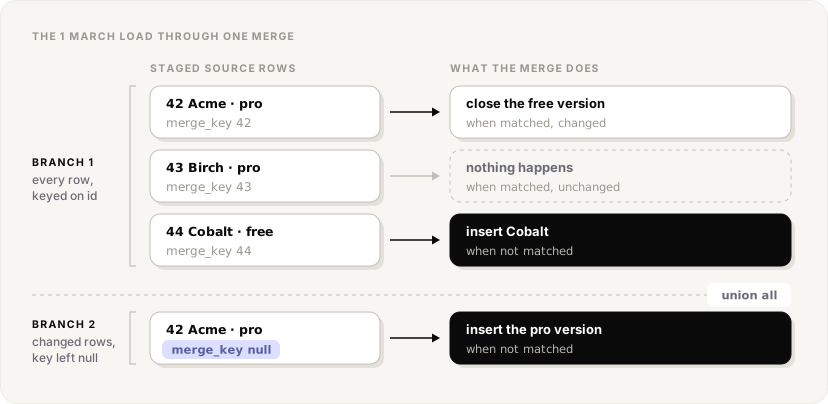
- Unchanged customer. The first branch matches its current row, the change condition is false, nothing happens. The second branch doesn't return it.
- Changed customer. The first branch matches and closes the current row at the new
updated_at. The second branch returns it again with anullkey, which matches nothing, so it is inserted as the new current version. - New customer. The first branch finds no current row, so it is inserted.
A few details matter more than they look:
is distinct frominstead of!=. With!=, a change fromnullto a value (or back) is never detected, because comparing withnullis never true. All three warehouses supportis distinct from. With many tracked columns, compare one hash of them instead, built so that anulland an empty string hash differently.- List the columns you track. A Type 2 table only needs a new version when a column you care about changes. Track
planandcountry, and a typo fix innamecan be updated in place (Type 1) without a new version. c.updated_at > cur.valid_fromstops an older copy of a row from closing a newer version. More on that under late rows below.- One row per key in staging. If
stg_customersholds two versions of the same customer, theMERGEfails. BigQuery and Postgres raise an error, and Snowflake does too by default (ERROR_ON_NONDETERMINISTIC_MERGE). Deduplicate first; see edge cases.
Hard deletes in the MERGE
If the staging table is a full snapshot of the source, a customer missing from it was deleted. BigQuery and Postgres 17 and later can close those rows in the same statement with when not matched by source. Add this clause before the insert:
1-- 3. gone from the full snapshot: close it
2when not matched by source
3    and d.is_current then
4update set
5    valid_to = current_timestamp
6  , is_current = false
The and d.is_current matters: closed versions never match the on condition either, and you don't want to touch them.
Snowflake's MERGE only has when matched and when not matched, so run the close as its own statement after the merge, in the same transaction:
1update dim_customer
2set
3    valid_to = current_timestamp
4  , is_current = false
5where
6    is_current
7    and not exists (
8        select
9            1
10        from
11            stg_customers as s
12        where
13            s.customer_id = dim_customer.customer_id
14    );
The same update works in every warehouse, so use it if you'd rather keep one version of the code. Only ever run it against a full snapshot: on an incremental load, every customer that simply didn't change would be closed.
2. SCD Type 2 with dbt snapshots
dbt snapshots generate that MERGE for you. Since dbt 1.9 you define a snapshot in YAML in the snapshots folder:
1snapshots:
2  - name: customers_snapshot
3    relation: source('app', 'customers')
4    config:
5      unique_key: customer_id
6      strategy: timestamp
7      updated_at: updated_at
8      hard_deletes: invalidate
9
Run dbt snapshot on a schedule and dbt keeps a table with the source columns plus four of its own. After the same three loads as above:
| customer_id | plan | country | dbt_valid_from | dbt_valid_to |
|---|---|---|---|---|
| 42 | free | DK | 2026-01-05 09:00 | 2026-02-20 14:30 |
| 42 | pro | DK | 2026-02-20 14:30 | 2026-05-14 11:00 |
| 42 | pro | NO | 2026-05-14 11:00 | null |
| 43 | pro | SE | 2026-01-05 09:00 | time of the run |
| 44 | free | NO | 2026-02-27 08:00 | null |
The columns dbt adds:
dbt_valid_fromanddbt_valid_to: the validity window.dbt_valid_toisnullon the current row unless you setdbt_valid_to_current, for example to"to_date('9999-12-31')"in Snowflake.dbt_updated_at: the change timestamp dbt used for the row.dbt_scd_id: a unique id per version, useful as the dimension's surrogate key.dbt_is_deleted: only withhard_deletes: new_record.
There is no is_current column. Filter on dbt_valid_to is null instead, or add it in a model on top of the snapshot.
Timestamp vs check strategy
strategy: timestampcomparesupdated_atwith the stored version. When it is newer, dbt closes the old row and inserts the new one, and both window edges come fromupdated_at, so the history reflects when things changed at the source. dbt recommends it whenever the source has anupdated_atyou can trust.strategy: checkcompares the columns incheck_colsand records a new version when any of them differ. Use it when the source has no reliableupdated_at. The windows then come from the timedbt snapshotran, unless you also configure anupdated_atcolumn. In our run, everydbt_valid_fromwas the run time, not the date the plan actually changed.
timestamp | check | |
|---|---|---|
| Detects a change by | a newer updated_at | a different value in any of check_cols |
dbt_valid_from / _to | the source's updated_at | the time of the snapshot run |
| Needs | an updated_at you can trust | the list of columns to compare |
| A column added to the source | no new versions | new versions only if it is in check_cols |
| Use when | the source has a reliable updated_at | it doesn't |
1snapshots:
2  - name: customers_check_snapshot
3    relation: source('app', 'customers')
4    config:
5      unique_key: customer_id
6      strategy: check
7      check_cols: [plan, country]
8      hard_deletes: new_record
9
List check_cols explicitly. check_cols: all works, but then any column, including ones added to the source later, opens a new version, and dbt itself advises against it.
Deletes in a snapshot
hard_deletes decides what happens when a row disappears from the source:
ignore(the default) leaves the last version open forever, so a deleted customer looks current.invalidatesetsdbt_valid_toon it, like theupdateabove. It replaces the olderinvalidate_hard_deletes: true.new_recordcloses the row and inserts a new version withdbt_is_deletedset to true. If the record comes back, it gets another new version withdbt_is_deletedfalse. This is the only option that tells you when a record came back.
Two things to know before you rely on snapshots. They only see what exists at the moment they run, so a record that changes twice between runs keeps only the second change. And they ignore --full-refresh: there is no rebuilding a snapshot, which is exactly why dbt suggests keeping them in their own schema.
3. Edge cases forum answers skip
Hard deletes
Covered above, with one caveat that applies to all three approaches: you can only detect a delete by comparing against a full copy of the source. An incremental load that reads "rows changed since yesterday" never sees a deleted row, because it is not there to read. Either run a periodic full snapshot to reconcile, or get deletes from somewhere that records them: a database change log (CDC), a deleted-records endpoint in the source API, or Capture deletes in Weld.
Also decide what a delete means in your reports. Closing the row (invalidate) says "this customer stopped existing on this date". An explicit deleted version (new_record) also lets you count deletions and restores, at the cost of an extra row per delete.
Late arriving and out of order rows
A load can contain a version that is older than what the dimension already holds: a retried batch, a slow replica, a backfill script. Without the updated_at > valid_from guard, the MERGE above would close Acme's May version with a February date and insert February as current, so the table claims Acme went back to the free plan.
With the guard, stale rows are ignored, which keeps the current state right. But the history is still missing the late version if it never got in. When order genuinely varies, stop treating the dimension as something you update and start treating it as something you derive: keep an append-only log of every version you have seen, and compute the windows from it with window functions.
1with
2    changes as (
3        select
4            customer_id
5          , name
6          , plan
7          , country
8          , updated_at
9          , row_number() over (
10                partition by
11                    customer_id
12                order by
13                    updated_at
14            ) as version_number
15          , lag(name) over (
16                partition by
17                    customer_id
18                order by
19                    updated_at
20            ) as prev_name
21          , lag(plan) over (
22                partition by
23                    customer_id
24                order by
25                    updated_at
26            ) as prev_plan
27          , lag(country) over (
28                partition by
29                    customer_id
30                order by
31                    updated_at
32            ) as prev_country
33        from
34            customers_log
35    )
36  , versions as (
37        select
38            customer_id
39          , name
40          , plan
41          , country
42          , updated_at as valid_from
43        from
44            changes
45        where
46            version_number = 1
47            or name is distinct from prev_name
48            or plan is distinct from prev_plan
49            or country is distinct from prev_country
50    )
51select
52    customer_id
53  , name
54  , plan
55  , country
56  , valid_from
57  , lead(valid_from) over (
58        partition by
59            customer_id
60        order by
61            valid_from
62    ) as valid_to
63  , lead(valid_from) over (
64        partition by
65            customer_id
66        order by
67            valid_from
68    ) is null as is_current
69from
70    versions;
The changes step drops rows identical to the version before them, so repeated loads of an unchanged record don't create versions. The lead() makes each version end where the next one starts, so a row that arrived late slots into its right place on the next rebuild. A rebuild costs more than a merge on very large dimensions, but customer and product dimensions are rarely that large, and a table you can recompute from its inputs is far easier to trust. If the steps are new to you, see CTEs in SQL.
Several changes inside one load
If a record changed twice since the last load and your staging has both versions, the MERGE errors (see above). If you only need the latest, keep one row per key before merging. In BigQuery, Snowflake and DuckDB:
1select
2    *
3from
4    raw_customers
5qualify
6    row_number() over (
7        partition by
8            customer_id
9        order by
10            updated_at desc
11    ) = 1;
In Postgres, select distinct on (customer_id) * from raw_customers order by customer_id, updated_at desc does the same. If you need every version, use the log-and-rebuild query above, which handles any number of versions per key.
Backfilling history you never captured
A Type 2 table only knows what it has seen since it started. Before that, there is nothing to recover from the current table, so be explicit about it:
- Open the first version at the record's real start. Use
created_atfor the firstvalid_fromrather than the date you started tracking, but know that this asserts the values never changed before you looked. Some teams use the tracking start date instead to make the gap visible; either way, write it down. - Look for history the source already keeps. Many systems log changes themselves: Salesforce field history, HubSpot property history, a billing system's events, an audit table in your own database. Load that into the log and the rebuild query turns it into windows.
- Warehouse time travel is short. BigQuery keeps between two and seven days (seven by default), and Snowflake one day by default and up to 90 on Enterprise edition. It can rescue last week, not last year.
- Old exports and backups can be loaded into the log as extra versions, with
updated_atset to the export date.
The real fix is to start capturing before anyone asks. History is the one thing you can't add later.
Querying "as of" a date
To see every customer as they were on 1 April 2026:
1select
2    customer_id
3  , name
4  , plan
5  , country
6from
7    dim_customer
8where
9    valid_from <= timestamp '2026-04-01 00:00:00'
10    and (
11        valid_to > timestamp '2026-04-01 00:00:00'
12        or valid_to is null
13    );
That returns Acme on pro in Denmark, Birch (not yet deleted) and Cobalt: the versions the dashed line crosses in the timeline above. More often you join facts to the version that was true when they happened, which is what a Type 2 table is for:
1select
2    o.order_id
3  , o.ordered_at
4  , d.plan
5  , d.country
6from
7    orders as o
8    join dim_customer as d on d.customer_id = o.customer_id
9    and o.ordered_at >= d.valid_from
10    and (
11        o.ordered_at < d.valid_to
12        or d.valid_to is null
13    );
Note >= on one side and < on the other, matching the half-open windows, so an order placed at the exact moment of a change joins to one version, not two. If you store 9999-12-31 instead of null in valid_to, drop the or ... is null. For a table without valid_to at all, such as a history table, take the latest version on or before the date:
1select
2    *
3from
4    customers__history
5where
6    updated_at <= timestamp '2026-04-01 00:00:00'
7qualify
8    row_number() over (
9        partition by
10            id
11        order by
12            updated_at desc
13    ) = 1;
qualify works in BigQuery, Snowflake, Databricks and DuckDB. In Postgres, compute the row_number() in a subquery and filter on it outside.
4. SCD Type 2 without code: Weld history tables
All of the above assumes you control the load. If the data comes from SaaS tools through an ELT pipeline, the pipeline can keep the log for you.
History tables in Weld do this per table. Turn on History table in a table's settings in your data source, and Weld writes every version of each row to a second table next to it, named with __history (for example customers__history), with the same columns as the original. The main table keeps the current state. When you turn it on for a table that is already syncing, Weld fills the history table from the current table straight away, so every record starts with its current version. There is no SQL to write and no snapshot job to schedule. Setup is in the history tables docs.
A history table is the append-only log from the edge cases section, already in your warehouse. Turning it into a Type 2 dimension with valid_from and valid_to is the rebuild query pointed at it, plus Capture deletes for records the source deletes. With Capture deletes on, a full sync keeps a row the source stopped returning and stamps it with _weld_deleted_at, which closes the last version:
1with
2    changes as (
3        select
4            id
5          , name
6          , plan
7          , country
8          , updated_at
9          , row_number() over (
10                partition by
11                    id
12                order by
13                    updated_at
14                  , _weld_synced
15            ) as version_number
16          , lag(name) over (
17                partition by
18                    id
19                order by
20                    updated_at
21                  , _weld_synced
22            ) as prev_name
23          , lag(plan) over (
24                partition by
25                    id
26                order by
27                    updated_at
28                  , _weld_synced
29            ) as prev_plan
30          , lag(country) over (
31                partition by
32                    id
33                order by
34                    updated_at
35                  , _weld_synced
36            ) as prev_country
37        from
38            customers__history
39    )
40  , versions as (
41        select
42            id
43          , name
44          , plan
45          , country
46          , updated_at as valid_from
47        from
48            changes
49        where
50            version_number = 1
51            or name is distinct from prev_name
52            or plan is distinct from prev_plan
53            or country is distinct from prev_country
54    )
55select
56    v.id as customer_id
57  , v.name
58  , v.plan
59  , v.country
60  , v.valid_from
61  , coalesce(
62        lead(v.valid_from) over (
63            partition by
64                v.id
65            order by
66                v.valid_from
67        )
68      , c._weld_deleted_at
69    ) as valid_to
70  , lead(v.valid_from) over (
71        partition by
72            v.id
73        order by
74            v.valid_from
75    ) is null
76    and c._weld_deleted_at is null as is_current
77from
78    versions as v
79    left join customers as c on c.id = v.id;
Use the source's updated_at for the windows where it has one, and _weld_synced (the time Weld synced the version) where it doesn't. Only the columns you list in changes and versions open a new version, so the dimension can track plan and country while the history table keeps everything. Save the query as a model in Weld's SQL workspace, or in your dbt project, and it rebuilds after each sync.
Three things to know:
- History starts when you turn it on. Like every approach here, a history table can't recover changes from before it existed. Turn it on for the tables you might report on historically, before you need them.
- It captures what each sync sees. If a record changes twice between two syncs, the history table holds the version that was current at each sync, the same limit as a dbt snapshot.
- History rows count toward active rows, at 50% of a regular active row from 1 December 2026. Capture deletes is in beta and available on the Premium and Business plans.
Which one to use
| MERGE | dbt snapshot | Weld history tables | |
|---|---|---|---|
| What you write | the staging step and the MERGE | a YAML config | nothing to capture; one query for the windows |
| A change is detected by | the columns you compare | updated_at, or the columns in check_cols | each sync, against the warehouse copy |
| Window timestamps | updated_at, or the load time | updated_at, or the run time | updated_at or _weld_synced, chosen in your query |
| Hard deletes | not matched by source, or an update, on full snapshots | hard_deletes: invalidate or new_record | Capture deletes (_weld_deleted_at) |
| Several changes between runs | the latest, after deduplication | the version current at each run | the version current at each sync |
| Can be rebuilt from scratch | no, it is updated in place | no, dbt never rebuilds a snapshot | yes, the windows are a query over the log |
- You load the data yourself and want full control: the
MERGE, with theupdated_atguard and a delete step that runs on full snapshots only. - You already run dbt: snapshots, with
strategy: timestampwhen the source has a trustworthyupdated_at, andhard_deletesset toinvalidateornew_record. - The data comes from SaaS tools through ELT: history tables plus Capture deletes in Weld, with the rebuild query on top.
Whichever you pick, keep a log you can rebuild from. A MERGE and a snapshot both update the dimension in place, and a bad load stays in it. A dimension derived from a log can be fixed by fixing the query and running it again.
FAQ
A slowly changing dimension Type 2 keeps every version of a record as a separate row, with columns for when the version became valid (valid_from), when it stopped (valid_to) and usually an is_current flag. It lets you report on data as it was at any point in time, instead of only as it is now.
Use a MERGE that closes the current row when a tracked column changes and inserts the new version. Because one MERGE can only do one action per source row, changed rows are passed in twice: once keyed on their id to close the old version, and once with a null key so they are inserted as the new one. The same statement works in BigQuery, Snowflake and Postgres 15 and later.
The timestamp strategy detects changes with an updated_at column and uses it for the validity windows, so history reflects when changes happened at the source. The check strategy compares the columns in check_cols and, unless you also set updated_at, uses the time of the snapshot run for the windows. Use timestamp when the source has a reliable updated_at.
Compare the dimension with a full snapshot of the source and close the current row of any record missing from it. In BigQuery and Postgres 17 and later this fits in the MERGE with when not matched by source; in Snowflake, run a separate update. In dbt snapshots, set hard_deletes to invalidate or new_record. Incremental loads can't see deletes, so they need a periodic full snapshot or a source that records deletions.
No. Snowflake's MERGE supports when matched and when not matched only. Close deleted records with a separate update in the same transaction.
Filter on valid_from <= date and valid_to > date or valid_to is null. To join facts to the right version, join on the key and on the fact's timestamp falling inside the version's window, with >= on valid_from and < on valid_to.
A Type 2 table stores validity windows on each row, so it is ready to join. A history table, like Weld's __history tables, appends every version with the time it was synced and leaves the windows to the query. You can turn a history table into a Type 2 dimension with lead() over each record's versions.