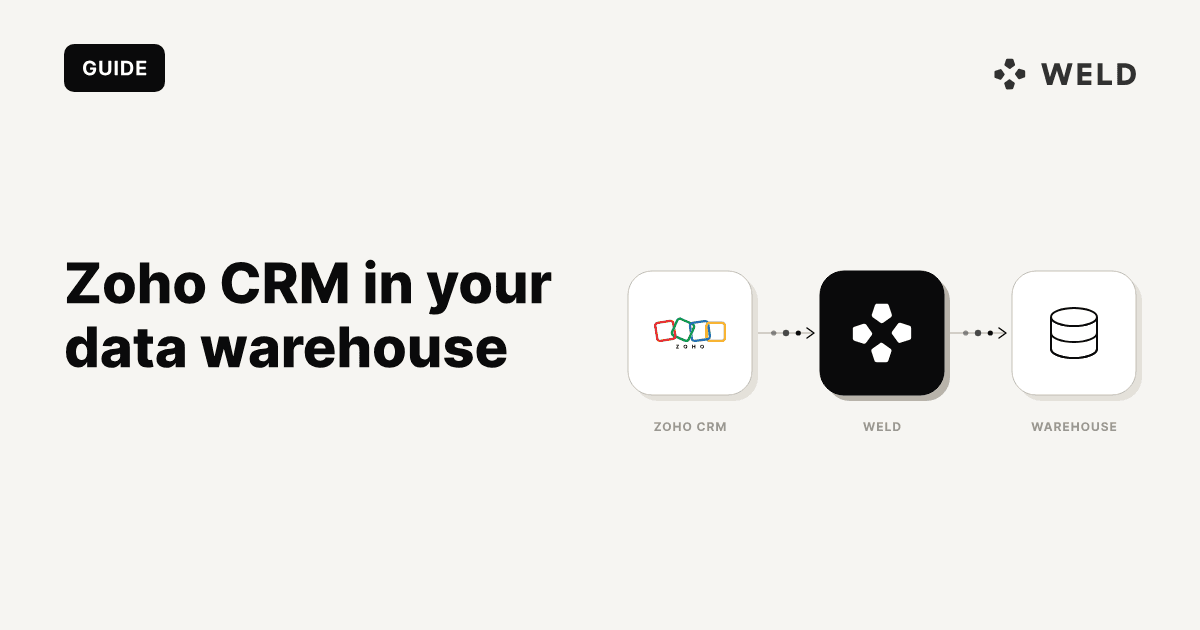
The Zoho CRM connector is live
You can now sync Zoho CRM into your data warehouse with Weld and put your pipeline next to your billing data, your product usage and your ad spend. Twelve modules, incremental on Modified_Time, read-only OAuth, and every Zoho data centre except China. Setup is four steps, and the connector docs walk through all of them.
Summary: Most connector announcements skip the part you actually need, which is what the data looks like once it lands and what you can honestly build with it. Zoho CRM's schema has one hub, two real foreign keys, and three tables nothing joins to. There's no won/lost flag, no stage history, and no link between an activity and the deal it was about. All of that changes what a Zoho pipeline report can say, so you want to know it before you build one. At the end you get four SQL models to start from: deal pipeline, deal flow by month, rep activity and account 360. All of them free to copy, in both Weld and dbt form.
What lands in your warehouse
Twelve streams, one per Zoho module. Every one is keyed on id and syncs incrementally on Modified_Time, so the first run backfills and every run after that only asks Zoho for what changed.
| Stream | Zoho module | Fields | What it's good for |
|---|---|---|---|
account | Accounts | 11 | Company dimension: name, industry, website |
contact | Contacts | 12 | People, with the only other real foreign key |
deal | Deals | 13 | The pipeline. Stage, amount, expected close |
lead | Leads | 12 | Volume and status only, see below |
user | Users | 13 | The rep dimension. Sync this one |
call | Calls | 11 | Activity volume per rep |
event | Meetings | 11 | Activity volume per rep |
task | Tasks | 11 | Activity volume per rep |
note | Notes | 11 | The only attributable activity |
campaign | Campaigns | 12 | Not much: no key to anything |
product | Products | 11 | Not much: no line items |
price_book | Price Books | 7 | Not much: no key to products |
Field names arrive in snake_case, and Zoho's lookup fields come out flattened instead of nested, so a record's owner turns up as three columns, owner_id, owner_name and owner_email, rather than one object. Custom modules and custom fields aren't synced.
Every field of every stream is in the schema explorer. Click through for the full, searchable version:
Part 1: What actually joins to what
That diagram shows all twelve tables. What it doesn't show is that most of them don't connect to each other. Here's the whole join graph:
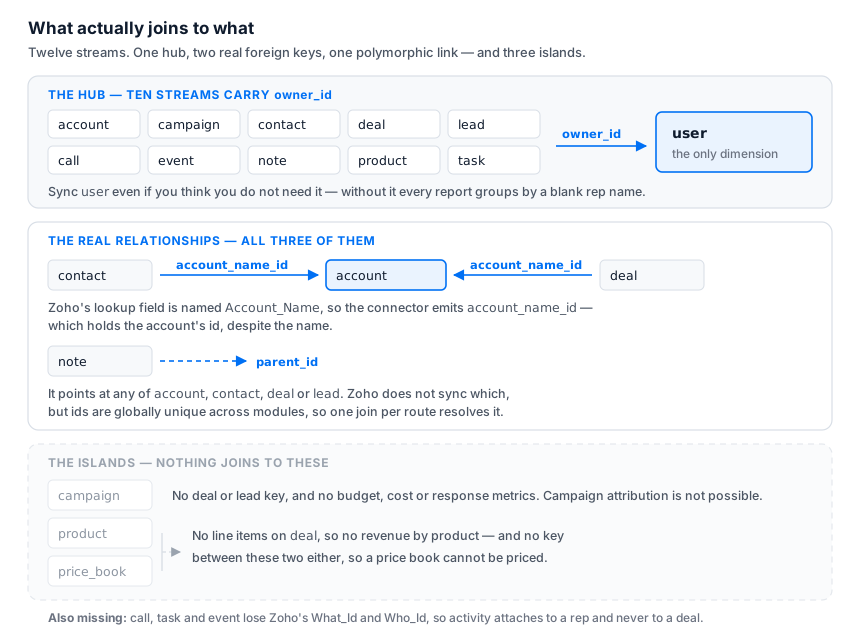
Three things follow from that picture.
user is the hub, so sync it first
Ten of the twelve streams carry owner_id. It's the most connected column in the schema, and the only dimension the modules share. Skip the user stream because a CRM user list sounds like metadata, and every report you build groups by a blank rep name. You won't notice until someone looks at a chart.
Zoho keeps deactivated users in the module instead of deleting them, so carry status through as a boolean. A deal owned by a deactivated rep is unmanaged pipeline, and that's a report you'll want.
The account key is called account_name_id
Zoho's lookup field on both Deals and Contacts is named Account_Name, so the connector flattens it into account_name_id and account_name_name. Despite the name, account_name_id holds the account's id. It's the foreign key. account_name_name is just a denormalised copy of the label.
Rename it in staging and drop the label. Keep the denormalised name around and a renamed account leaves stale copies of its old name scattered across every module that referenced it.
1-- staging.zoho_crm.deal
2select
3    cast(id as string) as deal_id
4  , nullif(trim(cast(stage as string)), '') as stage
5  , cast(amount as numeric) as amount
6  , cast(closing_date as date) as closing_date
7  , -- Zoho's lookup is named Account_Name; this column holds the account's id.
8    cast(account_name_id as string) as account_id
9  , cast(owner_id as string) as owner_id
10  , cast(created_time as timestamp) as created_time
11from
12    {{raw.zoho_crm.deal}}
Notes are the only activity you can attribute
Zoho's Notes module keeps its Parent_Id, and the connector syncs it as parent_id_id. That one column is your only route from something a rep did back to the record they did it about.
What it doesn't tell you is which module the parent lives in. Zoho exposes that as $se_module, and the connector doesn't sync it. Record ids are globally unique across Zoho modules though, so you can work it out by joining the parent id to each module in turn and seeing which one hits. That's how the account_360 model below counts notes written on an account, on its deals and on its contacts as a single number.
Part 2: Four things this schema can't do
None of these are bugs. They're just what the connector syncs, and each one quietly changes a number somebody's going to put on a dashboard.
1. Activity can't be attributed to a deal
Zoho's Calls, Events and Tasks modules each carry What_Id and Who_Id, the deal, account, contact or lead the activity belongs to. Neither field is synced. owner_id is the only foreign key on all three streams.
So you can report how many calls a rep made. You can't report how many calls went into the deals you won, how much activity a stalled deal has had, or the activity-to-close ratio someone always ends up asking for. Any dashboard claiming otherwise is inventing the link.
Three honest ways around it: use note.parent_id, which is attributable; join a dialer or calendar source on rep email and meeting time; or wait for the connector to sync the parent ids. What you shouldn't do is pick a proxy and let people assume it means something it doesn't.
2. There's no won/lost flag
Zoho ships no is_won, no is_closed, no probability, no forecast category. All you get is the stage string.
Match on a pattern, not an equality list, because Zoho's own defaults include Closed-Lost to Competition alongside Closed Won and Closed Lost:
1case
2    when lower(stage) like '%won%' then 'Won'
3    when lower(stage) like '%lost%' then 'Lost'
4    else 'Open'
5end as stage_status
That covers the defaults. It doesn't cover whatever your sales ops team added: Contract Signed, Churned, Dead, Nurture, or anything in another language. Every one of those reads as open pipeline until you add it, which inflates the forecast and hides losses from your win rate at the same time.
That's what the first test below is for, and it's the one edit almost every org ends up making.
3. There's no history, so today is all you get
Weld's Zoho CRM connector doesn't support history tables, and the deal stream carries no stage-change audit. So there's no way to ask what the pipeline looked like at the end of last month, how long a deal sat in Negotiation, or when a deal actually closed.
closing_date is Zoho's expected close date, and Zoho doesn't clear it when a deal closes. On a won deal it's whatever forecast happened to be in place, not the day money changed hands. Booking wins on modified_time is worse: that column moves every time anyone edits the record, so a note added in August drags a June win into August.
If pipeline trend or stage velocity matters, materialise the deal model on a daily schedule and keep the runs. It's the only route to history here, and it only starts working from the day you set it up. Which is a good argument for setting it up now, not the first time someone asks about last quarter.
4. call_duration is a string, and its unit is ambiguous
call_duration arrives as text with one colon. Zoho's API reference documents the field as hh:mm, the CRM UI shows mm:ss for short calls, and there's no Call_Duration_in_seconds column on this stream to settle it.
Parse it, but don't trust the unit until you've checked it against one call of known length:
1case
2    when regexp_contains(
3        cast(call_duration as string)
4      , r'^\s*\d+:\d{1,2}\s*$'
5    ) then safe_cast(
6        split(trim(cast(call_duration as string)), ':') [offset(0)] as int64
7    ) * 60 + safe_cast(
8        split(trim(cast(call_duration as string)), ':') [offset(1)] as int64
9    )
10end as call_duration_minutes
event behaves better. It carries both start_date_time and end_date_time, so meeting duration gets computed instead of parsed, and the unit isn't in question.
One more, and it's on the connector page too: Zoho's records API doesn't report deletions. A deleted record stops receiving updates and just sits in your warehouse. Run a ReSync on the affected table when the destination has to match Zoho exactly.
Part 3: Four models to start from
Four core models, in the same four-layer shape as the Shopify templates. Raw lands untouched, staging casts and renames, core holds every piece of business logic, and dashboards bind to thin analytics contracts.
1raw.zoho_crm.*        ELT output, untouched
2  ↓
3staging (9 models)    cast, rename, blanks to NULL: the dull work, once
4  ↓
5core (4 models)       stage classification, date spines, joins
6  ↓
7analytics (4 models)  BI-facing contracts, kept thin
8deal_pipeline: the workhorse
One row per deal, classified, with its account and owner joined on. The other three models read it, so the stage logic gets written once.
It returns stage_status plus is_open / is_won / is_lost, and splits amount into pipeline_amount, won_amount and lost_amount so BI can sum a column instead of repeating the CASE. age_days is time-to-close on a decided deal and time-in-pipeline on an open one. is_overdue flags open deals whose expected close date has already passed. It's the cheapest pipeline-hygiene number there is, and usually the first thing a sales lead asks for.
The user join is a LEFT join on purpose. A rep deleted from Zoho vanishes from the user module while their deals stay in the pipeline, and an inner join would silently drop that pipeline from your total.
deal_flow_by_month: created, won, lost, win rate
Month × owner, on a month spine so a rep with a quiet month returns a row of zeros instead of dropping out of the series and letting a line chart interpolate straight over the gap.
One decision to know about: open deals are excluded from the win-rate denominator. Counting them as not-yet-won drags every current month down and makes a healthy pipeline look like a collapse. You get both a count-based and a value-based win rate, plus average won deal size.
rep_activity: calls, meetings and tasks per rep per day
Day × owner, from call, event and task. Read Part 2 first: this is activity per rep, never per deal.
There's no tasks_completed column, and that's on purpose. The connector syncs the completion flag but no completion timestamp, so completions can be totalled as a current state and never placed on a day. Booking them on modified_time would move a task's completion every time anyone touched the record afterwards.
account_360: the account-level view
One row per account: contacts and how many are reachable by email, deals open, won, lost and overdue with amounts, the next expected close date, and note activity resolved through all three routes described above.
is_stale_with_open_pipeline flags accounts sitting on open pipeline with nothing written on them in 90 days. It's also the obvious source for a reverse-ETL sync writing pipeline value back onto the Zoho Account record, which puts the warehouse's view in front of the reps who need it.
Part 4: The tests that matter
Four ship with the templates. The first one matters most.
| Test | Catches |
|---|---|
assert_deal_stages_are_classified | A closed stage hiding in open pipeline: inflated forecast, missing losses |
assert_owner_ids_resolve | The user stream not synced, or a deleted rep's orphaned pipeline |
assert_call_duration_parses | Duration strings the regex rejected |
assert_no_duplicate_deals | A second org unioned in without changing the label |
assert_deal_stages_are_classified lists every distinct stage that fell through to Open. A failure here is information, not a defect. Open stages like Qualification are supposed to show up. What you're hunting for is a closed stage hiding among them. Run it when you deploy, and again whenever sales ops adds a stage.
Part 5: Deploying it
The models ship in both dialects, generated from the same source so they can't disagree about how a deal gets classified as won. The only difference is ref syntax:
1-- Weld: references map to folder paths
2from
3    {{staging.zoho_crm.deal}}
4    -- dbt: the same model, same logic
5from
6    {{ ref('stg_zoho_crm__deal') }}
With GitHub Sync a push deploys all of them and Weld resolves the dependency order. On the dbt side, copy dbt/models/ into your project and repoint sources.yml. The models set their own config(), so there are no dbt_project.yml changes and nothing to install.
Several Zoho orgs? Every staging model emits a zoho_org label, and it's part of every join key. To add an org, UNION ALL a second block in each staging model with a different label, and change nothing else.
Everything is written for BigQuery. GENERATE_DATE_ARRAY, COUNTIF, SAFE_DIVIDE and REGEXP_CONTAINS need swapping for other engines, but the logic ports without restructuring.
Get the templates
- Zoho CRM: 4 core models, 9 staging, 4 tests, both dialects
- The full SQL template library
- Zoho CRM connector docs for setup, scopes and data centres
Treat every model as unverified until you've reconciled it. Open pipeline against Zoho's own Deals view is the check that matters, and if the two disagree, the stage classification is where to look first.
If your CRM isn't the only system you're trying to report on, How to build a modern data stack covers the wider picture, and Defining core business metrics covers agreeing on what a "won deal" means before you model it.
FAQ
Can I sync custom fields and custom modules from Zoho CRM?
Not today. Each stream syncs a fixed set of fields from its Zoho module, and custom modules and custom fields aren't included. The connector changelog is where field additions get announced.
Why does my Zoho win rate look wrong?
Almost always because a custom deal stage is being read as open pipeline. Zoho has no won/lost flag, so the outcome has to come out of the stage string, and a stage like Contract Signed or Churned matches neither "won" nor "lost". Run assert_deal_stages_are_classified to list every stage falling through to open, then add the closed ones to the classification.
Can I report on how much activity went into a won deal?
Not from this connector alone. Zoho's Calls, Events and Tasks modules carry What_Id and Who_Id pointing at the related record, and neither field is synced, so activity attaches to a rep instead of a deal. Notes are the exception: parent_id is synced, so anything a rep wrote down can be tied back to the account, deal, contact or lead it was about.
Does the Zoho CRM connector capture deleted records?
No. Zoho's records API doesn't report deletions, so a record deleted in Zoho stops receiving updates and stays in your warehouse. Run a ReSync of the affected table when the destination has to match Zoho exactly.
Can I see how my pipeline changed over time?
Only from the point you start storing it. The connector doesn't support history tables and Zoho's deal stream carries no stage-change audit, so the warehouse holds current state only. Materialise the deal model on a daily schedule and keep the runs to build the history yourself.
Which Zoho data centres are supported?
All of them except China. You don't pick a region during setup. Start from the standard Zoho sign-in page and Zoho routes you to your own data centre, which Weld then stores and uses for every later API call. Accounts in the China data centre (accounts.zoho.com.cn) can't be reached through the standard sign-in flow, so they aren't supported.