
 Claude
 ChatGPT
 Perplexity
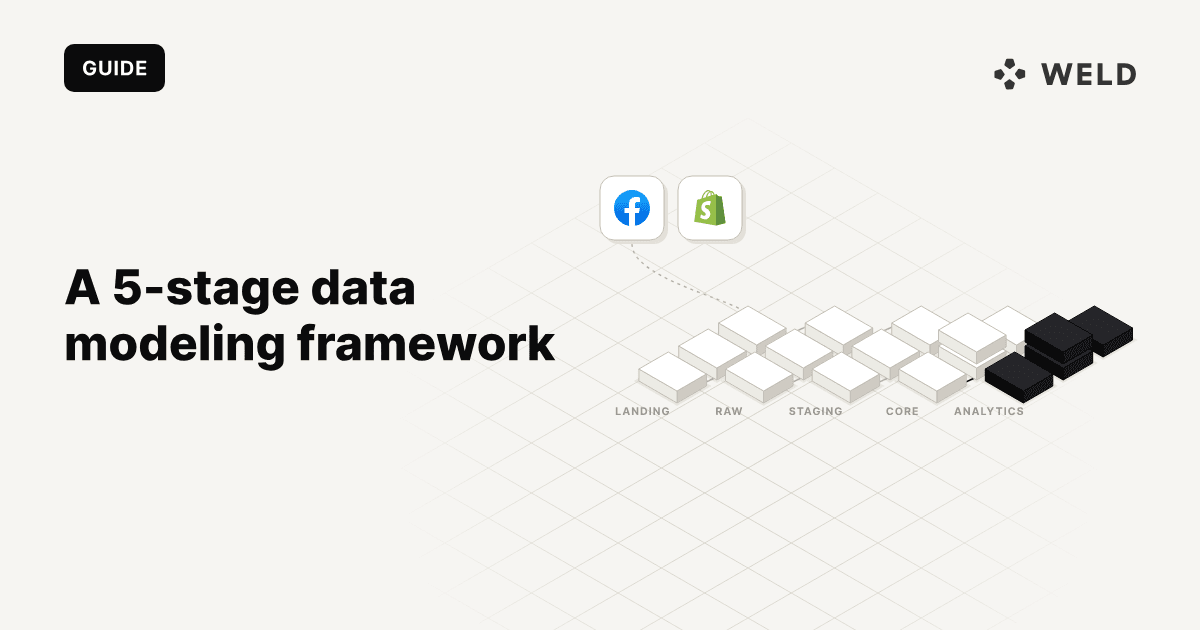
A data modeling framework is a set of rules for where each table in your data warehouse lives and what it is allowed to read. The one we recommend at Weld splits the warehouse into five layers: landing for data exactly as it is synced, raw for views over those tables, staging for cleaned tables, core for company-wide definitions, and analytics for tables built for one dashboard or use case. Data only moves forward: each layer reads from the one before it, and core models may also read other core models.
| Layer | What lands there | Who uses it | Example table |
|---|---|---|---|
| Landing | Tables exactly as your ELT tool writes them, one per source object | Your ELT tool. Nobody queries it directly | shopify.order |
| Raw | One view per landing table: select *, plus a fix when a source changes | Staging models | raw.shopify_order |
| Staging | One clean table per source object: renamed columns, fixed types, test rows removed | Analytics engineers building core | staging.stg_shopify_orders |
| Core | Shared business entities with one definition each: orders, customers, ad spend | Analytics models, analysts, AI agents | core.orders |
| Analytics | Tables shaped for one dashboard, report or sync, built only from core | BI tools, business users, reverse ETL | analytics.marketing_daily |
I've run data teams with no rules at all and with far too many. This is the framework I keep coming back to, and the one we suggest to most companies starting a warehouse. It works in BigQuery, Snowflake, Postgres or any other SQL warehouse, with plain SQL, dbt or Weld's own models.
This post explains each layer, then takes two sources, Shopify orders and Facebook Ads spend, through all five in SQL. After that: how to set the layers up as schemas, how they line up with other names you'll see (staging, integration and presentation layers, medallion architecture, dbt marts), and how they map to Weld.

The five data warehouse layers
1. Landing layer: data as it is synced
The landing layer, also called the landing zone or source layer, is where your ELT tool writes data. One table per source object, with the source's own column names, types and nesting, plus whatever metadata the loader adds. Shopify's orders land as shopify.order, Facebook Ads' campaign stats as facebook_ads.campaign_insight.
Two rules: never edit it, and never point anything at it except the raw layer. The loader owns these tables, and it can add columns, change types or rebuild a table during a full sync.
2. Raw layer: views over the landing tables
The raw layer, or raw data layer, is a view per landing table, and at first nothing more than select *. It looks redundant until a source changes. When a vendor renames a column or changes a type, you fix it once in the raw view, and everything downstream keeps working while the landing table stays an untouched copy of what the source sent.
Because these are views, the raw layer costs no storage and is always as fresh as the last sync.
3. Staging layer: one clean table per source object
The staging layer makes each source object usable. It keeps the grain and the table structure of the source, one staging model per raw table, and only cleans:
- rename columns to one convention (
order_id,created_at,customer_email) - cast types, such as strings to timestamps and floats to numerics for money
- remove test records, duplicates and soft-deleted rows
- standardise values, such as lower-case emails and one reporting currency
Staging has no business logic. "What counts as revenue" does not belong here.
Where staging lives depends on how you load data. In an ELT setup, which is how most cloud warehouses work today, staging is a set of views inside the warehouse. Older ETL designs kept a separate staging area outside the warehouse and cleaned data there before loading it. Our ETL vs ELT guide covers the difference.
4. Core layer: company-wide definitions
Most of the modeling work happens in core. Classic data warehouse design calls it the integration layer, because it is where data from different sources is reconciled into one model. It holds the business entities everyone shares, such as orders, customers, products and ad spend, each defined once for the whole company. This is where you decide that cancelled orders don't count, that revenue is net of tax, or that ad spend from every channel has the same columns.
Core tables usually combine sources. core.ad_spend is a union of Facebook Ads, Google Ads and TikTok staging models in one shape. core.customers merges customers from your shop and your CRM. When two dashboards disagree on a number, the cause is almost always a definition that lives in a dashboard instead of in core.
Most teams model core as facts and dimensions in a star schema, but the framework doesn't require it. What it requires is one definition per concept. When a dimension needs history, such as a customer's plan over time, build it in core as a slowly changing dimension; our SCD type 2 guide shows the SQL.
5. Analytics layer: tables for a specific use
The analytics layer, called the presentation or access layer in classic warehouse design, holds tables built for one purpose: a marketing dashboard, a finance report, a sync to your CRM. They read only from core, and they are where definitions specific to that use go, such as blended ROAS for the marketing team.
Connect your BI tool to the analytics layer and nothing else. When a new definition in analytics turns out to be useful in a second place, move it down into core and document it, so it exists once.
Example: Shopify and Facebook Ads through all five layers
Here is the full flow for a store that wants daily revenue, ad spend and blended ROAS on one dashboard. Each layer is a schema, and each model is a view or table in that schema. The SQL runs on BigQuery, Snowflake and Postgres with small changes.
Landing: the synced tables
Your ELT tool writes shopify.order (one row per order, more than a hundred columns) and facebook_ads.campaign_insight (one row per campaign per day). You don't write any SQL for this layer.
Raw: one view per table
1-- raw layer: one view per landing table, nothing else
2create or replace view raw.shopify_order as
3select * from shopify."order";
4
5create or replace view raw.facebook_ads_campaign_insight as
6select * from facebook_ads.campaign_insight;
order is a reserved word, so Postgres and Snowflake need it in double quotes. In Snowflake that also makes the name case-sensitive, so match the case your tables were loaded in. BigQuery accepts shopify.order unquoted, because a reserved word is allowed after the dataset name.
Staging: clean, rename, cast
1-- staging.stg_shopify_orders: one row per real order
2select
3    id                                as order_id,
4    customer_id,
5    lower(email)                      as customer_email,
6    cast(created_at as timestamp)     as created_at,
7    cancelled_at is not null          as is_cancelled,
8    currency,
9    cast(total_price as numeric)      as total_price,
10    cast(total_tax as numeric)        as total_tax,
11    cast(total_discounts as numeric)  as total_discounts
12from raw.shopify_order
13where coalesce(test, false) = false1-- staging.stg_facebook_ads_insights: one row per campaign per day
2select
3 date as spend_date,
4 account_id,
5 campaign_id,
6 campaign_name,
7 account_currency as currency,
8 cast(spend as numeric) as spend,
9 impressions,
10 clicks
11from raw.facebook_ads_campaign_insightIn Snowflake a plain numeric has no decimal places, so cast money to numeric(18, 2) there. Postgres and BigQuery keep the decimals.
This example assumes the store and the ad account use the same currency. If they don't, convert both to one reporting currency here, in staging.
Core: one definition of an order, one shape for ad spend
1-- core.orders: what the company counts as an order and as revenue
2select
3    order_id,
4    customer_id,
5    cast(created_at as date)          as order_date,
6    currency,
7    total_price - total_tax           as net_revenue
8from staging.stg_shopify_orders
9where not is_cancelled1-- core.ad_spend: every paid channel in the same columns
2select
3 spend_date,
4 'facebook_ads' as channel,
5 cast(campaign_id as varchar) as campaign_id,
6 campaign_name,
7 currency,
8 spend,
9 impressions,
10 clicks
11from staging.stg_facebook_ads_insights
12
13-- union all
14-- select spend_date, 'google_ads' as channel, ...
15-- from staging.stg_google_ads_campaign_statsnet_revenue is now defined once. Every model that needs revenue reads core.orders and gets the same number. Refunds and returns need more work than this to match the Shopify admin; our Shopify dbt sales model covers them in full.
Analytics: the table the dashboard reads
1-- analytics.marketing_daily: one row per day for the marketing dashboard
2with revenue as (
3    select order_date as day, currency,
4           count(*) as orders, sum(net_revenue) as net_revenue
5    from core.orders
6    group by 1, 2
7),
8
9spend as (
10    select spend_date as day, currency, sum(spend) as ad_spend
11    from core.ad_spend
12    group by 1, 2
13)
14
15select
16    coalesce(r.day, s.day)                        as day,
17    coalesce(r.currency, s.currency)              as currency,
18    coalesce(r.orders, 0)                         as orders,
19    coalesce(r.net_revenue, 0)                    as net_revenue,
20    coalesce(s.ad_spend, 0)                       as ad_spend,
21    coalesce(r.net_revenue, 0) / nullif(s.ad_spend, 0) as blended_roas
22from revenue r
23full outer join spend s
24    on r.day = s.day and r.currency = s.currency
The dashboard reads analytics.marketing_daily and nothing else. When Facebook changes a field, you fix one raw view or staging model. When finance changes what counts as revenue, you change core.orders, and this table and every other one built on it follow.
How to set up the data modeling framework in your warehouse
One schema per layer. Name them after the layer: raw, staging, core, analytics. Landing usually gets one schema per source, because that is how ELT tools write data (shopify, facebook_ads). In BigQuery a schema is a dataset; in Snowflake you can keep everything in one database, or put landing in its own database to manage access separately.
One direction of dependencies. Raw reads landing, staging reads raw, core reads staging and other core tables, analytics reads core. Nothing reads backwards, and nothing skips a layer. That rule is what lets you change one layer without breaking the next.
Views first, tables where it pays. Raw and staging are almost always views. Make core and analytics tables when they get slow or when a BI tool queries them often, and refresh them on a schedule after each sync.
Name models by layer. A stg_ prefix for staging, plain entity names in core (orders, customers, ad_spend) and use-case names in analytics (marketing_daily, finance_monthly_revenue). Anyone should be able to tell a table's layer from its name.
Document core. Each core table and column gets a description. It is the layer analysts, BI tools and AI agents rely on to know what a number means.
Other names for the same layers
The same idea shows up under different names. If you've read about data warehouse layers elsewhere, this is how they line up:
| This framework | Classic data warehouse terms | Medallion architecture | dbt project |
|---|---|---|---|
| Landing | Source layer, landing area | Bronze | Sources |
| Raw | Base views, source views | Bronze | Sources, or base models |
| Staging | Staging layer, cleansing layer | Silver | models/staging/ |
| Core | Integration layer, core warehouse, EDW model | Gold | models/intermediate/, models/marts/ |
| Analytics | Presentation layer, consumption layer, data marts | Gold | models/marts/<department>/ |
Staging, core and analytics together are what people mean by the transformation layer: everything you build with SQL on top of the data you load.
Five layers vs medallion architecture
Medallion architecture uses three layers: bronze for raw data, silver for cleaned data, and gold for business-ready tables. The five layers here make two splits that medallion leaves inside a single layer:
- Landing and raw are both bronze. Keeping a view between the synced table and your models gives you one place to absorb source changes without touching the loaded data.
- Core and analytics are both gold. Separating company-wide definitions from tables built for one dashboard is what stops the same metric from being defined twice.
If your team already talks in bronze, silver and gold, keep those names. The rules about what goes where are what matter.
A real example: Danish Endurance
Danish Endurance sells through its own Shopify store and marketplaces such as Amazon and Zalando. They used this approach to bring data from Google, Shopify, Amazon and Zalando into one place, with costs and revenue defined once in the core layer. That gave every team the same view of profitability by product and market, which helped them reach 77% year-over-year EBITDA growth.
The five layers in Weld
Weld syncs your sources into your warehouse and lets you build the modelled layers with SQL, so the framework maps directly:
- Landing: synced tables. Each data source writes to the destination schema you chose when you added it, for example
shopify. In Snowflake those schemas sit in theWELD_LANDINGdatabase by default. - Raw: raw views. On warehouses that support them, Weld creates a view over each synced table by default, and your models reference it as
{{raw.shopify.order}}. Iceberg, S3 and Databricks destinations don't get raw views, and accounts that model their data outside Weld can turn them off. - Staging, core and analytics: models in folders. In Weld's SQL editor you publish each model into a folder, and the folder becomes the schema in your warehouse: create
staging,coreandanalyticsfolders and you have the three modelled layers. Publish staging models as views, and core and analytics models as tables on a schedule. - Dependencies. Models reference each other by folder and name, so
core.ordersreads{{staging.stg_shopify_orders}}. Weld uses those references to draw lineage, and an orchestration rebuilds the table models in that order after the syncs they read from. - dbt instead. If you model with dbt, Weld loads the landing layer and the synced tables are your dbt sources. Weld can trigger dbt Cloud jobs when your syncs finish. dbt Core runs on its own schedule against the same warehouse.
The core orders model from the example, written in Weld:
1select
2    order_id,
3    customer_id,
4    cast(created_at as date) as order_date,
5    currency,
6    total_price - total_tax  as net_revenue
7from {{staging.stg_shopify_orders}}
8where not is_cancelled
When to use fewer layers
Five layers pay off when you have several sources and more than one person building on them. With one or two sources and a handful of reports, staging and analytics on top of the synced tables are enough. Add core when the same definition starts appearing in two analytics models, and raw views when a source change first breaks something downstream.
Whatever you start with, keep the direction rule: data only moves forward, and nothing reads from a later layer.
FAQ
A data modeling framework is a set of rules for organising the tables in a data warehouse: which layers exist, what goes in each, and which layer each model may read from. This framework uses five layers: landing, raw, staging, core and analytics.
In this framework the five layers are landing (data as synced), raw (views over the landing tables), staging (cleaned tables, one per source object), core (company-wide definitions) and analytics (tables for one dashboard or use case). Classic designs often use three or four: a source or landing layer, a staging layer, an integration layer and a presentation layer.
The integration layer is where data from different sources is combined into one consistent model, with shared keys and one definition per business concept. In this framework it is the core layer: core.orders and core.ad_spend are integration-layer tables.
The transformation layer is everything you build with SQL on top of the data you load. In this framework it covers staging, core and analytics. In an ELT setup it runs inside the warehouse, as SQL or dbt models.
The staging layer cleans one source object at a time without adding business meaning: renamed columns, fixed types, no test rows. The core layer combines sources into shared business entities and applies company-wide definitions, such as which orders count and how revenue is calculated.
A raw view between the landing table and your models gives you one place to fix a source change, such as a renamed column, without editing the data your loader wrote. Because it is a view, it costs no storage and is always up to date.
Medallion architecture has three layers: bronze, silver and gold. Landing and raw correspond to bronze, staging to silver, and core and analytics to gold. The five-layer framework splits bronze and gold in two so source fixes and shared definitions each have their own place.
Point BI tools at the analytics layer. Core holds the shared definitions that analytics tables are built from, and analysts or AI agents can query it directly, but dashboards should read tables built for them so a change in one dashboard's logic doesn't affect another.