
What Is Data Partitioning? (BigQuery Guide)
Data partitioning is a foundational technique for optimizing large-scale analytics, especially in cloud data warehouses like Google BigQuery. As your data grows in volume, variety, and velocity, partitioning helps you keep queries fast, costs low, and your platform scalable.
In this article, you’ll learn what data partitioning is, why it matters, and how to choose the right partitioning strategy for your use case—with practical examples from BigQuery.
What is Data Partitioning?
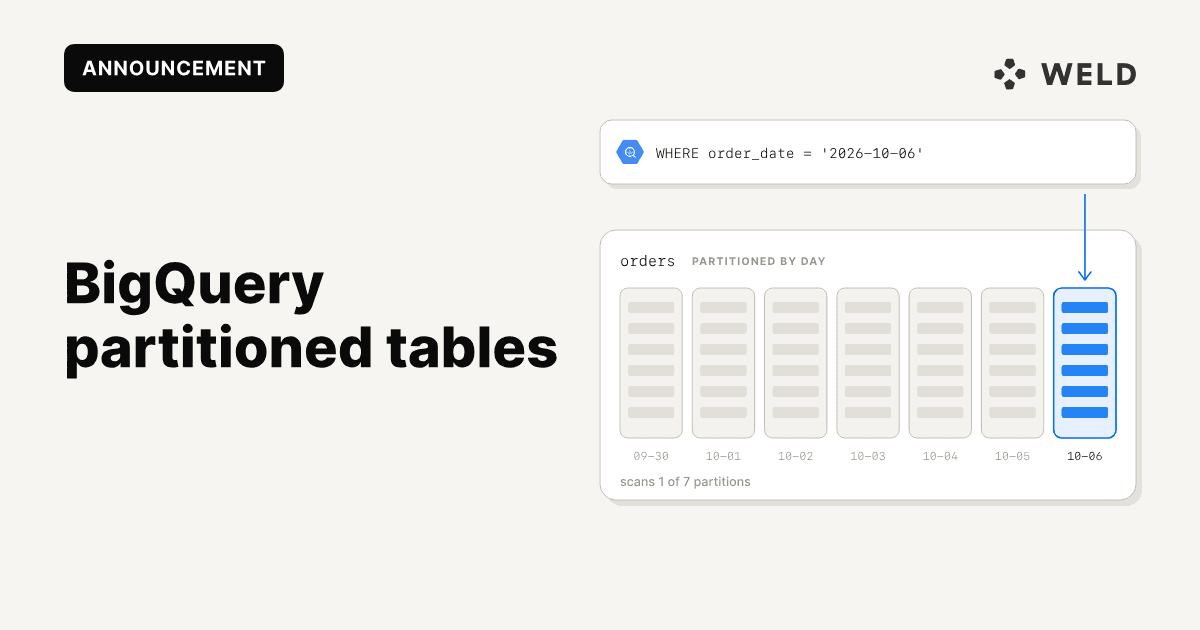
Data partitioning is the process of dividing a large dataset into smaller, more manageable chunks, called partitions, to improve performance, scalability, and maintainability. Instead of scanning an entire table for every query, the database can read only the relevant partitions.
Partitioning is typically done based on criteria like time, region, or ID ranges, depending on how the data is queried. The result: faster query times, lower costs, and more efficient storage.
Why Do We Need Partitioning?
Without partitioning, databases are forced to scan entire tables, even when only a small slice of data is needed. This quickly becomes a performance and cost issue as data volumes grow.
You’ll likely notice slower queries, increased CPU and memory usage, and longer wait times for results. Scaling becomes harder, and infrastructure costs creep up.
A real-world example: a BigQuery table with 7 million rows consumed about 2 GB when queried fully. Once partitioned by date, the same query, filtered by a specific day, scanned only 40–50 MB, a major improvement in speed and efficiency.
Key Benefits of Data Partitioning
Beyond query performance, partitioning helps with:
- Maintenance: You can archive or delete old partitions easily.
- Concurrency: More users can query without clashing over resources.
- Resilience: Failures or spikes in one partition don’t affect the whole table.
- Security and compliance: Sensitive data can be isolated; regional data can be localised.
When implemented thoughtfully, partitioning makes your data systems leaner and more adaptable.
How Partitioning Works (with Examples)
Let’s say you have a simple customers table:
| id | name | city | balance |
|---|---|---|---|
| 1 | lina | Oslo | 134 |
| 2 | mateo | Barcelona | 58,200 |
| 3 | hannah | Toronto | 1,005 |
| 4 | erik | Copenhagen | 342 |
| ... | ... | ... | ... |
There are different ways to partition this data depending on your goals:
Horizontal Partitioning
This splits the table by rows. For example:
- Partition A: customer IDs 1–5000
- Partition B: customer IDs 5001–10000
Each partition has the same columns, but stores a different subset of rows. This improves performance and enables sharding, distributing data across multiple machines.
Vertical Partitioning
This splits the table by columns. For instance:
- Partition A:
id,name,city - Partition B:
id,balance
Useful when some columns are updated frequently (e.g. balance) and others aren’t. You can optimise each partition for its workload.
Hybrid Partitioning
A mix of both, more complex, but helpful for very large, high-traffic datasets.
Common Partitioning Strategies
The partitioning approach you choose should reflect how your data is used. Here are a few common strategies:
- Time-based: Ideal for logs, events, or historical data. Often partitioned by day, month, or year.
- Key-based: Based on a field like user ID, customer ID, or product ID. Good for transactional systems.
- Geographic: Partitions data by country or region, often for compliance or latency.
- Hybrid: Combining strategies, like date + region, to support more complex access patterns.
Choosing the right strategy can reduce scanned data significantly and improve user experience.
Ready to implement? See our BigQuery Partitioned Tables guide for step-by-step instructions on setting up partitioning in your data warehouse.
Data Partitioning FAQ (BigQuery)
What is partitioning in BigQuery?
Partitioning in BigQuery is the process of dividing a table into segments (partitions) to improve query performance and reduce costs.
How do I partition a table in BigQuery?
You can partition tables by date, timestamp, or integer range. See our BigQuery guide for step-by-step instructions.
What are the benefits of partitioned tables in BigQuery?
Partitioned tables in BigQuery allow for faster queries, lower costs, and easier data lifecycle management.
Can I migrate an existing BigQuery table to use partitioning?
Yes! See our BigQuery migration guide for a practical example.
Sources & References
- BigQuery Partitioned Tables documentation
- Google BigQuery: Partitioned Tables
- Medium: Boosting Database Performance: The Magic of data Partitioning
- Medium: Data Partitioning in System Design: Why It Matters and How It Solves Real-World Problems
- Tiger Data: Data Partitioning: What It Is and Why It Matters